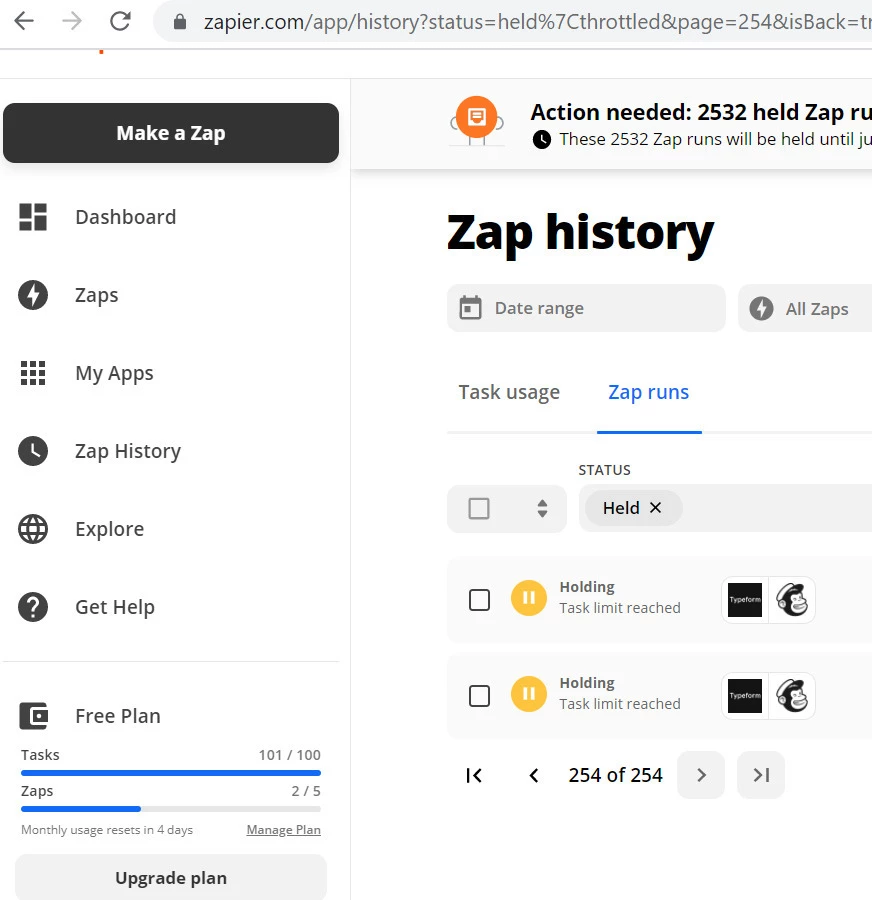
I am using the integration ‘Update a Mailchimp subscriber when someone completes your typeform’ with a free plan account in Zapier.
It doesn’t work that well, in Mailchimp I just see some of the contacts are updated, while in typeform there are many more. The contacts are like “held” in Zapier, I attach the screenshot.
Does anyone know the reason? Is each entry a task? Isn’t that weird?
Zap runs can have a status of Holding for one of four reasons:
High task use: too many (100+) steps were triggered in the Zap run in a single poll. This "flood protection" prevents a significant number of tasks from being automated by mistake. This helps keep your task usage down and prevent tedious work correcting unintended tasks.
Upgrade needed: the account has exceeded its plan limit for tasks or Zaps, or uses a premium app that is not supported by the plan. To replay the held Zap run, upgrade your Zapier plan.
Payment issue: the payment information on the account has expired. To replay the held Zap run, update your payment method.
This post has been closed for comments. Please create a new post if you need help or have a question about this topic.
Zap runs can have a status of Holding for one of four reasons:
High task use: too many (100+) steps were triggered in the Zap run in a single poll. This "flood protection" prevents a significant number of tasks from being automated by mistake. This helps keep your task usage down and prevent tedious work correcting unintended tasks.
Upgrade needed: the account has exceeded its plan limit for tasks or Zaps, or uses a premium app that is not supported by the plan. To replay the held Zap run, upgrade your Zapier plan.
Payment issue: the payment information on the account has expired. To replay the held Zap run, update your payment method.
The Zappy Awards are back
We're celebrating the Zapier builders making AI transformation happen. Winners get a published story on zapier.com, a trophy, $5,000 cash, and a feature at ZapConnect. Nominate yourself or a peer by July 24th, 2026.