


Best answer

StreetText to CloudCMA

  • February 9, 2021
  • 4 replies
  • 264 views

Forum|alt.badge.img

Hello! I’d like to connect StreetText with CloudCMA. The flow would be: a new submission comes in StreetText (person enters their home address, email, name) then CloudCMA would create a home value report and email it to them. 

StreetText is available in Zapier but CloudCMA is not. However, I do have an API key for CloudCMA. 

Any advice is greatly appreciated! 
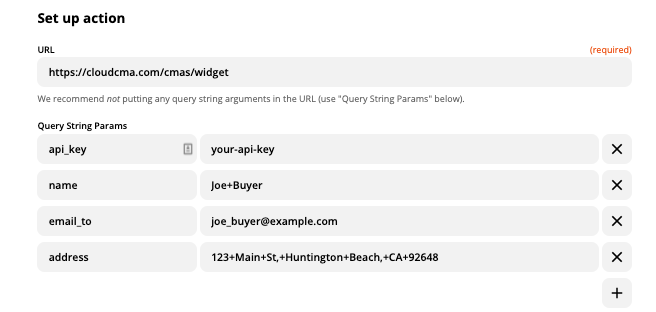
Best answer by GetUWired

Create and deliver a Quick CMA

The above is how you would configure your webhook but passing in the data from your trigger. If the quick CMA report is not the one you want to deliver, you will need to continue exploring the API docs for the url. 

This post has been closed for comments. Please create a new post if you need help or have a question about this topic.

4 replies

GetUWired
Forum|alt.badge.img+12
  • Zapier Solution Partner
  • February 9, 2021

The documentation for CloudCMA can be found here https://cloudcma.com/developers#create-report 

You can use these docs along with the Zapier’s webhook action to create the report. 

It seems that the only required fields for a quick report are:

api_key (Required)

API key for the Cloud CMA user. Users can obtain their unique key by choosing the Settings link, then API in Cloud CMA.

address (Required)

Consumers subject property address.


but I think you would need a bit more to get it emailed. Give me just a sec and I will share a screenshot of the webhook


GetUWired
Forum|alt.badge.img+12
  • Zapier Solution Partner
  • Answer
  • February 9, 2021

Create and deliver a Quick CMA

The above is how you would configure your webhook but passing in the data from your trigger. If the quick CMA report is not the one you want to deliver, you will need to continue exploring the API docs for the url. 


Forum|alt.badge.img
  • Author
  • Beginner
  • February 9, 2021

Awesome! Thank you so much, GetUWired! I’ll give this a try and let you know how it goes.


Forum|alt.badge.img
  • Author
  • Beginner
  • February 9, 2021

GetUWired, this worked perfectly! Thanks again, this was a HUGE help.



