Hello again! I’m having another Zaper/Mailchimp issue.
Here’s what I’ve got—
Trigger: New Subscriber in Mailchimp Action: Filter: Only Continue If > User doesn’t belong to certain Groups
Here’s a message that Zapier gives you in the Trigger:
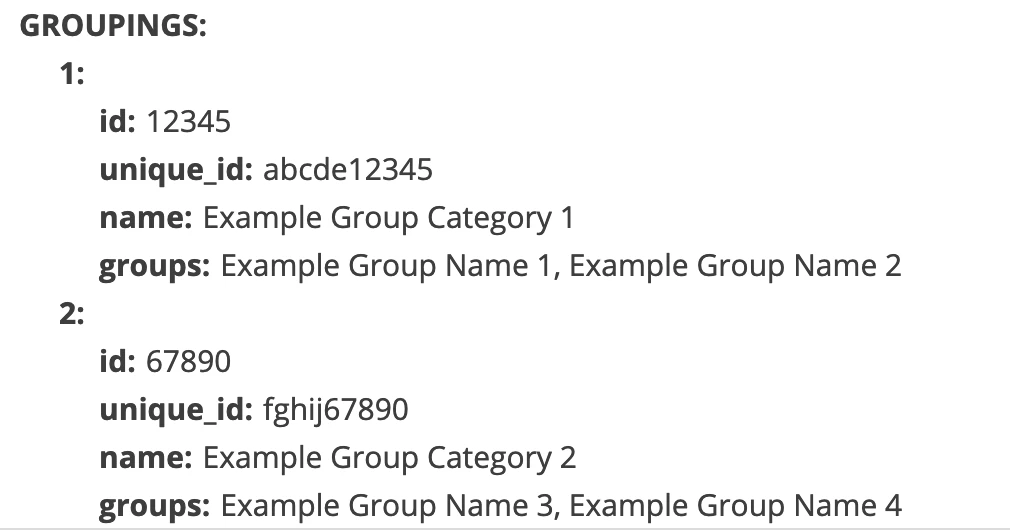
And, here’s the trigger data that it pulls from the user, related to Groupings:
Here’s one version of a solution I’ve tried:
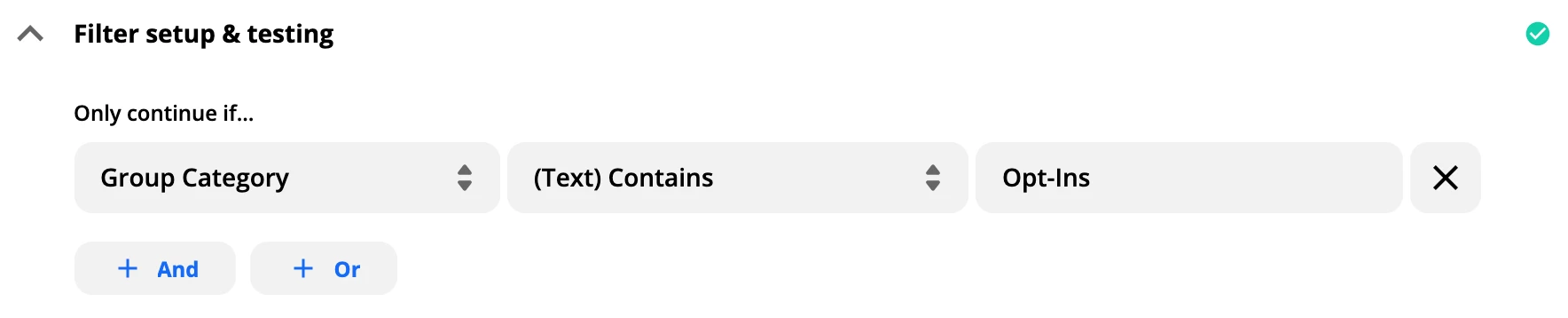
Filter set up like this, where the Zap wouldn’t continue if the new sign-up was in the “Opt-Ins” Group Category—
Am I instead supposed to put in “Example Group Category 1” or something? That seems like what the Zapier message is telling me to do. But that wouldn’t make sense because—
Problem 1: How am I supposed to know which Group is which?
Problem 2: It’s still only showing 2 Group Categories and I have more than 2 Group Categories. So, How would I set up a boolean string to keep the Zap from continuing if they were in ANY of the Group Categories I wanted to name?
Has anyone else run into this problem? This seems kind of basic, so I don’t understand. But, I hope I’m missing something.
Thanks for any help!
Best answer by Brandi
@Troy Tessalone That was a great suggestion. I might actually try it again to test some other things out in my funnel. But, before I saw it, I actually realized that the Filter set-up I have pictured above worked. (So, just typing in the name of the Group Category itself and not the dummy text.)
What WASN’T working was needing to put a delay between the trigger and that step, because I have another automation running that assigns a different Group Category to certain subscribers.
It’s a little hard to communicate, but (in case it’s helpful to others who come across this), here’s what I have going;
Zap 1:
Trigger: New Form Submitted in Leadpages (Survey Opt-In Group, inside of the “Opt-Ins” Group Category)
One of the Actions then includes: Add Subscriber to Mailchimp + Assign them to the Survey Opt-In Group
Zap 2 (the one addressed in my OP here):
Trigger: New Subscriber Added to Mailchimp
Action: Delay 3 Minutes (this keeps the two Zaps from conflicting)
Action: Filter > Only Continue If: Group Category / Does Not Contain / Opt-Ins (this keeps some duplication from happening, but also keeps the sign-ups that happen above—the “Survey Op-In people—from ALSO being added to a second Group, “Ongoing”)
Action: Add/Update Subscriber in Mailchimp > User is added to “Ongoing” Group
Thanks, all!
This post has been closed for comments. Please create a new post if you need help or have a question about this topic.
@Troy Tessalone That was a great suggestion. I might actually try it again to test some other things out in my funnel. But, before I saw it, I actually realized that the Filter set-up I have pictured above worked. (So, just typing in the name of the Group Category itself and not the dummy text.)
What WASN’T working was needing to put a delay between the trigger and that step, because I have another automation running that assigns a different Group Category to certain subscribers.
It’s a little hard to communicate, but (in case it’s helpful to others who come across this), here’s what I have going;
Zap 1:
Trigger: New Form Submitted in Leadpages (Survey Opt-In Group, inside of the “Opt-Ins” Group Category)
One of the Actions then includes: Add Subscriber to Mailchimp + Assign them to the Survey Opt-In Group
Zap 2 (the one addressed in my OP here):
Trigger: New Subscriber Added to Mailchimp
Action: Delay 3 Minutes (this keeps the two Zaps from conflicting)
Action: Filter > Only Continue If: Group Category / Does Not Contain / Opt-Ins (this keeps some duplication from happening, but also keeps the sign-ups that happen above—the “Survey Op-In people—from ALSO being added to a second Group, “Ongoing”)
Action: Add/Update Subscriber in Mailchimp > User is added to “Ongoing” Group
Thanks, all!
The Zappy Awards are back
We're celebrating the Zapier builders making AI transformation happen. Winners get a published story on zapier.com, a trophy, $5,000 cash, and a feature at ZapConnect. Nominate yourself or a peer by July 24th, 2026.