

Answer

Shopify product price option not available fix

  • December 11, 2024
  • 4 replies
  • 55 views

Hey so I noticed the functionality to add a price to a Shopify product with the “Create Product” action no longer exist. Their was a workaround posted in another post that you can find at this link:


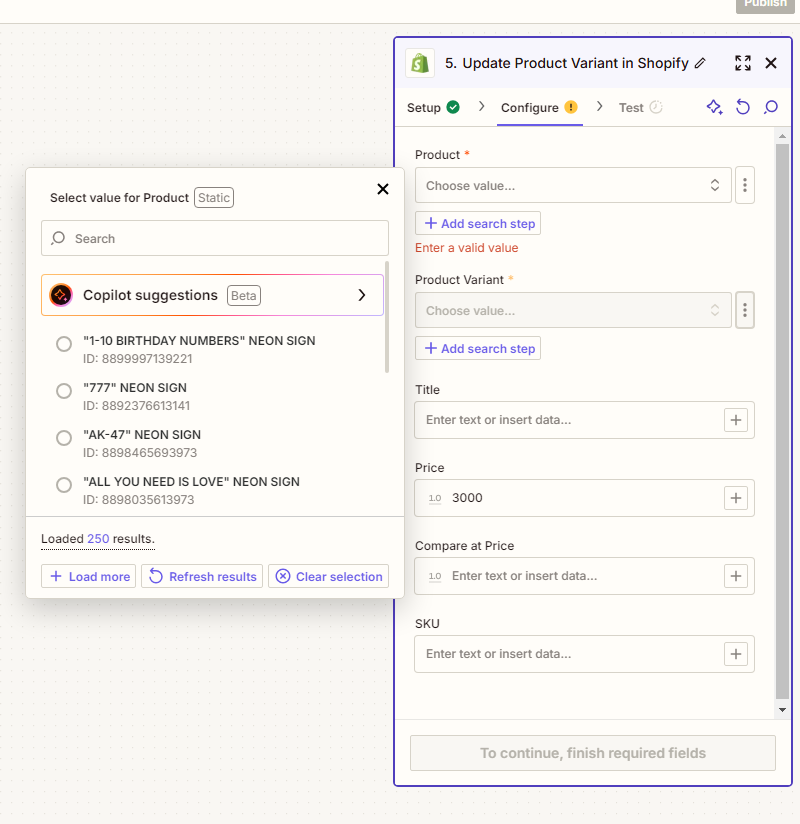
Unfortunately I’m still having trouble even though the Update product variant actions this post mentioned has a field to put the price. How am I supposed to find the product in the next action for Update Product Variant if it has not been created yet ? I can’t input it’s title under Product* (which you can see in the picture) because it is not in my Shopify plus I need it to dynamically change because this is pulling information from an Air table sheet so every time the Zap runs it creates a new product for a unique product. If anyone has a solution to this it would be greatly appreciated.



Best answer by JammerS

Hi ​@LightYourWay,


Welcome to the Community.


To create a product in Shopify and set its price, use the "Create Product" action first. Then, update the price by adding the "Update Product Variant" action and using the product ID from the "Create Product" step. This setup ensures that the product is created first and its price is updated immediately afterward.


I hope this helps! Let me know if you have any other questions.

This post has been closed for comments. Please create a new post if you need help or have a question about this topic.

4 replies

JammerS
Forum|alt.badge.img+6
  • Zapier Staff
  • Answer
  • December 11, 2024

Hi ​@LightYourWay,


Welcome to the Community.


To create a product in Shopify and set its price, use the "Create Product" action first. Then, update the price by adding the "Update Product Variant" action and using the product ID from the "Create Product" step. This setup ensures that the product is created first and its price is updated immediately afterward.


I hope this helps! Let me know if you have any other questions.


  • Author
  • Beginner
  • December 11, 2024

I’m new to Zapier can you tell me how to input the product ID into the Update Product Variant action under “Product Variant”.


  • Author
  • Beginner
  • December 11, 2024

Hey I figure it out thank you ! If anyone else is looking at this not sure how I just searched for Variant ID in the field it has to go in and I saw it categorically listed there.


ken.a
Forum|alt.badge.img+6
  • Zapier Staff
  • December 11, 2024

That’s awesome ​@LightYourWay! A huge thanks to ​@JammerS for pointing you in the right direction!

If you have any other questions, please don’t hesitate to reach out to the Community. We’re always happy to help! 🤗


