

Question

Perform Math Operation: Divide

  • September 19, 2025
  • 3 replies
  • 19 views

Forum|alt.badge.img+1

Hi, 

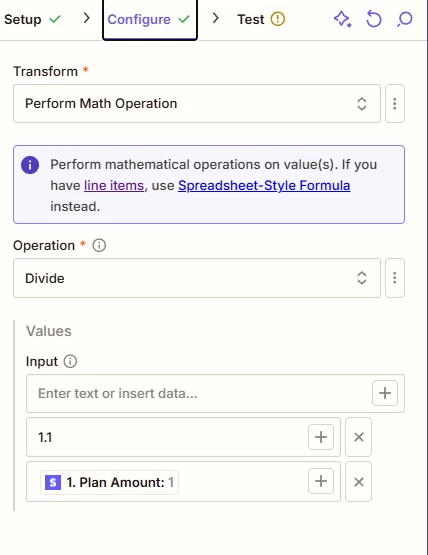
I’m trying to divide the input field value by 1.1 to calculate the amount excluding GST (10%).
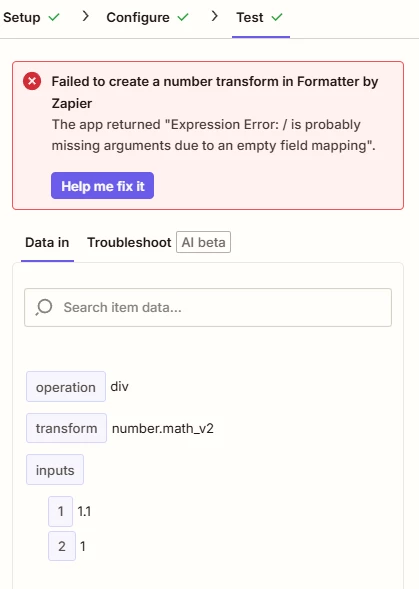
Here’s my set up. Couldn’t figure out why it doesn’t work. Any help is much appreciated.


This post has been closed for comments. Please create a new post if you need help or have a question about this topic.

3 replies

Sparsh from Automation Jinn
Forum|alt.badge.img+6

Hey ​@ASAoperations,

To get your desired result to divide by 1.1, you have to put the stripe amount in first input and 1.1 in the second input. Now coming to the error, you are probably getting it because the field you are sending from Stripe is not in a number format. You can use another Formatter Number action to convert that a field to a number which you can dynamically pass to the Formatter divide action. Hope it helps!


Troy Tessalone
Zapier Orchestrator & Solution Partner
Forum|alt.badge.img+14
  • Zapier Orchestrator & Solution Partner
  • September 19, 2025

Hi ​@ASAoperations 

An alternative approach would be to use this Zap action: Formatter > Numbers > Perform Math Operation


Formula Functions: 

https://help.zapier.com/hc/en-us/articles/8496181204877-Available-spreadsheet-style-formulas#formula-functions-0-0


SamB
Community Manager
Forum|alt.badge.img+11
  • Community Manager
  • September 23, 2025

Hi there ​@ASAoperations 👋

How did you get on with the suggestions from Sparsh and Troy? Were you able to get the plan amount value divided correctly?

Let us know how it goes, want to make sure you’re all set!







