Question

New paid order in shopify: How to get fee value from related PayPal payment

  • June 11, 2026
  • 5 replies
  • 50 views

Hi everyone,

I’m trying to build a Zap for Shopify + PayPal + Google Sheets.

My goal is:

When a new paid order is created in Shopify, I want to write the actual PayPal transaction fee for that specific order into a Google Sheet.

Current setup:

  • Trigger: Shopify → New Paid Order

  • Payment gateway: PayPal

  • Order numbers in Shopify start with “GG”

  • I need the real PayPal fee, not a calculated/estimated fee

  • The fee should be written back to the correct order row in Google Sheets

The problem:

I can get the Shopify order data from the Shopify trigger, but I cannot reliably get the related PayPal fee.

I also tried starting with a PayPal trigger, because PayPal provides the actual fee in the sale/payment details. However, mapping the PayPal transaction back to the correct Shopify order does not work reliably. The Shopify order number is not always available in the PayPal transaction data.

Matching by amount, currency, date/time or customer email is too risky, because there can be multiple PayPal orders with similar amounts on the same day.

What I need:

Is there a reliable field in the Shopify order or Shopify transaction data that contains the PayPal transaction ID / capture ID / sale ID, so I can use it to look up the matching PayPal payment and fee?

Or is there another recommended way in Zapier to get the actual PayPal fee for a Shopify order paid via PayPal?

Ideally the flow would be:

  1. New Paid Order in Shopify

  2. Get related Shopify payment transaction

  3. Extract PayPal transaction/capture/sale ID

  4. Use that ID to fetch the PayPal fee

  5. Update the matching row in Google Sheets

Has anyone solved this successfully?

Thanks!

5 replies

SamB
Community Manager
Forum|alt.badge.img+11
  • Community Manager
  • June 12, 2026

Hi and welcome to the Community ​@GoGrow! 😁

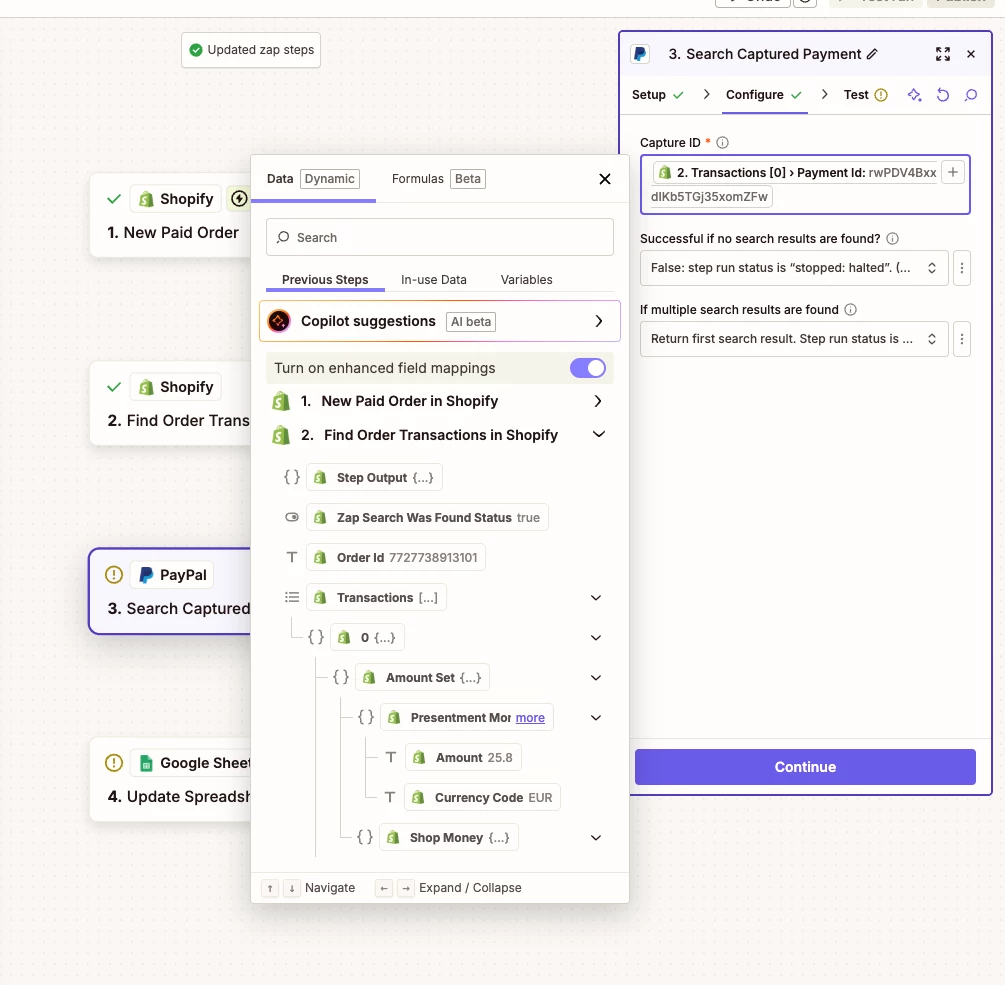
If the transaction ID isn't coming through from the New Paid Order trigger, you could try using a Find Order Transactions search step (Shopify) searching on the Order ID from the trigger. That should give you the transaction ID in the paymentId field. Then you’d use that in a Search Captured Payment (PayPal) action to get the actual fee amount. From there, it's just a case of using an Update Spreadsheet Row (Google Sheets) action to add the fee into the right row.

If you give that a try, let us know how it goes!


  • Author
  • Beginner
  • June 15, 2026

Hello ​@SamB & thanks for the reply!


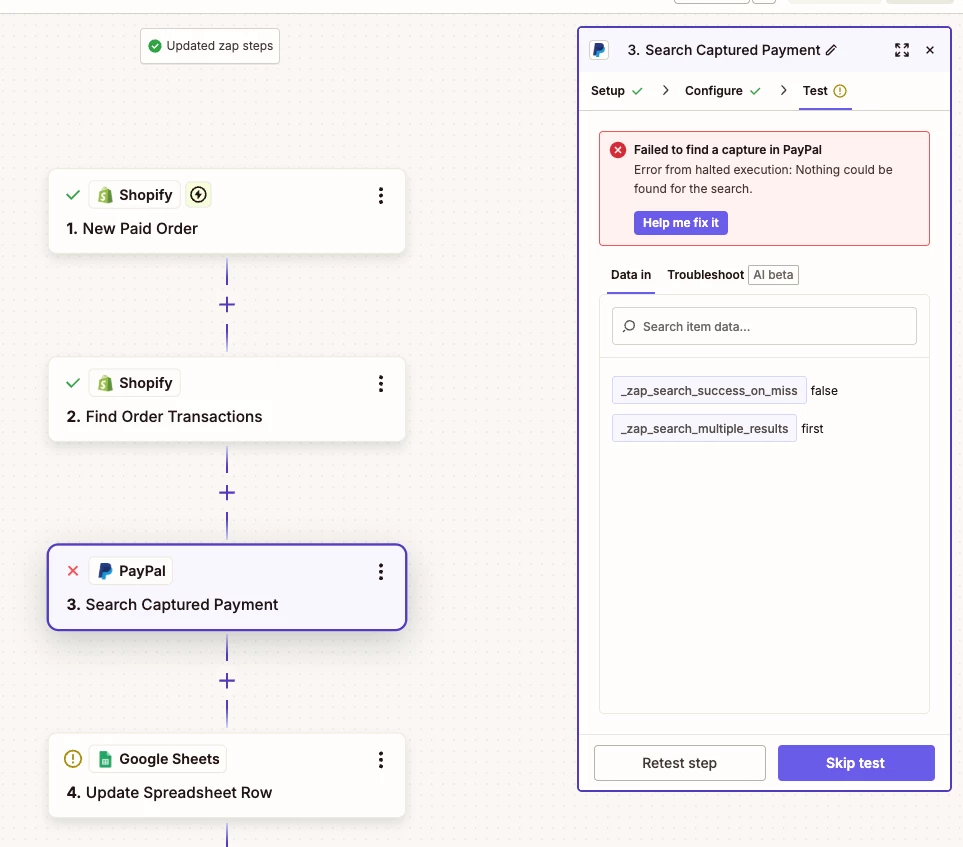
 Sounds pretty easy and I had already tried this in the past also without success, tried it now again but I can not find the captured payment in PayPal with Search Captured Payment via paymentId:


SamB
Community Manager
Forum|alt.badge.img+11
  • Community Manager
  • June 15, 2026

I’m so sorry to hear that didn’t work ​@GoGrow.

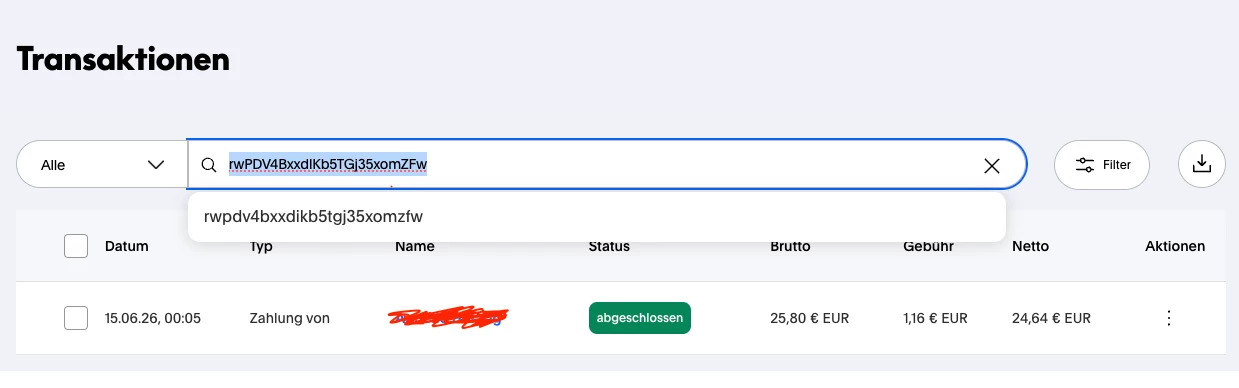
If you search for that same Payment ID directly in PayPal does it find the relevant payment? Just wondering if there’s either a bug with the Search Captured Payment action, or if there’s a mismatch between the Payment ID sent over by Shopify and the capture IDs that PayPal uses. 🤔


  • Author
  • Beginner
  • June 16, 2026

Hello ​@SamB ,

you are right, at PayPal transactions overview I can find the transaction via the Payment ID!

Must be a bug in zapier … can I raise a bug ticket here or how to proceed on this topic?


SamB
Community Manager
Forum|alt.badge.img+11
  • Community Manager
  • June 16, 2026

Thanks for checking on that ​@GoGrow! You’d need to flag this to our Support team directly: https://zapier.com/app/get-help. They’ll be able to investigate and open up a bug report so this can get fixed.

In the meantime, since Shopify does seem to have the correct Payment ID, you can have the Zap add that Payment ID into the relevant Google Sheets row. Then, have another Zap that uses PayPal for it’s trigger to get the fee (and the Payment ID), have a Lookup Spreadsheet Row (Google Sheets) action search for the Payment ID to find the relevant order row and use a Update Spreadsheet Row (Google Sheets) action to update it to add the fee amount.

That said, you may also need to add a Delay For action to the second Zap. This is to give the first Zap time to finish running and add the PayPal ID to the Google Sheets row before the second Zap tries to look for it.

Keep me posted on how you get on with that. Want to make sure this gets sorted!