Question

Mapping contact information between Fergus and Sender: Seeking a solution

  • September 18, 2026
  • 1 reply
  • 12 views

Hi everyone,


I’m trying to connect Fergus with Sender.

When mapping the data that comes in with Fergus the contact info is in one array. Mostly email and phone number. The problem here is, not every data input has both. So the naming convention changes. 


Also the “Main Contact Contact Items Contact Type”: can be email, phone or mobile which comes above the value which is the data itself. So all fields have the name value and change so no one field can be mapped always the same. 

How do I set this up without using premium features?

The AI feature is not really a help, and I already tried some formulars that didn’t work either. 

1 reply

Troy Tessalone
Zapier Orchestrator & Solution Partner
Forum|alt.badge.img+14
  • Zapier Orchestrator & Solution Partner
  • September 18, 2026

Hi ​@LenaStately 

For us to have more info about what you are referring to post screenshots showing the DATA OUT from the Zap step that you are trying to map so we can see the original structure of the data.


One approach is to use an AI step to create key/value pairs for the data.

Help: https://zapier.com/apps/ai/integrations#help


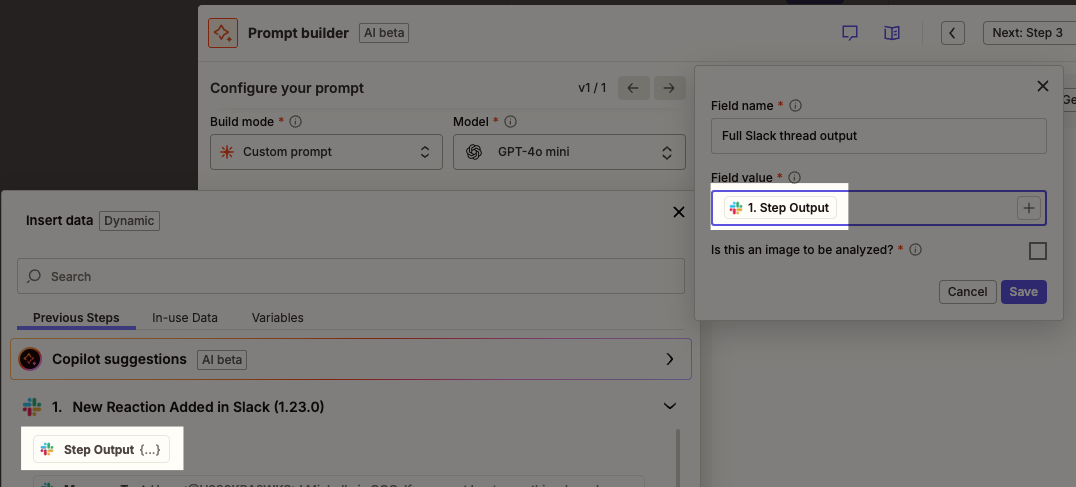
TIP: Map the var: Step Output, which is the full raw JSON data from the Zap step for the AI to have as context and structure to parse.

  • All steps return the entire output of a step in a single value via the Step Output field. This field is helpful to map to AI-powered, Tables, and any other steps and features that prefer full context and structured data.

Step output field displayed as a mapped field and as an option to map from a previous step.