
Best answer

Issue between Zapier and Ninja

  • April 19, 2020
  • 5 replies
  • 130 views

Hi,

I need to create client and invoice on Ninja, I use Zapier

I can create a client but when i want to create an invoice, the client is not found

Any help?


Thanks

Philippe

Best answer by Philippe

Hi Nick


Well, I created a client first, then I created an other Zap to create invoice.

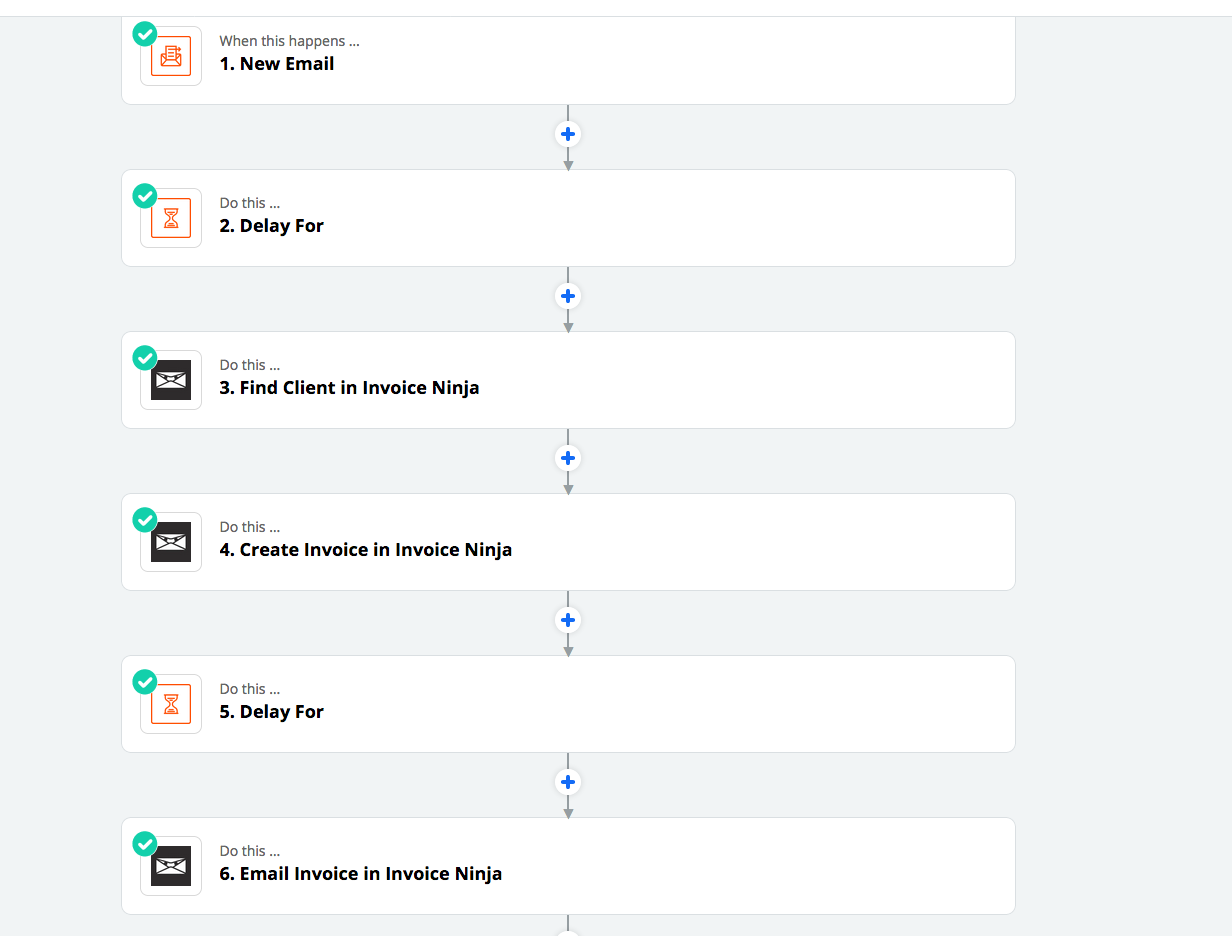
I tried a lot of configuration, here is the good one:

You have to add “delay”, so you make sure the first app have time to setup the client

Then, you add”find” client, then you create the invoice!

I aslo setup an other step to send the invoice via email, it’s working fine

See my screenshot

Philippe
 

This post has been closed for comments. Please create a new post if you need help or have a question about this topic.

5 replies

Liz_Roberts
Forum|alt.badge.img+8
  • Zapier Staff
  • April 21, 2020

Hi @Philippe ,

Thanks for reaching out and apologies for the delay in responding!

To help us dig deeper here could you share a screenshot of your configuration, specifically the Ninja action step? 

Will be on the lookout for your reply!


  • Author
  • Beginner
  • April 21, 2020

Hi Liz

I found a way to make it working


Thanks


Philippe


nicksimard
Forum|alt.badge.img+11
  • Zapier Staff
  • April 24, 2020

Hi @Philippe! Great to hear that you got things working. Would you mind sharing how you did it, in case anyone else is having this problem? Thanks!


  • Author
  • Beginner
  • Answer
  • April 24, 2020

Hi Nick


Well, I created a client first, then I created an other Zap to create invoice.

I tried a lot of configuration, here is the good one:

You have to add “delay”, so you make sure the first app have time to setup the client

Then, you add”find” client, then you create the invoice!

I aslo setup an other step to send the invoice via email, it’s working fine

See my screenshot

Philippe



Danvers
Forum|alt.badge.img+12
  • Zapier Staff
  • April 30, 2020

That’s great, thanks for sharing that with us @Philippe!



