Question

Is it possible to know the url of the webpage a Zapier chatbot conversation took place on?

  • February 2, 2026
  • 9 replies
  • 32 views

Forum|alt.badge.img+1

I have a Zapier chatbot on my website. After every chat, the transcript is sent to a Zapier table and then an email notification is sent to me containing the transcript.

It would be very useful to know which page on my website the chat took place and have that data included in the transcript. Is that possible?

9 replies

SamB
Community Manager
Forum|alt.badge.img+11
  • Community Manager
  • February 2, 2026

Hi there ​@RyanForsythe1979 👋

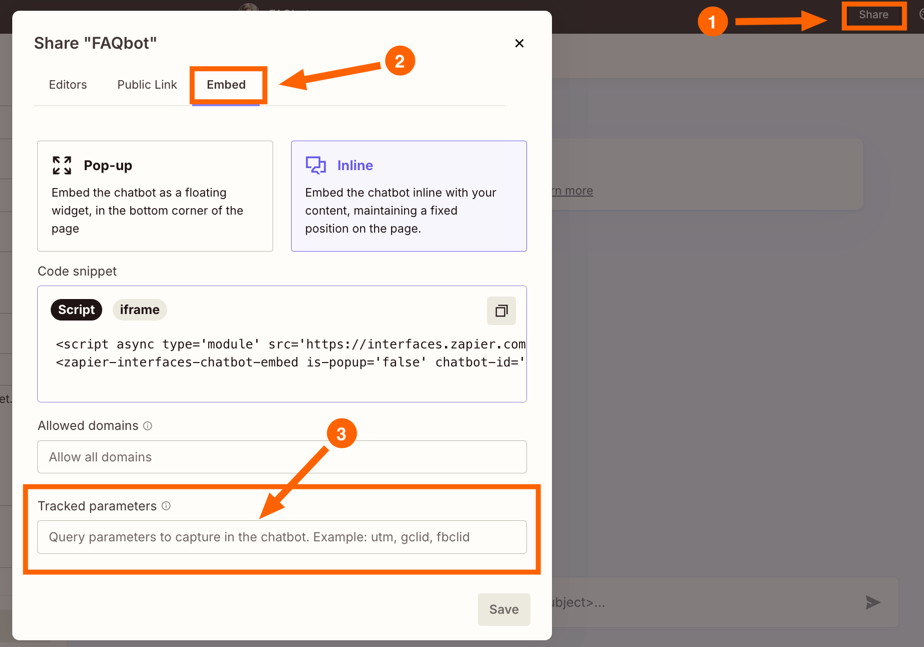
When generating the embed code for the chatbot there should be a Tracked Parameters field where you can set up that sort of tracking. You can learn more about that here: Use query parameters

Hope that helps. If you run into any trouble on that or if there’s anything else I can help with just let me know! 🙂


drtanvisachar
Forum|alt.badge.img+5
  • Zapier Solution Partner
  • February 3, 2026

Hello  ​@RyanForsythe1979  Yes, it’s possible, but the chatbot won’t capture the page automatically.

If you’re embedding a Zapier Interfaces chatbot, you can pass the page URL into the chat as context. Capture window.location.href on your site and send it to the chatbot as a variable or hidden input when the chat loads. That value can then be saved in Zapier Tables and included in your email notification along with the transcript.

Dr. Tanvi Sachar
Monday Certified Partner, Tuesday Wizard


Hi @RyanForsythe1979,

In addition to the tracked parameters mentioned above, here is a concrete JavaScript implementation you can use:

Step 1: Add this script to your webpage where the chatbot is embedded:

window.zapierChatbotConfig = { pageUrl: window.location.href, pageTitle: document.title, referrer: document.referrer };

Step 2: In your Zapier Chatbot settings, add these as hidden fields or initial context variables.

Step 3: In your Zap that saves the transcript to Tables, map these fields to new columns: Page URL, Page Title, and Referrer.

This gives you complete visibility into where each conversation originated. I use this same setup for tracking which blog posts generate the most chatbot engagement.

Hope this helps!


Forum|alt.badge.img+1

@SamB ​@drtanvisachar ​@TaylorBrooks 

Thank you all for your help and suggestions - I just haven’t had time to implement yet.

I’ll let you know how I get on.

Thanks again

Ryan


SamB
Community Manager
Forum|alt.badge.img+11
  • Community Manager
  • February 12, 2026

No worries ​@RyanForsythe1979. Look forward to hearing how it goes! 😁


Forum|alt.badge.img+1

Hi @TaylorBrooks

Where do I do this part?

Step 2: In your Zapier Chatbot settings, add these as hidden fields or initial context variables.

Thanks

Ryan


SamB
Community Manager
Forum|alt.badge.img+11
  • Community Manager
  • February 19, 2026

Good question ​@RyanForsythe1979! 🙂

With chatbots there’s the ability to add fields on an embedded lead capture form but there isn’t an option to make certain fields on that form hidden, or within the chatbot’s settings directly.

I’m not aware of any “initial context variables” setting but there is the ability to add parameters to the URL of a chatbot to dynamically specify certain directives or greetings. However, that’s only supported for standalone chatbots, not embedded chatbots.

To track the page the chat took place on you’d need to use the Tracked parameters field in the Embed settings (Inline embed). Any parameters you add there (for example utm_origin, utm_referrer) will be captured and available to use in the Zap that sends you the email notification.

9e0724a484f059bbd4b74f10b263efc5.png

Let us know if you run into any trouble with that.


Forum|alt.badge.img+1

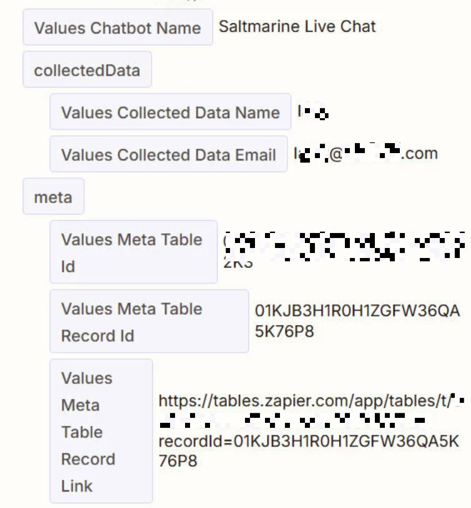
Hi ​@SamB. So I’ve updated the embed script to include both utm_origin and utm_referrer. I’ve added a column in my Zapier table but when I go to the Zap to map the page to the column there’s nothing new to map. Am I missing something?


Forum|alt.badge.img+1

Btw ​@SamB I’m using the Pop-up embed, just incase that matters. Thanks.