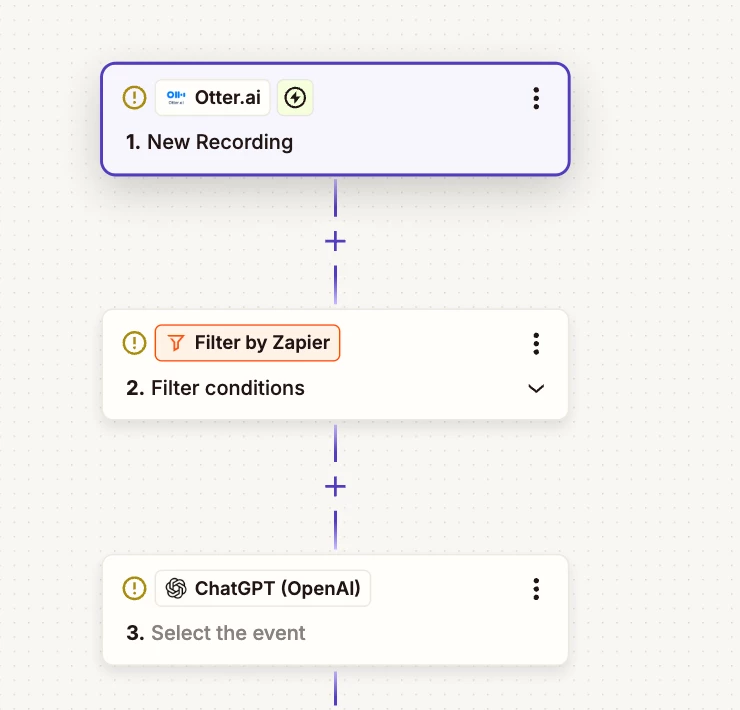
Question

Import from Otter.ai only if in a defined folder

  • August 27, 2025
  • 7 replies
  • 44 views

Hello !

I am a newbie trying my best and I need your help regarding some filters related to Otter.ai.

My intent is to import Otter.ai scripts to Chat GPT but only is these scripts are in a certain folder in Otter.ai. I have few streams of recording that are not related and I don’t want to automate all of them with the same chain of Zaps.

Thank you very much for your help and have a great day !



This post has been closed for comments. Please create a new post if you need help or have a question about this topic.

7 replies

Troy Tessalone
Zapier Orchestrator & Solution Partner
Forum|alt.badge.img+14
  • Zapier Orchestrator & Solution Partner
  • August 27, 2025

  • Author
  • Beginner
  • August 28, 2025

Hello ​@Troy Tessalone 

Thanks for your answer ! Sure, that was what I was aiming to do but it’s the filter setting I am nit sure about.

I’d like it to filter with the condition “only if this recording is in the folder X on otter.ai”.

Do you know which filter settings I should use to do that ?


Thank you very much in advance.


Sparsh from Automation Jinn
Forum|alt.badge.img+6

Hey ​@Morganelle 

If you can paste screenshots of Otter test step with the data out in the zap, I can help you more precisely. But it should contain a folder id or name if you want to filter by folder.

It will look something like this 


In Filter by Zapier Step, you can filter for the name/id of the folder. Feel free to reply here, happy to help :)


Troy Tessalone
Zapier Orchestrator & Solution Partner
Forum|alt.badge.img+14
  • Zapier Orchestrator & Solution Partner
  • August 28, 2025

@Morganelle 

That depends on the data points returned from the Zap trigger step that are available to use in the Filter step conditions.

Post screenshots of the DATA OUT from Zap step 1 to give us more info.


  • Author
  • Beginner
  • August 29, 2025

Hello ​@Troy Tessalone 


Thank you so much for your follow-up.

Here are the screenshots. 


Troy Tessalone
Zapier Orchestrator & Solution Partner
Forum|alt.badge.img+14
  • Zapier Orchestrator & Solution Partner
  • August 29, 2025

@Morganelle 

Otter.ai Zap trigger would need to return a data point that indicates the Folder by Name or ID for you to be able to use in a Zap Filter condition.

Perhaps the URL variable includes the Folder ID?

Otherwise, you may not be able to Filter by Folder.


SamB
Community Manager
Forum|alt.badge.img+11
  • Community Manager
  • September 24, 2025

Hey ​@Morganelle 👋 Just wanted to check how things are going. Did the URL contain the necessary folder ID? 

Keep us posted on your progress, want to make sure you’re all set! 🙂