Question

How to set up Metricool to trigger email notifications for new post comments

  • July 4, 2026
  • 3 replies
  • 23 views

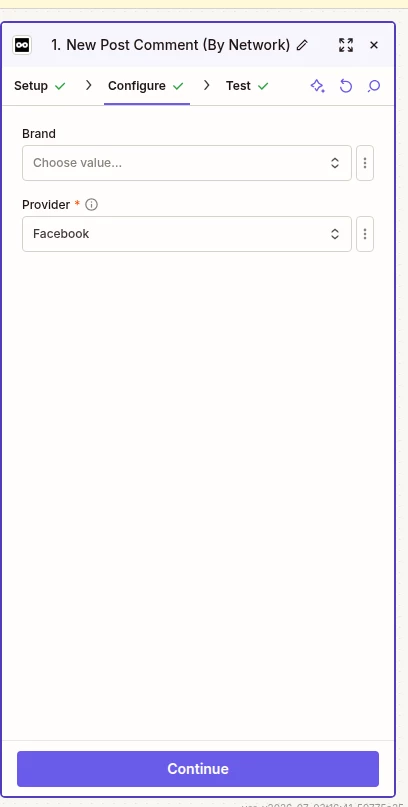
We are in the process of building a zap that will send our clients email notification when someone leaves a comment on their post, but it seems like when you are configuring the connection there is Brand and Provider(required). At the moment we have over 250 brands, how do we go about this because building this for each brand is not a smart decision, so if we select no brand will that trigger whenever there is a new comment from any of the brands considering we have a selected provide already?



3 replies

robintrainward
Zapier Orchestrator & Solution Partner
Forum|alt.badge.img
  • Zapier Orchestrator & Solution Partner
  • July 6, 2026

Hey ​@LPN


Just throwing out there the first thing I thought of, I haven’t worked with the metricool connector before.


One scalable approach I can think of would be to store all of your Metricool Brand IDs in a Zapier Table and have a scheduled Zap loop through each brand, polling for new comments. If a new comment is found for a brand, you can then branch into the rest of your workflow for subsequent actions.

The main advantage is that you only have one automation to maintain and adding a new brand is as simple as adding a row to the table. The tradeoff is that it relies on polling rather than an event-driven trigger that appears in your screenshot so notifications won't be instantaneous and you'll make more API requests as your number of brands grows. Just to be clear you’re going to have to set a schedule and create a custom api call to Metricool servers to query for new comments. Overall, though, it's a much more maintainable solution than creating hundreds of separate Zaps that differ by brand ID.

Hope this helps!


  • Author
  • Beginner
  • July 7, 2026

Nice approach

Thank you


SamB
Community Manager
Forum|alt.badge.img+11
  • Community Manager
  • July 10, 2026

Welcome to the Community ​@LPN! 😁 I see you got a great suggestion from ​@robintrainward for this, nice one Robin! 🙌

Have you had a chance to give it a try yet? Let us know how it goes!