

Best answer

How to See All Available Mapping Options within a Trigger Event

  • September 4, 2025
  • 2 replies
  • 21 views

Hello!


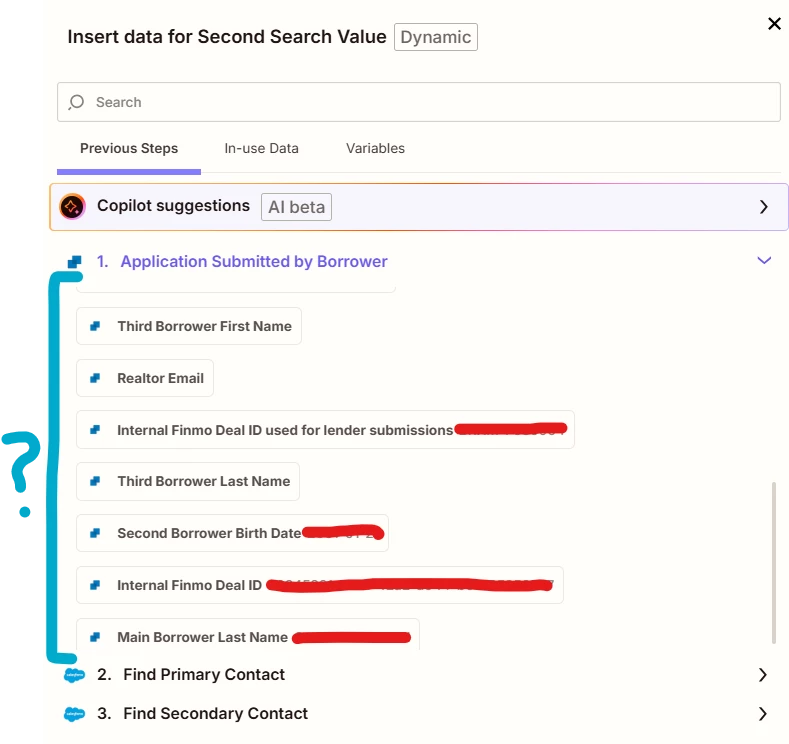
When mapping, there are only so many options I can scroll through, however, there are more if I use different keywords. I have attached a picture as I am not 100% sure what this subsection of a Zap is called.

How do I see all available mapping options without guessing at keywords?


Thank you!
Ben


Best answer by Troy Tessalone

Hi ​@B-Zaps 

In previous Zap steps, in the TEST tab, you can see all of the DATA OUT that is returned from the app.

There can be 1 to hundreds of variables returned from an app in a Zap step, so scrolling is not always an effective approach to find the desired variable to map, plus variables are not necessarily sorted in A>Z order.

Instead, you can search by variable names or variable values to narrow the listed variables when trying to map a variable in a Zap step.

This post has been closed for comments. Please create a new post if you need help or have a question about this topic.

2 replies

Troy Tessalone
Zapier Orchestrator & Solution Partner
Forum|alt.badge.img+14
  • Zapier Orchestrator & Solution Partner
  • Answer
  • September 4, 2025

Hi ​@B-Zaps 

In previous Zap steps, in the TEST tab, you can see all of the DATA OUT that is returned from the app.

There can be 1 to hundreds of variables returned from an app in a Zap step, so scrolling is not always an effective approach to find the desired variable to map, plus variables are not necessarily sorted in A>Z order.

Instead, you can search by variable names or variable values to narrow the listed variables when trying to map a variable in a Zap step.


  • Author
  • Beginner
  • September 5, 2025

Thank you ​@Troy Tessalone !




