Best answer

How to create a lookup table for multiple line items from Shopify in Zapier

  • March 7, 2026
  • 3 replies
  • 19 views

Forum|alt.badge.img

Hi, 
Now im stuck again and need som good help!

I need would like to be able to take the data(line items) from a order in shopify and put that in a table or sheet or similar procedure. If its possible to choose what data columns to retrieve it would be great.
 
Next step is to retrieve the line item data(several rows needed) from that list and use it in another step of the zap. It would be good if the same could be used in some different paths in a convinient way.

How is this most convinient to do? 
I have tried some hours with Google sheets but only one line could be retrieved with Lookup spreadsheet rows in the end 🙃so it did not work great with two or more lines.

I have tested different things, but I have not yet found what way that would be best!

Best Regards Gordon


Best answer by GordonE

Hi Troy, 
As im very stubborn i managed after some hours with testing. I always try myselfe as I am a DIY guy!

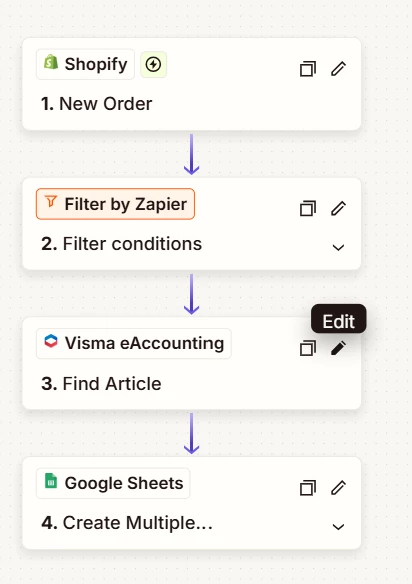
I used google sheets “Create Multiple Spreadsheet Rows” to get all rows from my shopify store after some fake purchses :) Then I exported a CSV file and inported them into Zapier tables in the end. 
So now i have to fill in any new products in tables, or use the google sheet way I did this time. It will be enough for now!

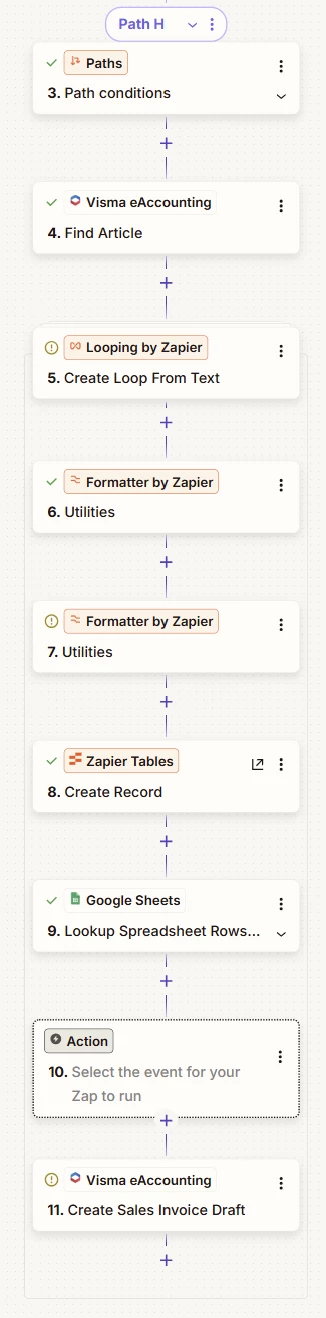
How I use it in my shopify triggered Zaps you can see in the last picture, 
I use looping for the line items and save the loops in Storage by Zapier. In the end I erase all records to start fresh in next Zap run. Shipping line is fetched in a lookup table, but could as well have been in the loop too.

I hope this can help someone in a similar situation.


So now my skills has reached next level in Zapier 😉


Thanks for the pointers!


3 replies

Troy Tessalone
Zapier Orchestrator & Solution Partner
Forum|alt.badge.img+14
  • Zapier Orchestrator & Solution Partner
  • March 8, 2026

Hi ​@GordonE 

Trying to retrieve multiple records based on different criteria can be tricky.

Here’s a way to solve for it…

Retrieve ALL of the records from the Zapier Table or GSheet.

Then use a Code step with logic to filter/match and output the desired data as an array of objects.

Code help: https://zapier.com/apps/code/integrations#help


TIP: Try asking AI for help with the custom code.


If you are looking to hire help, there is a directory of Zapier Partners: https://zapier.com/partnerdirectory


Forum|alt.badge.img
  • Author
  • Beginner
  • Answer
  • March 13, 2026

Hi Troy, 
As im very stubborn i managed after some hours with testing. I always try myselfe as I am a DIY guy!

I used google sheets “Create Multiple Spreadsheet Rows” to get all rows from my shopify store after some fake purchses :) Then I exported a CSV file and inported them into Zapier tables in the end. 
So now i have to fill in any new products in tables, or use the google sheet way I did this time. It will be enough for now!

How I use it in my shopify triggered Zaps you can see in the last picture, 
I use looping for the line items and save the loops in Storage by Zapier. In the end I erase all records to start fresh in next Zap run. Shipping line is fetched in a lookup table, but could as well have been in the loop too.

I hope this can help someone in a similar situation.


So now my skills has reached next level in Zapier 😉


Thanks for the pointers!


SamB
Community Manager
Forum|alt.badge.img+11
  • Community Manager
  • March 16, 2026

Love this, ​@GordonE! 🎉 Thanks so much for coming back to share how you solved this, it’s super helpful for others here in the Community. Thanks as well to ​@Troy Tessalone for helping to point you in the right direction. 🙌