Answer

How to cancel held Zap tasks to free up task usage?

  • May 31, 2024
  • 4 replies
  • 328 views

I didn’t understand about the task limit and went beyond it trying to get a zap to work. Now I have lots of held tasks.


I would like to cancel those task so that they will not run when my task usage resets.


I can’t figure out how to do this. What I can see is just how to re-run the tasks.


Thank you,

Tiggy626
Best answer by Troy Tessalone

Hi @Tiggy626 

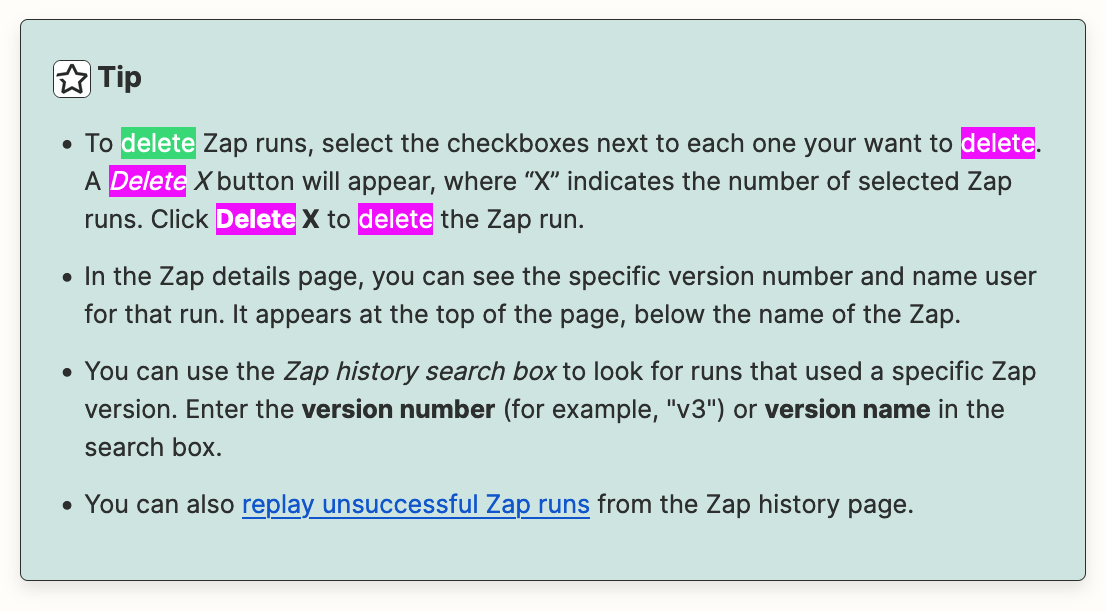
Here’s how: https://help.zapier.com/hc/en-us/articles/8496291148685-View-and-manage-your-Zap-history#h_01HD2KKYMTS7ASSEPXRMT57H63


This post has been closed for comments. Please create a new post if you need help or have a question about this topic.

4 replies

Troy Tessalone
Zapier Orchestrator & Solution Partner
Forum|alt.badge.img+14
  • Zapier Orchestrator & Solution Partner
  • Answer
  • May 31, 2024

  • Author
  • Beginner
  • June 1, 2024

But what about this window? I don’t want the tasks to be counted in my monthly usage, that is actually the opposite of what I want. Am I misinterpreting this?


Troy Tessalone
Zapier Orchestrator & Solution Partner
Forum|alt.badge.img+14
  • Zapier Orchestrator & Solution Partner
  • June 1, 2024

@Tiggy626 

If the Zap Run already used Tasks, then you can’t get those back.

The pop up window warning, indicates that even if you delete the Zap Runs, any Task usage from those Zap Runs still count towards your Zapier plan monthly allotment.


  • Author
  • Beginner
  • June 1, 2024

Oh, I get it now. This will just stop more tasks being counted, not eliminate the ones previously done.


Thanks so much for clarifying this.


I just wish I had figured this out sooner. Oh, well. You live and you learn.


Thanks again