Question

How to add or update GoHighLevel contacts when a specific product is purchased via PayPal

  • January 18, 2026
  • 6 replies
  • 26 views

I need to connect Paypal to Go High Level, in that when a Paypal sale is made for a specific product, the contact details will be automatically transferred over to Go High level and tagged properly. 

6 replies

Sparsh from Automation Jinn
Forum|alt.badge.img+6

Hey ​@James Lam,

Yeah it’s possible.

Here are all the triggers/actions for Paypal in Zapier- https://zapier.com/apps/paypal/integrations

Here are all the triggers/actions for GHL in Zapier- https://zapier.com/apps/leadconnector/integrations

Here is a sample workflow- 

  • Paypal Sale Webhook trigger
  • Add/Update contact action

You can dynamically map in Add/Update action from the trigger. Here is a helpful article about connecting Paypal in Zapier- https://help.zapier.com/hc/en-us/articles/8495999676045-How-to-get-started-with-PayPal-on-Zapier. Hope it helps!

PS: If you need more active help, I’m happy to connect through my Zapier Solution Partner page if you’d like to reach out here- https://zapier.com/partnerdirectory/automation-jinn


Troy Tessalone
Zapier Orchestrator & Solution Partner
Forum|alt.badge.img+14
  • Zapier Orchestrator & Solution Partner
  • January 19, 2026

Hi ​@James Lam 

Help link for using a Filter as Zap step 2: https://zapier.com/apps/filter/integrations#help


SamB
Community Manager
Forum|alt.badge.img+11
  • Community Manager
  • February 10, 2026

Hi there ​@James Lam 👋 

How did things go with Sparsh’s and Troy’s suggestions here? Were you able to get the Zap tagging contacts in GoHighLevel when specific products are purchased via PayPal?

Let us know how you got on and whether you need any more help at all, want to make sure you’re all set! 🙂


Hey ​@SamB ​@Sparsh from Automation Jinn 


The Add/Update Contact LeadConnector Zap has no lookup field to search for existing the contact and try to update the same. Instead, it creates a new contact everytime. 


Is this how it’s supposed to be?


Sparsh from Automation Jinn
Forum|alt.badge.img+6

Hey ​@The Modern Exodus,

I think it should update the existing contact based on the email or phone number. If it’s not working as usual, I would recommend querying the API endpoint directly using Webhooks in Zapier.

Here is a helpful article about it here- https://marketplace.gohighlevel.com/docs/ghl/contacts/upsert-contact

Here is a helpful article about Webhooks in Zapier- https://help.zapier.com/hc/en-us/articles/8496326446989-Send-webhooks-in-Zaps

Hope it helps!


SamB
Community Manager
Forum|alt.badge.img+11
  • Community Manager
  • February 16, 2026

Hi ​@The Modern Exodus 👋

Hey ​@SamB ​@Sparsh from Automation Jinn 


The Add/Update Contact LeadConnector Zap has no lookup field to search for existing the contact and try to update the same. Instead, it creates a new contact everytime. 


Is this how it’s supposed to be?

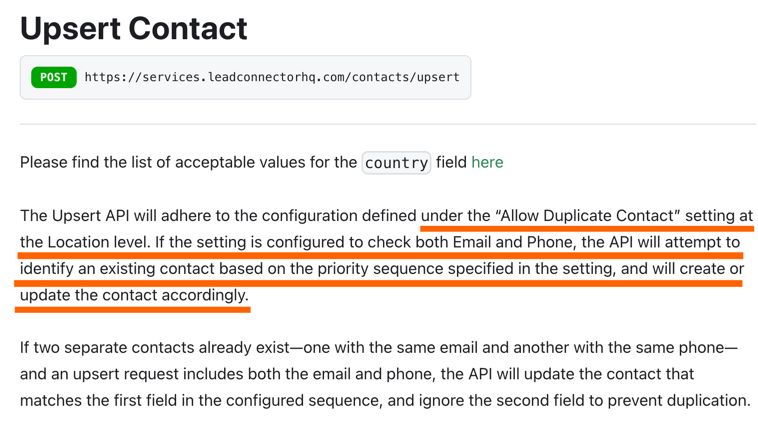
Like Sparsh mentioned, it should be updating the existing contact based on the either the email or phone number. Looking at the HighLevel guide Sparsh shared there’s an Allow Duplicate Contact setting in your account that could be causing duplicate contacts to be created instead of updating the existing ones:

bde1905a0781945e7475a0ab4cbf99d2.png
Can you try changing the “Allow Duplicate Contact” settings under Settings > Business Profile > Contact Deduplication Preferences in your HighLevel account and let us know if that then allows the Zap to update the existing contacts?