Best answer

How to add co-worker's accounts to a Zap in Asana?

  • Aug 30, 2023 2:45 PM UTC
  • 6 replies
  • 171 views

alexb123

I have a ‘task’ table in airtable and each task is assigned an owner. I set up a zap to basically duplicate these tasks to asana. The assignee field shows the proper owner email as pulled from airtable, but only I am actually seeing new tasks pop up in asana as created by the zap. Is it because my asana account is attached to the zap? Bu then how would I add all my co-workers accounts to the zap? Thanks!

Best answer by Troy Tessalone

@alexb123 

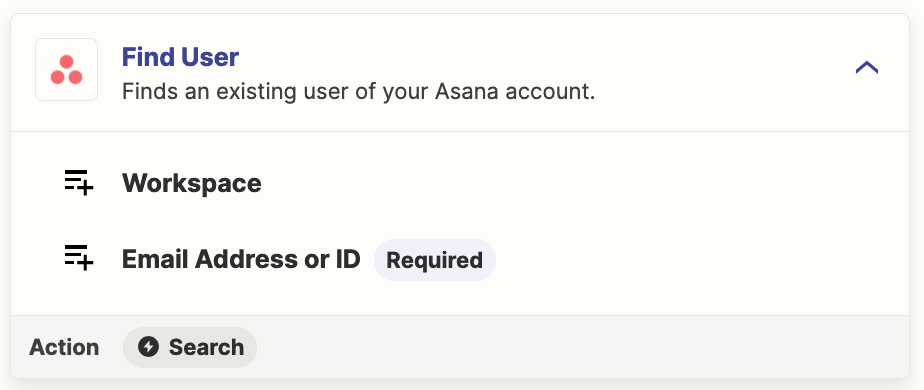
Add this Zap action: Asana - Find User

Search by Email Address..

That will return the Asana User ID.

Map that Asana User ID to the Assignee field in the Asana action.


View original
This post has been closed for comments. Please create a new post if you need help or have a question about this topic.

6 replies

Troy Tessalone
Zapier Orchestrator & Solution Partner
Forum|alt.badge.img+14
  • Zapier Orchestrator & Solution Partner
  • Aug 30, 2023 3:38 PM UTC

Hi @alexb123 

Good question.

To help give us more context, please post detailed screenshots with how each of your Zap steps is configured in the Zap Edit mode.


alexb123
  • Author
  • Beginner
  • Aug 31, 2023 7:18 AM UTC

Thanks. See attached.


Troy Tessalone
Zapier Orchestrator & Solution Partner
Forum|alt.badge.img+14
  • Zapier Orchestrator & Solution Partner
  • Answer
  • Aug 31, 2023 3:23 PM UTC

@alexb123 

Add this Zap action: Asana - Find User

Search by Email Address..

That will return the Asana User ID.

Map that Asana User ID to the Assignee field in the Asana action.



alexb123
  • Author
  • Beginner
  • Sep 1, 2023 8:02 AM UTC

amazing, that worked, thanks!


alexb123
  • Author
  • Beginner
  • Sep 1, 2023 11:48 AM UTC

Ah, but now I have to switch to a paid version to have a multi-step Zap. I knew this was too good to be true! I assume there is no one-step workaround?


ken.a
Forum|alt.badge.img+6
  • Zapier Staff
  • Sep 4, 2023 7:06 AM UTC

Hi there @alexb123,

That’s great news! I’m glad Troy was able to help you out!

Regarding your question about a one-step workaround, unfortunately, there is no one-step workaround for this one. Since the “Assignee” field looks for the Assignee ID, we will need to add a “Find User” step, as Troy suggested.

I appreciate your understanding.