Question

How to add an email address for Zaps in Zapier

  • July 6, 2026
  • 11 replies
  • 49 views

How can we add an email address to use in Zaps? And how can we tell which account is our Zapier admin account? 

11 replies

Troy Tessalone
Zapier Orchestrator & Solution Partner
Forum|alt.badge.img+14
  • Zapier Orchestrator & Solution Partner
  • July 6, 2026

Hi ​@Nadieh 

Zapier Team plans allow for more account users.

Help link: https://help.zapier.com/hc/en-us/articles/22330796898189-Manage-members-in-your-Team-or-Enterprise-account


lyverasolen
  • Beginner
  • July 10, 2026

HI, If you're trying to add an email address for use in your Zaps, you can usually do that when connecting the specific app (like Gmail or Outlook) during the Zap setup by authorizing the account you want to use. As for the Zapier admin account, it's typically the account that owns the workspace or has Admin/Owner permissions. You can check this under Settings > Members in your workspace to see each user's role. 


  • Author
  • Beginner
  • July 13, 2026

Can you figure out what the problem is—why Signwell isn't connecting to the Excel file? Because we can't get the data into our Excel file anymore. We also can't figure out where the problem is. 


SamB
Community Manager
Forum|alt.badge.img+11
  • Community Manager
  • July 16, 2026

Hey ​@Nadieh 👋

When you say it’s not connecting to the Excel file, is it that the Zap isn’t adding Signwell’s data to it? 

If you can share a screenshot of any error messages in the Zap or in the Zap history that would be super helpful to us in figuring out what might be causing the trouble here. Be sure to use a tool like Zappy to remove any personal/sensitive info before sharing here.

Also, with your earlier question about adding email addresses, is it that you're having trouble adding an app connection for a different Excel or Signwell account?


  • Author
  • Beginner
  • July 20, 2026

Good morning,
Thank you for your response.
We haven't received anything in the Sign-Well document since June 29.
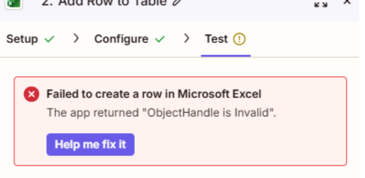
See the screenshots. Ich habe die Schritte bereits mehrmals befolgt und es über den Chat auf eurer Website versucht. Aber ich komme nicht weiter und das Problem lässt sich nicht beheben. 

2c9db2e9e95a9ad63f82fe3354adee7c.png

This post has been edited by a moderator to include error screenshot directly in the reply rather than in a docx file attachment that needs to be downloaded in order to view it. 


SamB
Community Manager
Forum|alt.badge.img+11
  • Community Manager
  • July 20, 2026

Thanks for sharing the error you’re getting ​@Nadieh. I looked into that "ObjectHandle is Invalid" error and it appears to usually occur when there’s an issue with the authentication. 

Can you try reconnecting your Microsoft Excel app connection and then in the Add Row to Table action, reselect the values in Folder, Workbook and Worksheet fields again to see if that fixes it?

Keep us posted on how it goes, want to make sure this gets sorted! 


  • Author
  • Beginner
  • July 20, 2026

Unfortunately, that doesn't work either... We really need this; it needs to be fixed as soon as possible... What else could be causing this to not work? Or can you look into our system and get it working?


SamB
Community Manager
Forum|alt.badge.img+11
  • Community Manager
  • July 20, 2026

Sorry to hear it didn’t work ​@Nadieh. I can’t access your Zap or it’s logs from my side but our Support team can. If you reach out to them here they’ll be able to investigate this further.

That said, I’d be happy to continue trying to get this figured out here! 🙂

Has there been any change to the plan or the permissions of the connected Microsoft account? Asking as the Microsoft Excel app requiresMicrosoft 365 Business or Enterprise plan as well sufficient permissions to view and edit workbooks. Also, I see the Add Row to Table action requires workbooks to be stored in OneDrive for Business, a Sharepoint site, or Group Drive. So it could be that if the workbook has been moved somewhere else, or if there’s been a change to the Microsoft account’s plan or permissions, then that might be why it’s erroring.

If that’s not the case, can you share a screenshot of what you’re seeing on the Configure tab of that Add Row to Table action? Seeing that allow us to check if there’s anything on the set up there that might be causing issues. You can use a tool like Zappy to remove any personal/sensitive info before sharing here.


  • Author
  • Beginner
  • July 20, 2026

How can I contact them?


SamB
Community Manager
Forum|alt.badge.img+11
  • Community Manager
  • July 20, 2026

Happy to help ​@Nadieh. The best way to contact them is to fill out the contact form on this page: https://zapier.com/app/get-help. From there they’ll be in touch with you via email. 

Let us know how you get on!


SamB
Community Manager
Forum|alt.badge.img+11
  • Community Manager
  • July 29, 2026

How did things go with our Support team @Nadieh? Were you able to get it sorted?

Want to make sure you're all set! 🙂