



Best answer

How does the daily task limit affect autoresponder emails on a free account?

  • September 17, 2023
  • 5 replies
  • 112 views

JF_1010
Forum|alt.badge.img

Hi,

I think I saw that with a free account, there is a limit to the number of tasks I get per day. So if I set up an autoresponder “welcome email”, does it only respond so many times per day? And if so, how does that work?  So if I’m allowed 10 autoresponders per day and I have 20 signs ups, how would those remaining 10 work?  Thanks in advance.
Best answer by Troy Tessalone

Hi @JF_1010 

Good question.

Zapier plans and pricing: https://zapier.com/app/pricing

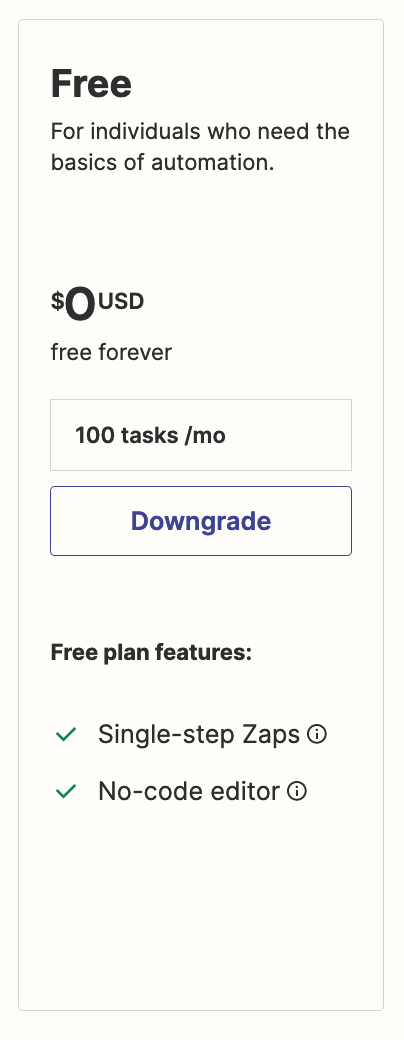
Free plan has 100 tasks / month.


This post has been closed for comments. Please create a new post if you need help or have a question about this topic.

5 replies

Troy Tessalone
Zapier Orchestrator & Solution Partner
Forum|alt.badge.img+14
  • Zapier Orchestrator & Solution Partner
  • Answer
  • September 18, 2023

Hi @JF_1010 

Good question.

Zapier plans and pricing: https://zapier.com/app/pricing

Free plan has 100 tasks / month.


JF_1010
Forum|alt.badge.img
  • Author
  • Beginner
  • September 19, 2023

Thanks Troy. And if I hit the 100 task limit, will the tasks start in the next month?  For instance, if I have a welcome email set up and get 120 new subscribers in September, would it stop at 100 and then start again at the 101st new subscriber from September in October?


Troy Tessalone
Zapier Orchestrator & Solution Partner
Forum|alt.badge.img+14
  • Zapier Orchestrator & Solution Partner
  • September 19, 2023

@JF_1010 

Help article about Held Zap Runs: https://help.zapier.com/hc/en-us/articles/8496291148685-View-and-manage-your-Zap-history#h_01HA7YN3RYSJN93FJZQS0DXAPE

Held

Zap runs can have a status of Held for one of four reasons:

  • Too much data: too many steps (100+) would have been triggered when Zapier checked for new data. This "flood protection" prevents a significant number of tasks from being automated by mistake. This helps keep your task usage down and prevents unintended tasks.
  • Disconnected app: the connection to one of the app accounts used in the Zap is no longer active. Reconnect the app account, then replay the held Zap run.
  • Task limit reached: the account has exceeded its plan limit for tasks or Zaps, or uses a premium app that is not supported by the plan. To replay the held Zap run, upgrade your Zapier plan.
  • Payment issue: the payment information on the account has expired. To replay the held Zap run, update your payment method.
  • Restricted app: your Zapier account owner or admin has limited the use of the app and you do not have permission to use it. 

Learn how to replay Zap runs that failed or were not successful.

The Zap runs page will not show activity if your Zap checks for new data and does not find any.

You can filter your Zap runs by status, date range, owner, folder, apps, or Zap name. You can also search your entire Zap history with the search bar in the upper right, which will search all the data that was sent to and received by each step in your Zaps.


JF_1010
Forum|alt.badge.img
  • Author
  • Beginner
  • September 23, 2023

Awesome.  Thanks a lot for sending this info.  Much appreciated.


ken.a
Forum|alt.badge.img+6
  • Zapier Staff
  • September 26, 2023

That’s awesome! Shoutout to Troy for pointing you in the right direction @JF_1010!

If you have any other questions, please don’t hesitate to reach out to the Community. We’re always happy to help! 😊





