Best answer

How do you practice zapier?

  • September 23, 2025
  • 6 replies
  • 51 views

How do you practice using Zapier when you don’t have any clients yet? I know the basics of using Zapier, but I don’t have the confidence to look for clients because I haven’t actually done real work with it. Are there any practice tasks for this?

Best answer by Ashar Malik Easyaiz

Hi ​@lionelperez13 , 

I’m sharing this based on my own experience, if you follow it and give just 2–3 hours daily, you’ll learn Zapier easily.

- Start with Zapier’s own free learning platform: https://learn.zapier.com/

- Explore triggers and actions of popular apps (Shopify, Gmail, Google Sheets, Docs, Airtable, HubSpot, etc.)

- Use Zapier’s 14-day free trial and set a goal to reach at least an intermediate level within that time

- You can practice with free apps like Gmail, Google Sheets, and Google Calendar — no client needed

- To simulate real client requirements, use ChatGPT with this prompt:


I want you to act like a real client who needs Zapier automation.  
I will give you the names of some apps (it could be 2, 3, or more).  
Your task is to generate 5 realistic client requirements that combine these apps in practical ways.  
Make the requirements sound like real-world client requests, not just generic ideas.  

Here are the apps: [APP 1], [APP 2], [APP 3] ...


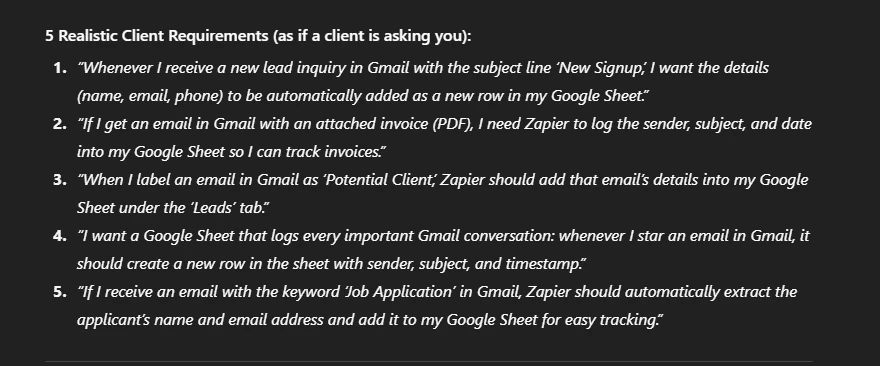
- Keep giving it different apps, and it will generate new practice scenarios for you eg: Here are the apps: gmail, google sheet.
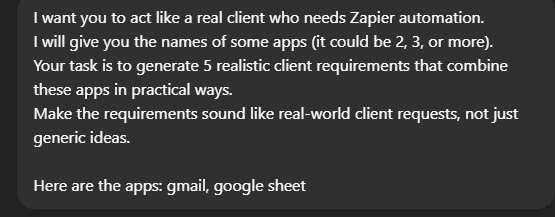
 

Prompt example
Example of the Responses generated by above prompt

- For each requirement:

  • Sketch the flow or try building it directly in Zapier
  • Learn how to apply logic (e.g., using “Filter by Zapier” effectively)

This process will help you move past beginner level quickly

Best of luck with your journey, and remember, the community is here if you need help!

This post has been closed for comments. Please create a new post if you need help or have a question about this topic.


6 replies

Troy Tessalone
Zapier Orchestrator & Solution Partner
Forum|alt.badge.img+14
  • Zapier Orchestrator & Solution Partner
  • September 23, 2025

Hi ​@lionelperez13 

Check out the courses on Zapier Learn: 

https://learn.zapier.com/


  • Author
  • New
  • September 23, 2025

Hi ​@lionelperez13 

Check out the courses on Zapier Learn: 

https://learn.zapier.com/


 Thank you but are there more lessons, or is this all of them?


Troy Tessalone
Zapier Orchestrator & Solution Partner
Forum|alt.badge.img+14
  • Zapier Orchestrator & Solution Partner
  • September 23, 2025

@lionelperez13 

There are 25+ Courses.


  • Author
  • New
  • September 23, 2025

@lionelperez13 

There are 25+ Courses.


i saw it thank you sir


Ashar Malik Easyaiz
Forum|alt.badge.img+1

Hi ​@lionelperez13 , 

I’m sharing this based on my own experience, if you follow it and give just 2–3 hours daily, you’ll learn Zapier easily.

- Start with Zapier’s own free learning platform: https://learn.zapier.com/

- Explore triggers and actions of popular apps (Shopify, Gmail, Google Sheets, Docs, Airtable, HubSpot, etc.)

- Use Zapier’s 14-day free trial and set a goal to reach at least an intermediate level within that time

- You can practice with free apps like Gmail, Google Sheets, and Google Calendar — no client needed

- To simulate real client requirements, use ChatGPT with this prompt:


I want you to act like a real client who needs Zapier automation.  
I will give you the names of some apps (it could be 2, 3, or more).  
Your task is to generate 5 realistic client requirements that combine these apps in practical ways.  
Make the requirements sound like real-world client requests, not just generic ideas.  

Here are the apps: [APP 1], [APP 2], [APP 3] ...


- Keep giving it different apps, and it will generate new practice scenarios for you eg: Here are the apps: gmail, google sheet.


Prompt example
Example of the Responses generated by above prompt

- For each requirement:

  • Sketch the flow or try building it directly in Zapier
  • Learn how to apply logic (e.g., using “Filter by Zapier” effectively)

This process will help you move past beginner level quickly

Best of luck with your journey, and remember, the community is here if you need help!


  • Author
  • New
  • September 24, 2025

Hi ​@lionelperez13 , 

I’m sharing this based on my own experience, if you follow it and give just 2–3 hours daily, you’ll learn Zapier easily.

- Start with Zapier’s own free learning platform: https://learn.zapier.com/

- Explore triggers and actions of popular apps (Shopify, Gmail, Google Sheets, Docs, Airtable, HubSpot, etc.)

- Use Zapier’s 14-day free trial and set a goal to reach at least an intermediate level within that time

- You can practice with free apps like Gmail, Google Sheets, and Google Calendar — no client needed

- To simulate real client requirements, use ChatGPT with this prompt:


I want you to act like a real client who needs Zapier automation.  
I will give you the names of some apps (it could be 2, 3, or more).  
Your task is to generate 5 realistic client requirements that combine these apps in practical ways.  
Make the requirements sound like real-world client requests, not just generic ideas.  

Here are the apps: [APP 1], [APP 2], [APP 3] ...


- Keep giving it different apps, and it will generate new practice scenarios for you eg: Here are the apps: gmail, google sheet.


Prompt example
Example of the Responses generated by above prompt

- For each requirement:

  • Sketch the flow or try building it directly in Zapier
  • Learn how to apply logic (e.g., using “Filter by Zapier” effectively)

This process will help you move past beginner level quickly

Best of luck with your journey, and remember, the community is here if you need help!

wow this practice is what i am looking for thank you so much!!!