Question

How do you convert Qualtrics rank results to picklist and text fields?

  • August 23, 2024
  • 2 replies
  • 75 views

I am working on moving survey results from Qualtrics into our Salesforce CRM system. In Qualtrics, we allow respondents to rank their preferences for programming/contact methods/etc. 

In Zapier, each of these comes in as it’s own item, instead of a response to the one question. 

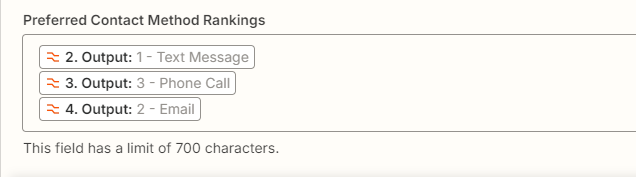
My current solution is using the utilities tool to convert each of these to a text value and then combine them into a text field that recombines them: 
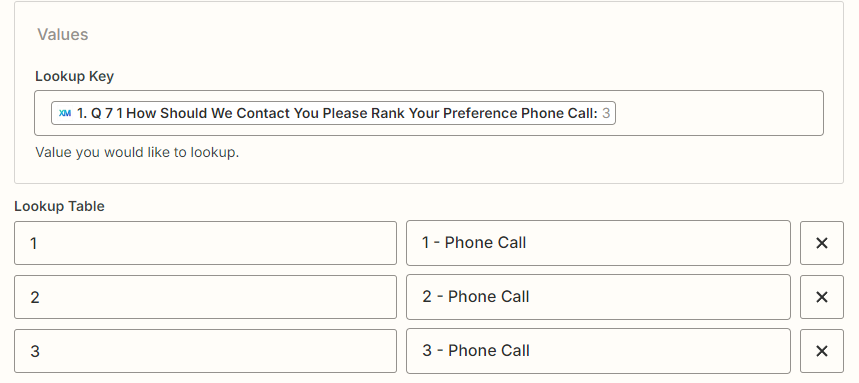
 

This works, but it isn’t really sustainable since we have a number of these rank choice questions so doing this for each question won’t work great and doesn’t end up with them in rank order. 

I ideally want to be able, for each of these rank questions, to end up with a text box that has the ranking results listed in order. Is there an easier/better/more sustainable way to do this? 

I know there is the table function, but I’m having trouble figuring out how to use it when Zapier is viewing these as their own fields.


This post has been closed for comments. Please create a new post if you need help or have a question about this topic.

2 replies

Troy Tessalone
Zapier Orchestrator & Solution Partner
Forum|alt.badge.img+14
  • Zapier Orchestrator & Solution Partner
  • August 23, 2024

Hi @heatherolsen 

The solution would likely involve using a custom Code step: https://zapier.com/apps/code/help

The 1 Code step can handle all the different variables and desired logic.


SamB
Community Manager
Forum|alt.badge.img+11
  • Community Manager
  • August 27, 2024

 Hey @heatherolsen, welcome to the Community! 🎉

Just wanted to check in to see how you’re getting on with this? Were you able to solve this using a Code step as Troy suggested? 

Want to ensure you’re all set so please let us know whether you’re still in need of any help at all! 🙂