Question

How do I use Zapier to unenroll a student on Thinkific after they cancel subscription on Shopify?

  • October 12, 2023
  • 9 replies
  • 158 views

Hello! 


I am looking to integrate Zapier to help automate the process of unenrolling students from having access to Thinkific courses after a subscription has been cancelled. If a student cancels their subscription on Shopify, they will have access to the course or bundle until renewal or billing date occurs, at which their access will be revoked. For example, if a student ends their subscription on Sept 1 and the next billing date is Sept 30, they’ll have access until Sept 30.


So far, we have created this Zap template: 

  1. Trigger - New Cancelled Order in Shopify 
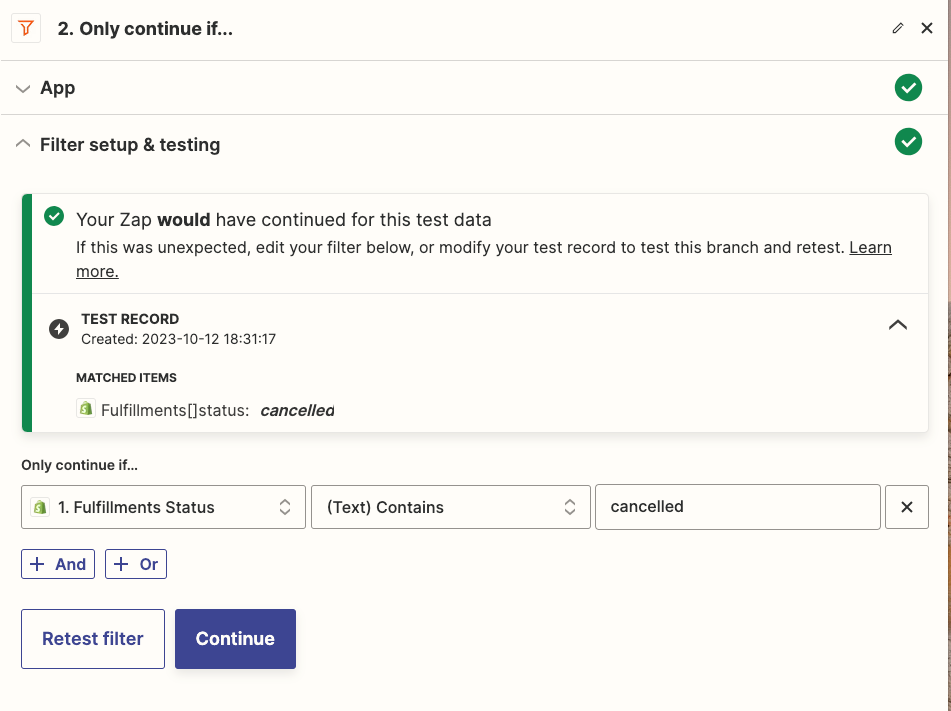
  2. Only continue if fulfillment status contains ‘cancelled’ (Have tried with and without this step)
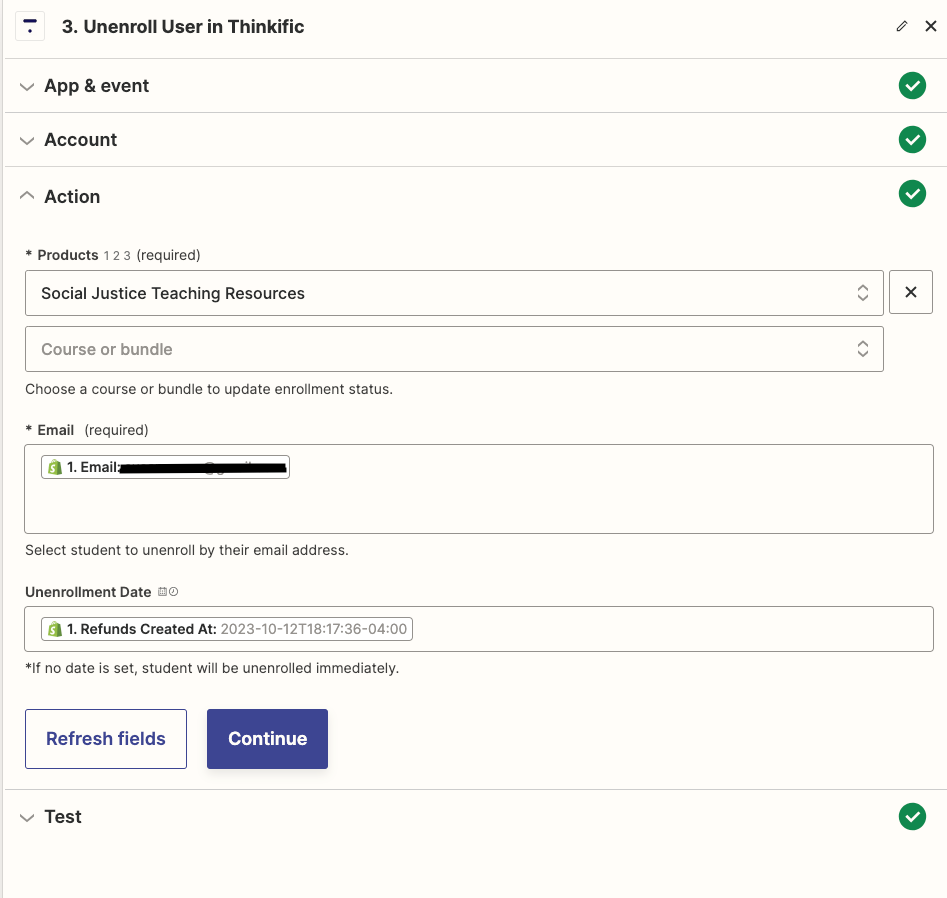
  3. Unenroll User in Thinkific 

Both times we’ve tried this template with and without step 2, has yielded a ‘success true’ message, but when we look on the Thinkific platform, the test student is still enrolled in the course. How might we solve this problem?

This post has been closed for comments. Please create a new post if you need help or have a question about this topic.

9 replies

SamB
Community Manager
Forum|alt.badge.img+11
  • Community Manager
  • October 13, 2023

Hi @LJL, welcome to the Community! 🎉

That’s very strange. My first thought here is that perhaps there’s an issue with the Unenrollment Date that’s been selected on the Thinkific action. It could be that’s it’s interpreting the date incorrectly if it’s not in the expected format. Causing it to be set the unenrollment date to be further in the future than intended.

Do you think that could be the case or was an unenrollment date not set?

To help us to better to determine what may be the cause of the issue could you please share a screenshot of the Data In and Data Out for the Thinkific step on a recent run of the Zap? Remember to remove/hide any private information (like names, emails addresses etc.) from the screenshot before sharing.

Thanks, I look forward to hearing from you! 🙂


  • Author
  • Beginner
  • October 13, 2023

Hi @SamB


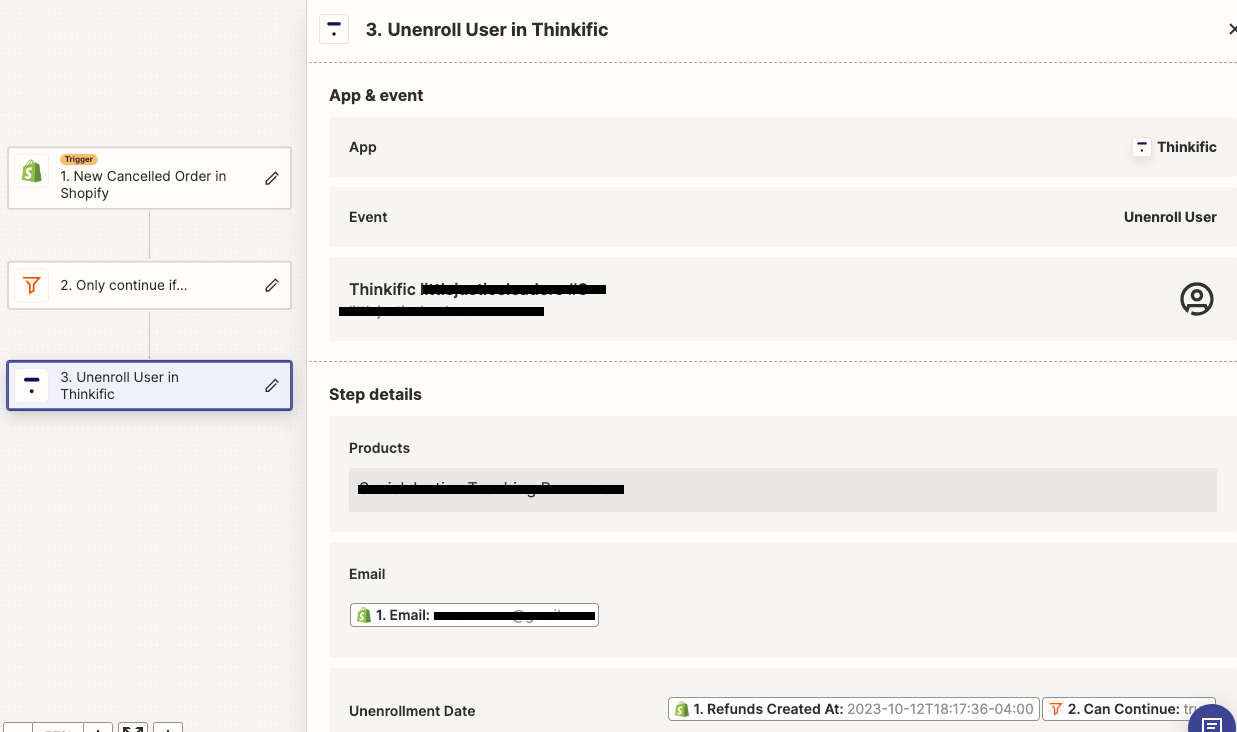
Thanks for the response. Here’s a screenshot of what we have so far.


Troy Tessalone
Zapier Orchestrator & Solution Partner
Forum|alt.badge.img+14
  • Zapier Orchestrator & Solution Partner
  • October 13, 2023

@LJL 

Looks like you have an invalid date configured due to the mapped “Can Continue” variable from the Filter in Step 2.


  • Author
  • Beginner
  • October 18, 2023

@Troy Tessalone I removed the “Can Continue” variable from the Filter in Step 2, but the cancelled user is still enrolled on Thinkific.

A thought the team had was perhaps the line data that we’ve chosen from Shopify - the ‘Refunds Created At...’ data may not be appropriate to use. We don’t know the end date until the user cancels the sub, so how might we navigate the “Unenrollment Date”? 


Troy Tessalone
Zapier Orchestrator & Solution Partner
Forum|alt.badge.img+14
  • Zapier Orchestrator & Solution Partner
  • October 18, 2023

@LJL 

Can you post screenshots with how your Filter in Step 2 is configured?


  • Author
  • Beginner
  • October 20, 2023

@Troy Tessalone 

p8uSR826DaACjsibCR_WCEEYp8CuvTTIbPaxNnsWckEuyQIuk2Lr93k7IB1EbGC-2GjPbNkNqRUFbJ2EccZzrfmX1eWkfEn4DheArnQkkt7xyPso4nyDdMmJ9aYNpoi4yO4bcky__S7sQCQohtf6hQo


Troy Tessalone
Zapier Orchestrator & Solution Partner
Forum|alt.badge.img+14
  • Zapier Orchestrator & Solution Partner
  • October 20, 2023

@LJL 

Can you show screenshots of the DATA IN/OUT for a representative Zap Run?

https://zapier.com/app/history/


  • Author
  • Beginner
  • October 24, 2023

@Troy Tessalone 

In step 1, we have the “New Cancelled Order” event and it’s pulling test data from a cancelled test record. Here are some of the line data that we can pull from (see screenshot-of-data-in.pdf) 


In step 2, we have this filter setup 

In step 3 to “Unenroll User in Thinkific” we have the “Unenroll User event” 


Does this information answer your question? 


Troy Tessalone
Zapier Orchestrator & Solution Partner
Forum|alt.badge.img+14
  • Zapier Orchestrator & Solution Partner
  • October 24, 2023

@LJL 

Looks like you have some line breaks in the Email field that need to be removed.