Question

How do I upload product and its variable to WooCommerce?

  • October 14, 2024
  • 10 replies
  • 79 views

Hi!

I would like to add a VARIABLE PRODUCT to Woocommerce and then add variations (different size and ticknesses to it) to it by means of ZAP.


I failed to find anything that will help me to see how that can be done. 

Please help !!!

 

This post has been closed for comments. Please create a new post if you need help or have a question about this topic.

10 replies

Troy Tessalone
Zapier Orchestrator & Solution Partner
Forum|alt.badge.img+14
  • Zapier Orchestrator & Solution Partner
  • October 14, 2024

Hi @Batu 

WooCommerce available Zap triggers/actions: https://zapier.com/apps/woocommerce/integrations#triggers-and-actions

Search for these terms:

  • Product
  • Variation

Csaba
Forum|alt.badge.img
  • Beginner
  • October 14, 2024

Hi,

You can see how to create a variable product and product variations here:

 https://docs.tectalic.com/woocommerce-zapier/resources/product/#create-product


JammerS
Forum|alt.badge.img+6
  • Zapier Staff
  • October 15, 2024

Hi @Batu,
 
We just wanted to see how everything is going with your Zap. Did everyone’s recommendation get the job done? Feel free to reach out if you need further assistance with your Zap. We're glad to address any concerns and assist you.
 
We're looking forward to your response.


  • Author
  • Beginner
  • November 6, 2024

Hi,

Despite numeroues attempts, we have not found any solution yet. Let me know please when are you available.

Looking forward to getting your support.


ken.a
Forum|alt.badge.img+6
  • Zapier Staff
  • November 7, 2024

Hi @Batu,

Before we dig deeper into this, have you tried using the “Create Product” action? If so, could you please send a screenshot of your “Create Product” setup that shows all of its fields. This will help me take a closer look at this.

Please don't include personal information in the screenshot, or be sure blur out any personal information.

Thanks!


  • Author
  • Beginner
  • November 8, 2024

Hi

How are you today?

I am ready to provide you with relevant information. For sure I will need some guidance to start with.
Let me know when you are available.

Best regards


ken.a
Forum|alt.badge.img+6
  • Zapier Staff
  • November 14, 2024

Hi @Batu,

I’m so sorry for the delayed response here.

It would be helpful to share the relevant information in this post so that other community members who might have the same questions can follow along. I’d be happy to guide you in setting up your Zap here.

I appreciate your patience and understanding.


  • Author
  • Beginner
  • November 14, 2024

Hi,

No worries, I am glad that you have finally responded ))

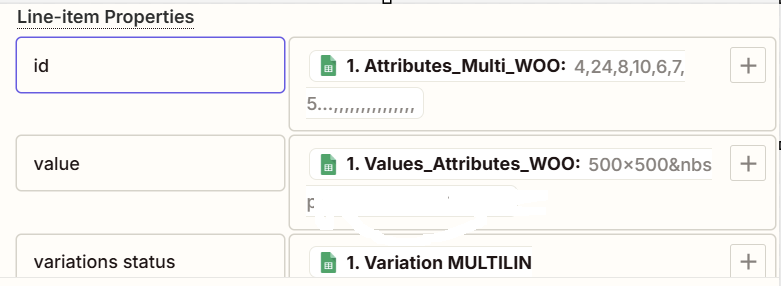
So I have a ZAP  that has to upload the Product from Google Sheets to Woocommerce. So I have created I variable that downloads a “Parent ID” back to Google Sheets. At the first stage it generates attributes by LINE ITEMIZER to upload attributes to the Woocommerce.

Here is the sturcture we use:


 Along with the Category ID and relevant values we get variation statues from Google Sheets (“Used for variations” in Woocommerce).  


  • Author
  • Beginner
  • November 14, 2024

The variarions do not appear at Product Page after we upload both of them - variable and variations to Woocommerce


SamB
Community Manager
Forum|alt.badge.img+11
  • Community Manager
  • November 18, 2024

Hi ​@Batu 👋

Would you be able to share further screenshots showing the full set up of the Formatter action that’s creating the line items as well as the WooCommerce action that’s failing to create the product variations? Asking for further screenshots here as we don’t have access to your Zaps and it’s a little hard at this point to see exactly what’s causing the issue from the provided screenshot - sorry for any additional hassle caused here!

Keen to help get to the bottom of this so will be keeping an eye out for your reply here 🙂