

Answer

How do I refresh Google Sheet data after delay in Zap to accurately transform values to CSV?

  • October 23, 2023
  • 3 replies
  • 163 views

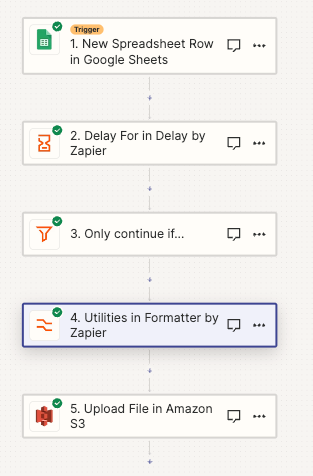
Hi everyone! I have created a Zap that will transform Google Sheet values to CSV. One column is added by a different Zap about ~30 seconds after this Zap is initiated. I created a delay for 5 minutes. It seems that the Zap does not refresh the data in those 5 minutes.

Two questions:

Should I add a Lookup Row step for it to refresh the fields after 5 minutes?

Would it be better for me to create a subzap, and if so, how will it know which row to format?


Best answer by Troy Tessalone

Hi @elizabethfreewill 

Good question.

You will need to add a GSheet Lookup Row step after the Delay in order to get fresh data.

This post has been closed for comments. Please create a new post if you need help or have a question about this topic.

3 replies

Troy Tessalone
Zapier Orchestrator & Solution Partner
Forum|alt.badge.img+14
  • Zapier Orchestrator & Solution Partner
  • Answer
  • October 23, 2023

Hi @elizabethfreewill 

Good question.

You will need to add a GSheet Lookup Row step after the Delay in order to get fresh data.


Thank you so much Troy!


ken.a
Forum|alt.badge.img+6
  • Zapier Staff
  • October 31, 2023

That’s awesome @elizabethfreewill! Big thanks to Troy for pointing you in the right direction!

If you have any other questions, please don’t hesitate to reach out to the Community. We’re always happy to help! 🤗






