I have made a couple of zaps now and it appears some of them are instant and some of them aren’t event though they in most cases use the same 2 apps integrations.

I have made a couple of zaps now and it appears some of them are instant and some of them aren’t event though they in most cases use the same 2 apps integrations.
Best answer by nicksimard
Hi
As Troy mentioned, some triggers are instant and others are not. When they’re not, it isn’t something users can change. Here are Monday’s triggers, for example:
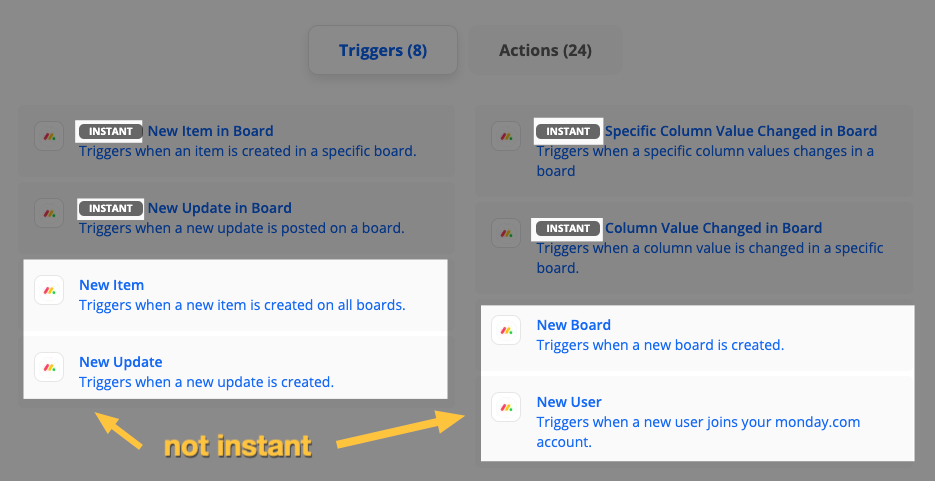
Depending on the app, there may be ways around it by using an email trigger (with Email by Zapier) that receives notifications from the app, assuming those are instant.
For example: if Monday was able to send email notifications right away, you could have them go to an email address attached to Email by Zapier, then trigger the Zap that way.
Handy tip for ya :)

Build and deploy automations from AI tools you already use. With Agentic Management, if anything breaks, the agent diagnoses the issue and proposes a fix.

Join us September 23rd, 2026 for a free, one-day virtual event with 30+ sessions on AI automation. Get live build-alongs, playbooks, and strategies to lead AI transformation at your organization.
No account yet? Create an account
Enter your E-mail address. We'll send you an e-mail with instructions to reset your password.





