
Question

How do I find the list of call statuses for Phone.com to set up a filter for missed calls in Zapier?

  • August 16, 2024
  • 2 replies
  • 17 views

I am connecting Phone.com through Zapier and then back to itself, when a call is missed I want to send a text saying “ Sorry we missed your call” etc. This is the process I have: 
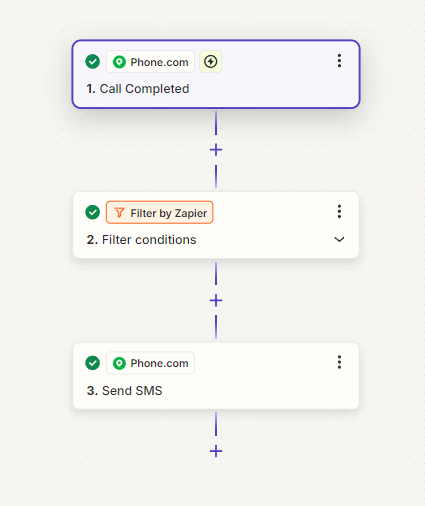
The filter is the piece that I am missing, I don’t know what status Phone.com has as options, the one that is listed in the sample is Call Status = Completed. So I need to figure out what the code or Status is for a missed call. The Phone.com support and documentation does not have any information on this. 

 

Does anyone know where I could find or figure out how to get the Call State list of statuses? 

This post has been closed for comments. Please create a new post if you need help or have a question about this topic.

2 replies

Troy Tessalone
Zapier Orchestrator & Solution Partner
Forum|alt.badge.img+14
  • Zapier Orchestrator & Solution Partner
  • August 16, 2024

Hi @SamsChristmasLights 
Try this…

Turn the Zap ON.

Test live for a missed call.

Check your Zap Runs history details to see the DATA IN/OUT for each step to help you troubleshoot.

https://zapier.com/app/history/

Then adjust your Zap Filter step condition.


SamB
Community Manager
Forum|alt.badge.img+11
  • Community Manager
  • August 21, 2024

Hi there, @SamsChristmasLights! 👋

Were you able to confirm the call state/status for missed calls is by running a live test? If so, we’d love it if you could confirm what the status was. This information would be really useful for others in the Community that are also wanting to trigger a Zap on missed calls.

If not, perhaps you could try using a Find Call Data (Phone.com) action to get more details for the call then use the filter to confirm whether it was missed or not. If you give that a try please let us know whether that works - keen to ensure you’re all set with this.

Looking forward to hearing from you!




