Best answer

How do I create a Zap that automatically welcomes new Slack users?

  • July 25, 2022
  • 9 replies
  • 740 views

I run a Slack community on a free plan. I want to be able to automatically welcome new users through a Zap message sent to them directly, or to their Slackbot. 

I seem to be able to set up a trigger: When new user joins. 

However, the action doesn’t seem correct as I’m only able to send DMs to a specific user - which would surely mean I’d message one person for every new joiner. 

Help appreciated?

Best answer by rachael.silvano

Hey there @JoeHostPog  - interestingly my sister's name is Sarah, but I’m Rachael 😅


Anyways, into your question, I know it looks like it’s sending it just to that one user because it’s working off the test info you have established in the previous setup. But fear not!  If you build the Zap using that custom ID field, I can promise that any time any new user joins, it will send them the DM to them, not just the user you have identified in the test info.  


Let me know if you have any other questions. 

This post has been closed for comments. Please create a new post if you need help or have a question about this topic.

9 replies

rachael.silvano
Forum|alt.badge.img+7

Hi @JoeHostPog - it’s always great to hear from someone building Community! 


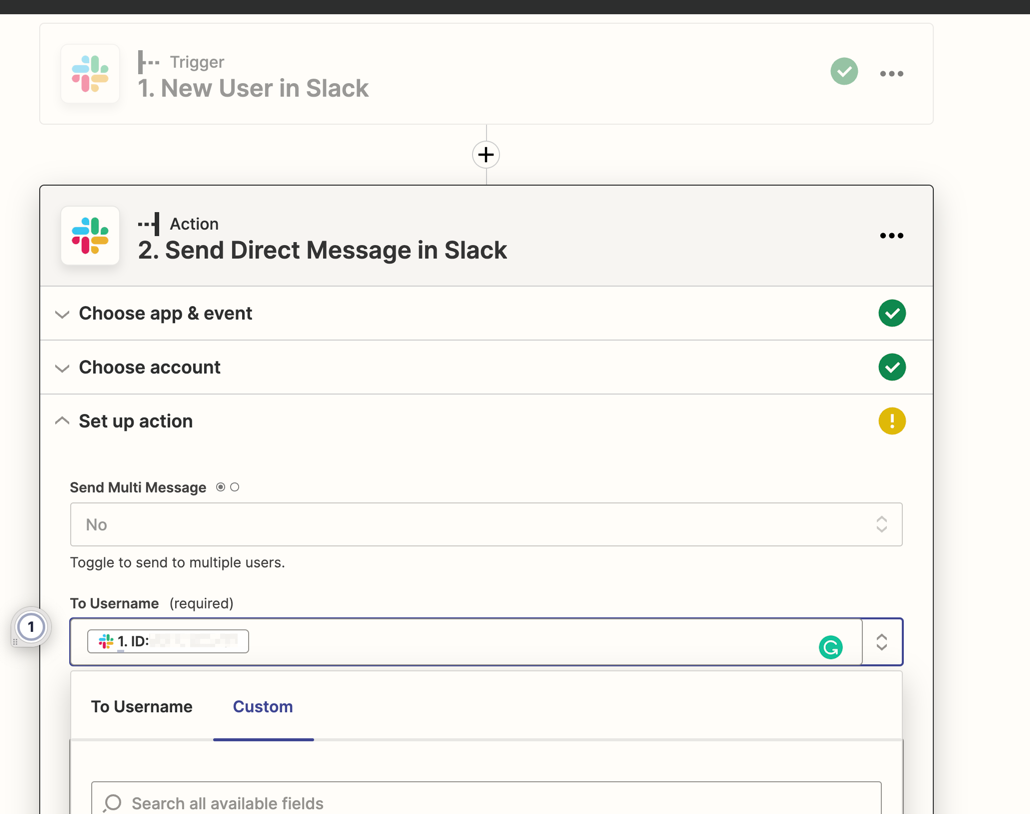
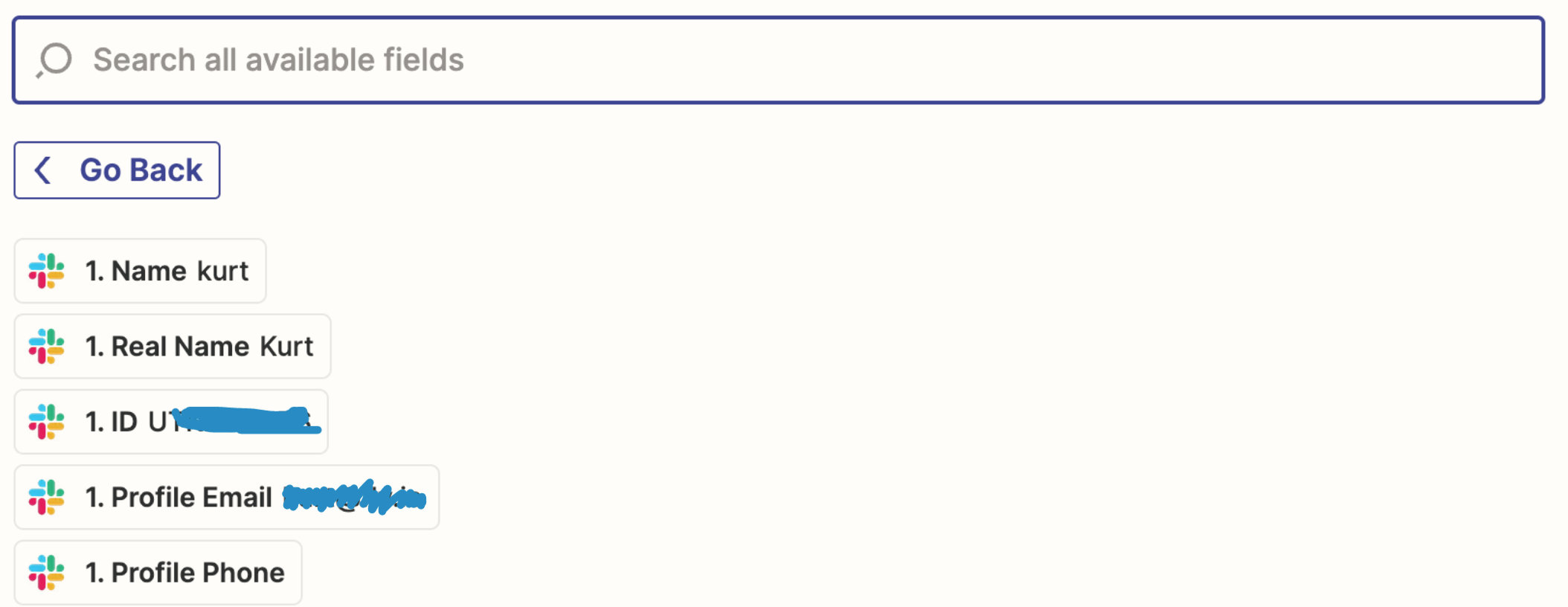
When setting up Action step of your Zap, navigate over to the Custom section and select ID- this is what will make the DM dynamic to the new user who joins your Slack account. I have a printscreen of what that looks like below: 


Let me know if you have any other questions, and best of luck in building your Community!


  • Author
  • Beginner
  • July 25, 2022


Hi Sarah. This is what I see when I go to that section: prefilled info with test data for a specific user. Surely if I specify the ID, it will always send a message to this specific user? 

What I want is to send a DM to each user when they join. E.g User 1 joins the Slack, gets a welcome DM. User 2 joins the Slack and gets a welcome DM, etc. 

Your solution seems like it would send this user (kurt) a message when User 1 joins the Slack, then again when User 2 joins the Slack, etc. 


rachael.silvano
Forum|alt.badge.img+7

Hey there @JoeHostPog  - interestingly my sister's name is Sarah, but I’m Rachael 😅


Anyways, into your question, I know it looks like it’s sending it just to that one user because it’s working off the test info you have established in the previous setup. But fear not!  If you build the Zap using that custom ID field, I can promise that any time any new user joins, it will send them the DM to them, not just the user you have identified in the test info.  


Let me know if you have any other questions. 


  • Author
  • Beginner
  • July 25, 2022

Thank you, Rachel (and sorry about the name mixup!)


  • Author
  • Beginner
  • July 25, 2022

Unfortunately, this doesn’t seem to have worked as I’ve just created a test account and it’s not yet (20 mins after) sent the welcome notification. 


rachael.silvano
Forum|alt.badge.img+7

Hi again @JoeHostPog - a few questions I may have: 

  • I would double check that your Zap is turned on (if not, turn it on first prior to making a new account). If you want to send a full printscreen of the Zap, we can make sure it all looks good!
  • Sometimes app struggle with test info like name+1@gmail vs name@gmail , I’d try setting up an entirely new user

If neither of these are the culprit, I may send you over to our friends in Support by using the Get Help form who can deep dive with you on where things may be going awry. Let us know how it goes, and hopefully they can get you up and running soon! 


nicksimard
Forum|alt.badge.img+11
  • Zapier Staff
  • July 25, 2022

 Hey@JoeHostPog!

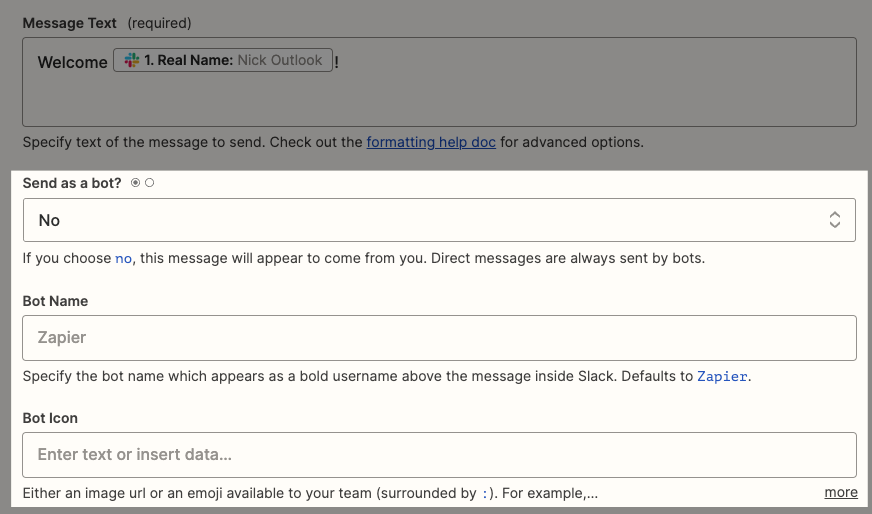
Something else to check is whether you’ve chosen Send as a bot or not:


Here’s how the message will be sent, depending whether you’re sending as bot (using the default settings of bot name ‘Zapier’ and not specifying the icon) or as the account that you connected to Zapier:

a6ed46a8154d6b5f44126b16a4a06a5b.gif


NOTE: if you give your bot a name (in your Zap) it will then show up under Slackbot, using that name (instead of in the Zapier app as shown above). 


Does any of that help?


  • Author
  • Beginner
  • July 26, 2022

Thank you, this helped a lot!


jesse
Forum|alt.badge.img+9
  • Architect
  • July 27, 2022

Wonderful @JoeHostPog! We’re glad to hear it. :)