Hi! So i have linked teachable to my zapier. I have set up my zaps as follows in the photo. However, when this lecture is completed, all the other zaps and emails associated for the other lectures get sent out? Can someone please help me out?
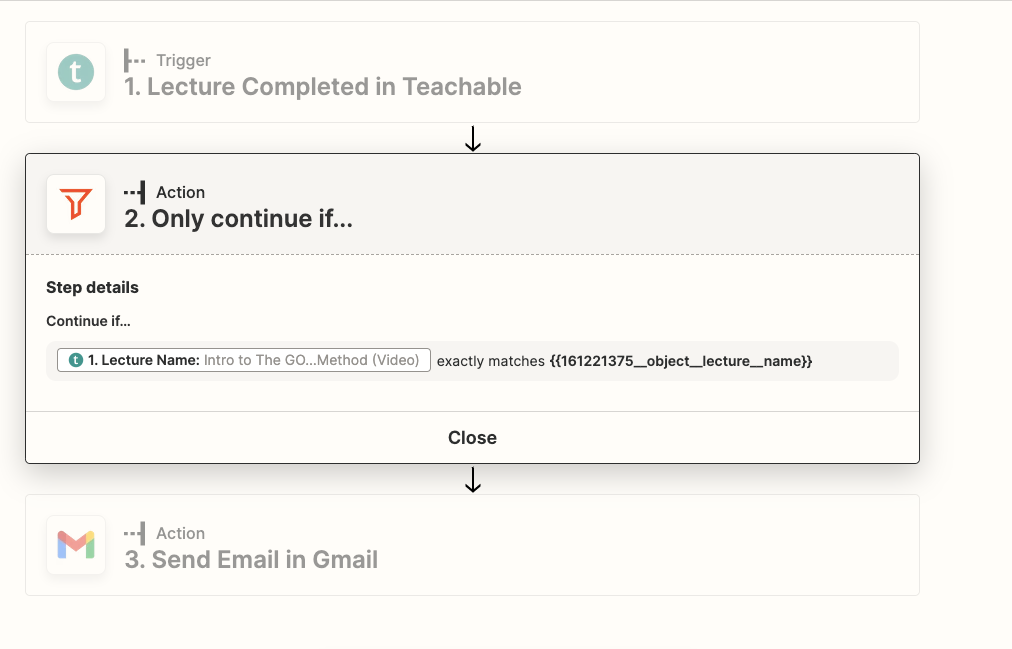

Hi! So i have linked teachable to my zapier. I have set up my zaps as follows in the photo. However, when this lecture is completed, all the other zaps and emails associated for the other lectures get sent out? Can someone please help me out?
Best answer by Doyle
It looks like this Filter is currently checking that the Lecture Name from Teachable matches itself — so this will always pass, and always send an email.
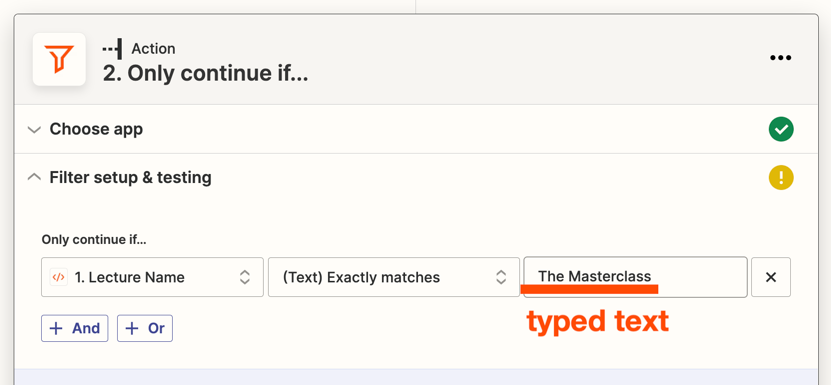
I think it will be more helpful to type text on the right side of the Filter. You could type the name of the lecture that’s relevant for the email, so your Zap workflow will only continue when the lecture that was just completed matches that specific lecture name.
The Filter setting would look more like this instead:

Build and deploy automations from AI tools you already use. With Agentic Management, if anything breaks, the agent diagnoses the issue and proposes a fix.

Join us September 23rd, 2026 for a free, one-day virtual event with 30+ sessions on AI automation. Get live build-alongs, playbooks, and strategies to lead AI transformation at your organization.
No account yet? Create an account
Enter your E-mail address. We'll send you an e-mail with instructions to reset your password.