

Best answer

How do I automatically create scheduled posts in ContentStudio from Google Sheets?

  • September 28, 2026
  • 8 replies
  • 1239 views

Hi everyone, I use ContentStudio to manage and schedule social media posts. I'd like to automate adding content to it:

  1. When a new row is added to a Google Sheet (with post text, image URL, and publish date), create a post in ContentStudio and schedule it for that date.
  2. Is there an official ContentStudio app on Zapier, and which triggers and actions does it support?
  3. If there's no suitable action, can I use Webhooks by Zapier with ContentStudio's API instead? If so, which endpoint and authentication should I use?

Thanks in advance!
Best answer by SamB

Hi ​@davidmartin1, welcome to the Community! 👋

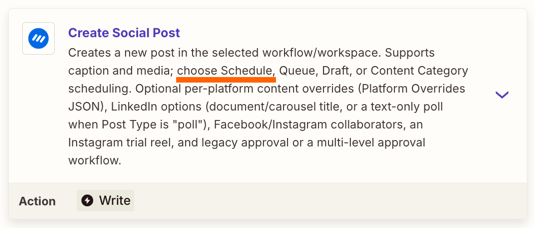
There is indeed an app integration for ContentStudio and it’s got a Create Social Post action that would allow you to schedule the post:
6487abbc88a87ead9dc224ff372c28b9.png

You’d want to use the Google Sheets New Spreadsheet Row trigger for the Zap. Then you’d map the necessary fields that contain the post text, image URL, and publish date from the new row into the ContentStudio action. You shouldn’t need Webhooks by Zapier unless the ContentStudio action doesn’t support one of the fields you need.

Give it a try and let us know how it goes!

View original

8 replies

SamB
Community Manager
Forum|alt.badge.img+11
  • Community Manager
  • Answer
  • September 28, 2026

Hi ​@davidmartin1, welcome to the Community! 👋

There is indeed an app integration for ContentStudio and it’s got a Create Social Post action that would allow you to schedule the post:
6487abbc88a87ead9dc224ff372c28b9.png

You’d want to use the Google Sheets New Spreadsheet Row trigger for the Zap. Then you’d map the necessary fields that contain the post text, image URL, and publish date from the new row into the ContentStudio action. You shouldn’t need Webhooks by Zapier unless the ContentStudio action doesn’t support one of the fields you need.

Give it a try and let us know how it goes!


Hi ​@davidmartin1, welcome to the Community! 👋

There is indeed an app integration for ContentStudio and it’s got a Create Social Post action that would allow you to schedule the post:
6487abbc88a87ead9dc224ff372c28b9.png

You’d want to use the Google Sheets New Spreadsheet Row trigger for the Zap. Then you’d map the necessary fields that contain the post text, image URL, and publish date from the new row into the ContentStudio action. You shouldn’t need Webhooks by Zapier unless the ContentStudio action doesn’t support one of the fields you need.

Give it a try and let us know how it goes!

 ​@SamB Thank youu..


SamB
Community Manager
Forum|alt.badge.img+11
  • Community Manager
  • September 29, 2026

You’re very welcome ​@davidmartin1! Glad it helped 😁


Hello.

Not sure if this helps but if you want detailed scheduling, you can try Schedule Helper


https://zapier.com/apps/schedule-helper/integrations/skool


SamB
Community Manager
Forum|alt.badge.img+11
  • Community Manager
  • October 1, 2026

Thanks for suggesting Schedule Helper here ​@base64to.xyz, a useful app to know about for those looking for more detailed scheduling! 🧡


Forum|alt.badge.img

Hi everyone, I use ContentStudio to manage and schedule social media posts. I'd like to automate adding content to it:

  1. When a new row is added to a Google Sheet (with post text, image URL, and publish date), create a post in ContentStudio and schedule it for that date.
  2. Is there an official ContentStudio app on Zapier, and which triggers and actions does it support?
  3. If there's no suitable action, can I use Webhooks by Zapier with ContentStudio's API instead? If so, which endpoint and authentication should I use?

Thanks in advance!

Hi ​@davidmartin1, welcome to the Community! 👋

There is indeed an app integration for ContentStudio and it’s got a Create Social Post action that would allow you to schedule the post:
6487abbc88a87ead9dc224ff372c28b9.png

You’d want to use the Google Sheets New Spreadsheet Row trigger for the Zap. Then you’d map the necessary fields that contain the post text, image URL, and publish date from the new row into the ContentStudio action. You shouldn’t need Webhooks by Zapier unless the ContentStudio action doesn’t support one of the fields you need.

Give it a try and let us know how it goes!

Great answer. I too I'm having the same problem. But I'll definitely give your solution a try. Thank you. 


SamB
Community Manager
Forum|alt.badge.img+11
  • Community Manager
  • October 12, 2026

You’re welcome ​@Calverhart! Let us know how you get on with that Create Social Post action, happy to lend a hand if you get stuck at all.


Hi everyone, I use ContentStudio to manage and schedule social media posts. I'd like to automate adding content to it:

  1. When a new row is added to a Google Sheet (with post text, image URL, and publish date), create a post in ContentStudio and schedule it for that date.
  2. Is there an official ContentStudio app on Zapier, and which triggers and actions does it support?
  3. If there's no suitable action, can I use Webhooks by Zapier with ContentStudio's API instead? If so, which endpoint and authentication should I use?

Thanks in advance!

Hey, SamB's path is the right one, New Spreadsheet Row in Google Sheets into ContentStudio's Create Social Post action, no Webhooks needed for the standard case. A few things that tend to trip people up on exactly this setup, so you don't lose an afternoon to them:

Date formatting is the big one. ContentStudio's scheduled publish time expects a proper date/time, but a value coming out of a Sheets cell often arrives as plain text or a serial number. Drop a Formatter by Zapier step (Date/Time) between the trigger and the action to convert your "publish date" into the format ContentStudio accepts, and set the timezone explicitly there. Otherwise posts quietly schedule an hour off, or in the wrong day.

Guard against past dates. If a row's publish date is already in the past when the Zap runs, ContentStudio can either reject it or push it live immediately. Add a Filter step so the Zap only continues when the date is in the future, that alone prevents most "why did it post right now" surprises.

Image URL has to be a direct, public link. ContentStudio pulls the image from the URL you pass, so a Google Drive "share" link or anything behind a login won't render. Use a direct file URL (or host the image somewhere that serves the raw file).

Watch the trigger behavior. New Spreadsheet Row only fires on rows appended at the bottom, not on edited or mid-sheet inserts, and it polls on an interval rather than instantly. If you ever plan to edit rows or pre-fill a batch, add a "posted?" checkbox column plus a Filter so nothing gets picked up twice.

On your Webhooks question: you'd only need Webhooks by Zapier if the native action is missing a field you care about (specific channel targeting, first comment, labels, etc). If that happens, a POST to the ContentStudio API with your API key in the Authorization header covers it, but try the native action first, it handles the text + image + schedule case cleanly.

If you share what platforms you're posting to and whether the sheet is one-row-at-a-time or a bulk list, happy to help you nail down the exact field mapping.


