

Best answer

How do I automatically create scheduled posts in ContentStudio from Google Sheets?

  • September 28, 2026
  • 7 replies
  • 904 views

Hi everyone, I use ContentStudio to manage and schedule social media posts. I'd like to automate adding content to it:

  1. When a new row is added to a Google Sheet (with post text, image URL, and publish date), create a post in ContentStudio and schedule it for that date.
  2. Is there an official ContentStudio app on Zapier, and which triggers and actions does it support?
  3. If there's no suitable action, can I use Webhooks by Zapier with ContentStudio's API instead? If so, which endpoint and authentication should I use?

Thanks in advance!
Best answer by SamB

Hi ​@davidmartin1, welcome to the Community! 👋

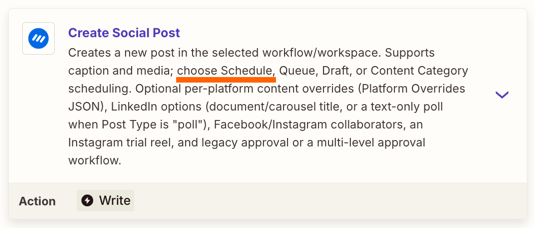
There is indeed an app integration for ContentStudio and it’s got a Create Social Post action that would allow you to schedule the post:
6487abbc88a87ead9dc224ff372c28b9.png

You’d want to use the Google Sheets New Spreadsheet Row trigger for the Zap. Then you’d map the necessary fields that contain the post text, image URL, and publish date from the new row into the ContentStudio action. You shouldn’t need Webhooks by Zapier unless the ContentStudio action doesn’t support one of the fields you need.

Give it a try and let us know how it goes!

View original

7 replies

SamB
Community Manager
Forum|alt.badge.img+11
  • Community Manager
  • Answer
  • September 28, 2026

Hi ​@davidmartin1, welcome to the Community! 👋

There is indeed an app integration for ContentStudio and it’s got a Create Social Post action that would allow you to schedule the post:
6487abbc88a87ead9dc224ff372c28b9.png

You’d want to use the Google Sheets New Spreadsheet Row trigger for the Zap. Then you’d map the necessary fields that contain the post text, image URL, and publish date from the new row into the ContentStudio action. You shouldn’t need Webhooks by Zapier unless the ContentStudio action doesn’t support one of the fields you need.

Give it a try and let us know how it goes!


Hi ​@davidmartin1, welcome to the Community! 👋

There is indeed an app integration for ContentStudio and it’s got a Create Social Post action that would allow you to schedule the post:
6487abbc88a87ead9dc224ff372c28b9.png

You’d want to use the Google Sheets New Spreadsheet Row trigger for the Zap. Then you’d map the necessary fields that contain the post text, image URL, and publish date from the new row into the ContentStudio action. You shouldn’t need Webhooks by Zapier unless the ContentStudio action doesn’t support one of the fields you need.

Give it a try and let us know how it goes!

 ​@SamB Thank youu..


SamB
Community Manager
Forum|alt.badge.img+11
  • Community Manager
  • September 29, 2026

You’re very welcome ​@davidmartin1! Glad it helped 😁


Hello.

Not sure if this helps but if you want detailed scheduling, you can try Schedule Helper


https://zapier.com/apps/schedule-helper/integrations/skool


SamB
Community Manager
Forum|alt.badge.img+11
  • Community Manager
  • October 1, 2026

Thanks for suggesting Schedule Helper here ​@base64to.xyz, a useful app to know about for those looking for more detailed scheduling! 🧡


Hi everyone, I use ContentStudio to manage and schedule social media posts. I'd like to automate adding content to it:

  1. When a new row is added to a Google Sheet (with post text, image URL, and publish date), create a post in ContentStudio and schedule it for that date.
  2. Is there an official ContentStudio app on Zapier, and which triggers and actions does it support?
  3. If there's no suitable action, can I use Webhooks by Zapier with ContentStudio's API instead? If so, which endpoint and authentication should I use?

Thanks in advance!

Hi ​@davidmartin1, welcome to the Community! 👋

There is indeed an app integration for ContentStudio and it’s got a Create Social Post action that would allow you to schedule the post:
6487abbc88a87ead9dc224ff372c28b9.png

You’d want to use the Google Sheets New Spreadsheet Row trigger for the Zap. Then you’d map the necessary fields that contain the post text, image URL, and publish date from the new row into the ContentStudio action. You shouldn’t need Webhooks by Zapier unless the ContentStudio action doesn’t support one of the fields you need.

Give it a try and let us know how it goes!

Great answer. I too I'm having the same problem. But I'll definitely give your solution a try. Thank you. 


SamB
Community Manager
Forum|alt.badge.img+11
  • Community Manager
  • October 12, 2026

You’re welcome ​@Calverhart! Let us know how you get on with that Create Social Post action, happy to lend a hand if you get stuck at all.

