Question

How can I automate Zoom Audio transcripts to ChatGPT meeting summary

  • August 27, 2025
  • 3 replies
  • 95 views

Hey Everybody,


I am new to Zapier.

I would like to automate the following:

Once I get email via outlook from Zoom that my meeting video record is ready, to download the audio transcript, share it with ChatGPT and ask it to write a session summary like a support engineer would do, send it to my approval, then send it to the customer via Salesforce once I approve. 


Currently, I am doing it in the following way:

1. Once I get the Zoom email I open the link for the browser meeting files.

2. I then click on "Audio transcript - English(original)" which downloads the meeting summary file as a vtt file

3. I then change the file type name from vtt to txt.

4. I then upload the file to ChatGPT and ask it to write a session summary as a support engineer would send following a meeting. 


Any ideas how can I automate this?

When I ask ChatGPT it provides me with very complicated solutions, involving scripts which I want to avoid as possible.


This post has been closed for comments. Please create a new post if you need help or have a question about this topic.

3 replies

Troy Tessalone
Zapier Orchestrator & Solution Partner
Forum|alt.badge.img+14
  • Zapier Orchestrator & Solution Partner
  • August 27, 2025

Hi ​@Rony77 

I’ve automated a similar workflow for a client of mine using Zaps.

If you are looking to hire help, there is a directory of Zapier Partnershttps://zapier.com/partnerdirectory


Review the available Zap app triggers/actions for each app: 


Sparsh from Automation Jinn
Forum|alt.badge.img+6

Hey ​@Rony77,

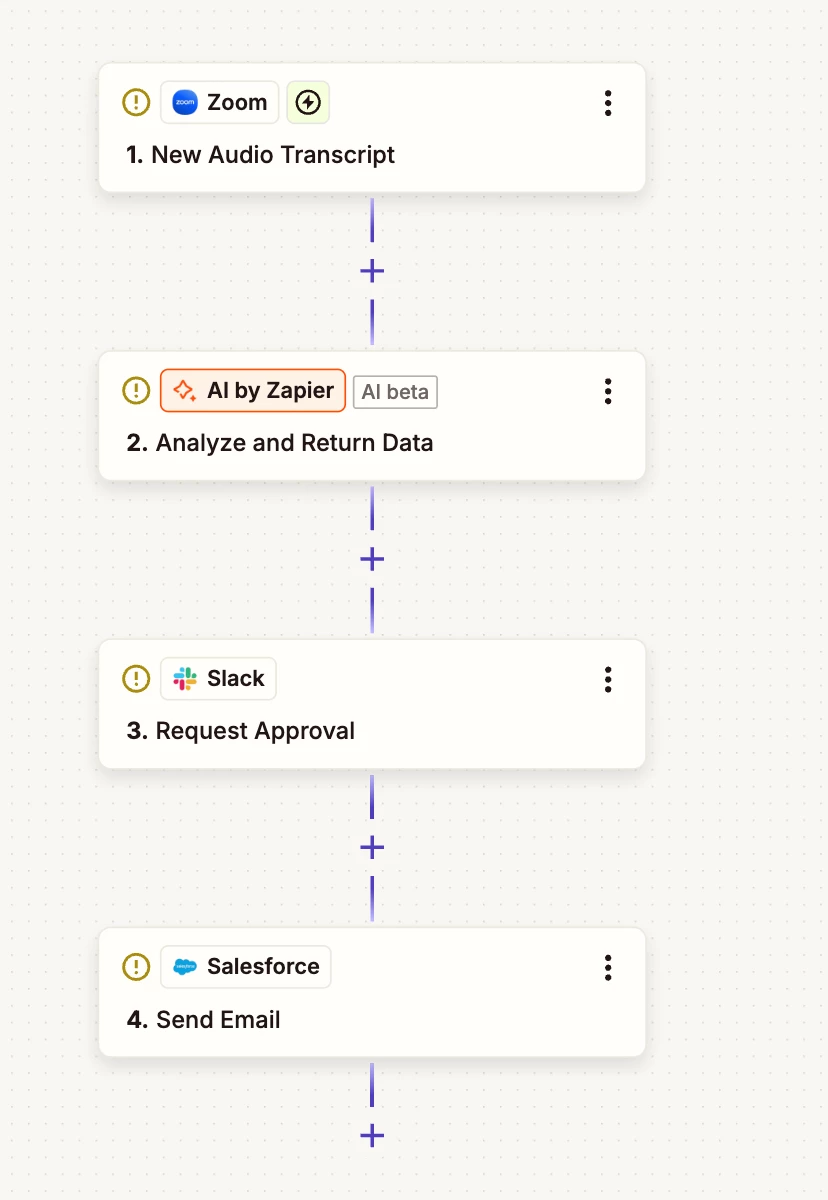
Just checking in if you were able to automate your desired workflow of automating the Zoom transcripts. I will attach a screenshot below so it becomes more clear. You workflow will probably look something like this-


Hope it’s more clear now. I used Slack here for the approval step but if you don’t use Slack feel free to use Outlook, Gmail or even Zapier Tables can work.

PS: Need professional help? Reach me through my Zapier Solution Partner page here :)


SamB
Community Manager
Forum|alt.badge.img+11
  • Community Manager
  • September 25, 2025

Hey ​@Rony77 👋

Just checking in! Did the replies from Troy and Sparsh help to point you in the right direction?

Let us know how it’s going, happy to lend a hand if you’re stuck at all 🙂