Question

Google Ads Offline Conversions: How to handle optional identifier fields (email, phone, gclid) without using 7 Paths?

  • March 18, 2026
  • 1 reply
  • 9 views

Hi everyone,

I'm trying to send offline conversions to Google Ads and need to pass user identifiers (email, phone, and gclid). The challenge is that I don't always have all three — sometimes I only have one, sometimes two, sometimes all three. It depends on what data was captured for that particular lead.

The problem is that the Google Ads module in Zapier doesn't seem to support optional fields. If I map all three fields and one of them is empty, it causes issues.

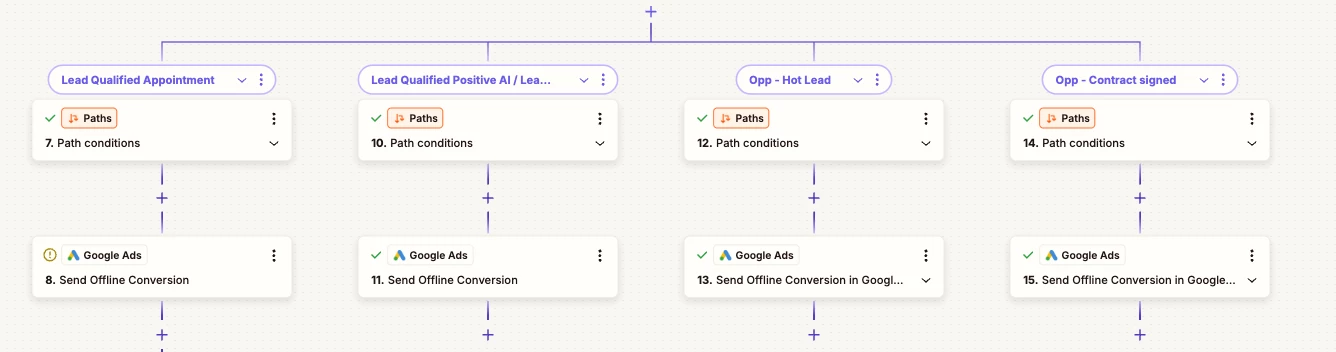
I reached out to support and was told to use Paths to handle every possible combination of available identifiers. That would mean creating a separate path for each scenario (only email, only phone, only gclid, email + phone, email + gclid, phone + gclid, all three) — which is 7 paths. That feels overly complex and hard to maintain, especially since I already have paths in my Zap for other logic.

Is there a cleaner way to handle this? Has anyone found a solution for dynamically passing only the identifier fields that are available without having to build out every possible combination as a separate path?

Thanks in advance!

1 reply

Troy Tessalone
Zapier Orchestrator & Solution Partner
Forum|alt.badge.img+14
  • Zapier Orchestrator & Solution Partner
  • March 18, 2026

Hi ​@KaanPPC 

Here are options to consider...

Use Code in a Zap step to determine the data point priority to use.

Then have 1 Path per data point, so only 3 Paths:

  • GCLID
  • Email
  • Phone


EXAMPLES

  • If you have all 3 data points, then the Code would derive that you should use GCLID, so the Zap run continues down the GCLID path, and only sends GCLID
  • If you have only 2 data points (email/phone), then the Code would derive that you should use email, so the Zap run continues down the Email path, and only sends email.
  • If you only have 1 data point, then use the matching path.


Another approach would be to send the data to another Zap that has 7 paths just for handling the GAds, so your existing Zap does not get overly convoluted with paths.

You can use the Webhookshttps://zapier.com/apps/webhook/integrations#help


EXISTING ZAP

Action: Webhook - POST

  • configured to send all the needed data points


NEW ZAP

  1. Trigger: Webhook - Catch Hook
  2. Action: PATHS
  3. Action: GAds


A more advanced approach is to use a custom GAds API request to pass a combo of identifiers.

Zap action: GAds - API Request

A Zap Code step can be used to prep the GAds API request body to use based on which of the 3 identifiers are present.