Best answer

Generating AI replies for Google reviews automation

  • May 5, 2025
  • 8 replies
  • 505 views

Forum|alt.badge.img

Hello, i’m new here. Is it possible to find a complete template for the next automation:

  • getting al my google reviews in a table (or interface)
  • generating a reply text with AI
  • putting that text as a draft in the table with the corresponding review
  • When i click the ‘reply’ button, posting that reply to the corresponding review in google business

The first 3 steps go automatically, i only have to dubbelcheck the reply text and adjust when necessary.


Best answer by Troy Tessalone

@SammyS 

Zap 1

  • should only be 3 steps
  • should NOT have this Zap action: GBP - Create Reply
  • should log the necessary Review Name as a field in the Zapier Table to use in Zap 2

Zap 2

  • should have this Zap action: GBP - Create Reply
  • should use the Review Name field value
This post has been closed for comments. Please create a new post if you need help or have a question about this topic.

8 replies

Troy Tessalone
Zapier Orchestrator & Solution Partner
Forum|alt.badge.img+14
  • Zapier Orchestrator & Solution Partner
  • May 5, 2025

Hi ​@SammyS 

Most automations are unique to the user requirements, so there won’t be a complete template available, but there are resources to reference.


Zap apps can be searched here: https://zapier.com/apps

Each Zap app has a profile page with the available triggers/actions and help links.


Google Business Profile


Tutorial for creating approvals table with Zapier Tables: https://zapier.com/blog/create-approvals-table-with-zapier-tables/


Forum|alt.badge.img
  • Author
  • Beginner
  • May 6, 2025

Hello Troy


Thanks for your response.

I’ve managed to get this far:

  • I have a table for the reviews
  • This table gets automatically filled in when there is a new review when i run the test (not dure if it actually works when there is a real new review)
  • I get an AI reply generated and filled in as a draft in the table when i run te test

What i cannot get to work:

  • the “send reply” button in the table does not work yet
  • the zap for the publication of the reply in google review is stuck at the “Review Name” part where i have to put in an adress. I can’t get that right.

Can you give me some extra information about this please?


Greetings, Sammy


Troy Tessalone
Zapier Orchestrator & Solution Partner
Forum|alt.badge.img+14
  • Zapier Orchestrator & Solution Partner
  • May 6, 2025

@SammyS 

Post screenshots in the comments as we are not about to access the attachment.


Troy Tessalone
Zapier Orchestrator & Solution Partner
Forum|alt.badge.img+14
  • Zapier Orchestrator & Solution Partner
  • May 6, 2025

@SammyS 

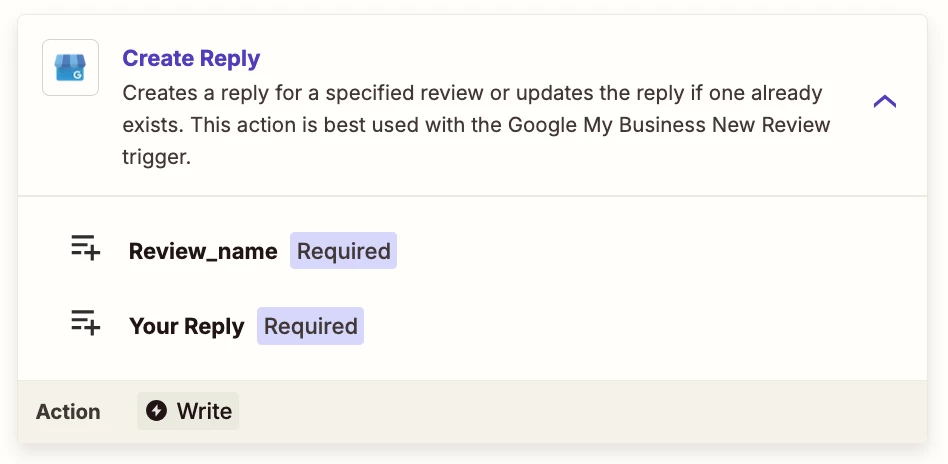
Zap action: GBP - Create Reply

Field: Review Name

Value: This will come from the original Zap trigger “New Review”, which may be a number, so you’ll need to track that data point int the Zapier Table to use.

TIP: Click field labels that are underlined to see tooltips with more info.


Forum|alt.badge.img
  • Author
  • Beginner
  • May 6, 2025

Hey Troy


Ok so i found out how to retrieve the necessary “Review Name” data.

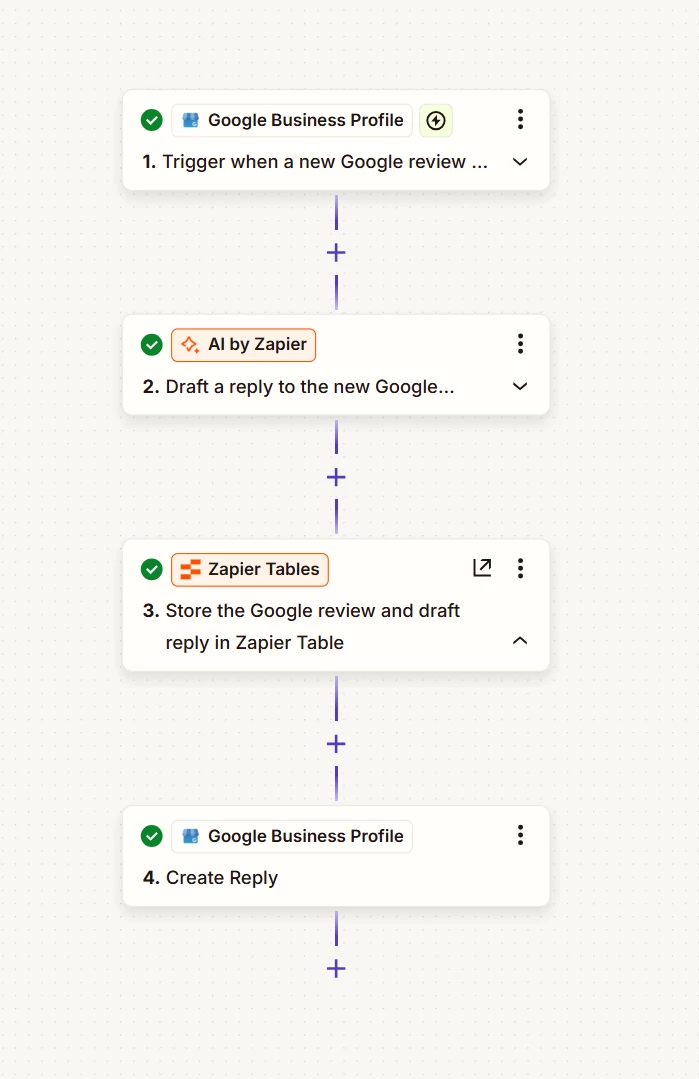
It only shows up when i add the “GBP create reply” in the same ZAP window as the first 3 steps.

But in this case it will work completely automatically without me giving the consent to post the reply by pushing the butten in the Table.
 

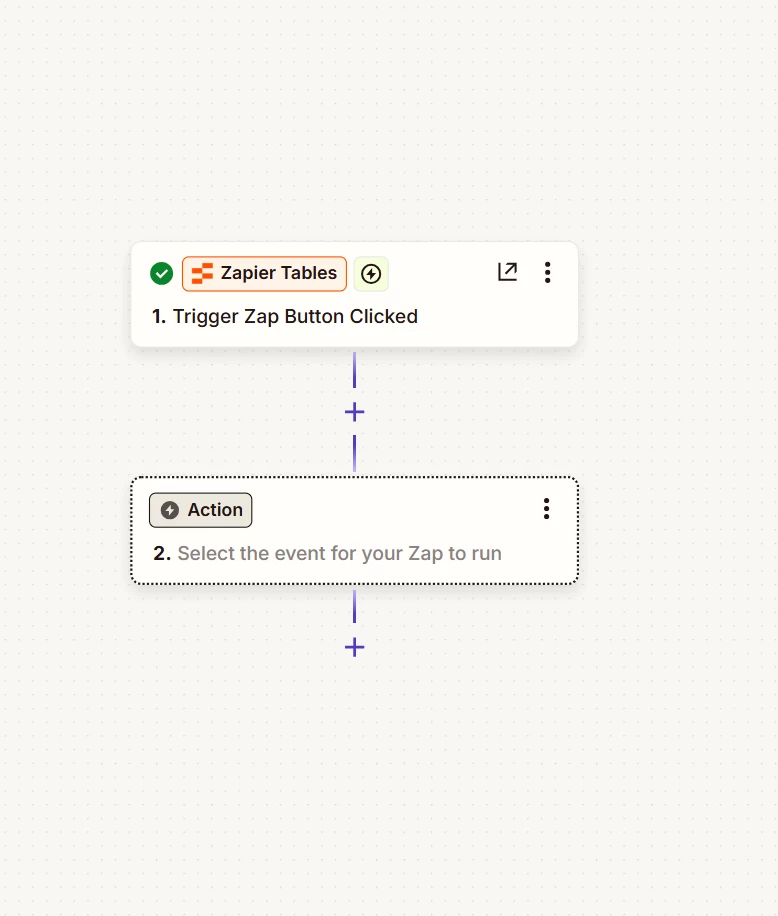
When i want to configure the “Post Reply” button, this only opens a new ZAP window, which i cannot connect to the other ZAP window…


So i think if i can connect those 2, or if i can put an action from this one ZAP to that other, it will werk perfect.


Troy Tessalone
Zapier Orchestrator & Solution Partner
Forum|alt.badge.img+14
  • Zapier Orchestrator & Solution Partner
  • Answer
  • May 6, 2025

@SammyS 

Zap 1

  • should only be 3 steps
  • should NOT have this Zap action: GBP - Create Reply
  • should log the necessary Review Name as a field in the Zapier Table to use in Zap 2

Zap 2

  • should have this Zap action: GBP - Create Reply
  • should use the Review Name field value

Forum|alt.badge.img
  • Author
  • Beginner
  • May 7, 2025

Thanks Troy!


That was the missing piece, that i needed the Review name as a field value in the table.

Works perfect now!!


Have a good day!


JammerS
Forum|alt.badge.img+6
  • Zapier Staff
  • May 8, 2025

Wow! Thank you for confirming that Troy’s resolution got the Zap running. This will significantly help our Community members to have as a reference for the same issue.