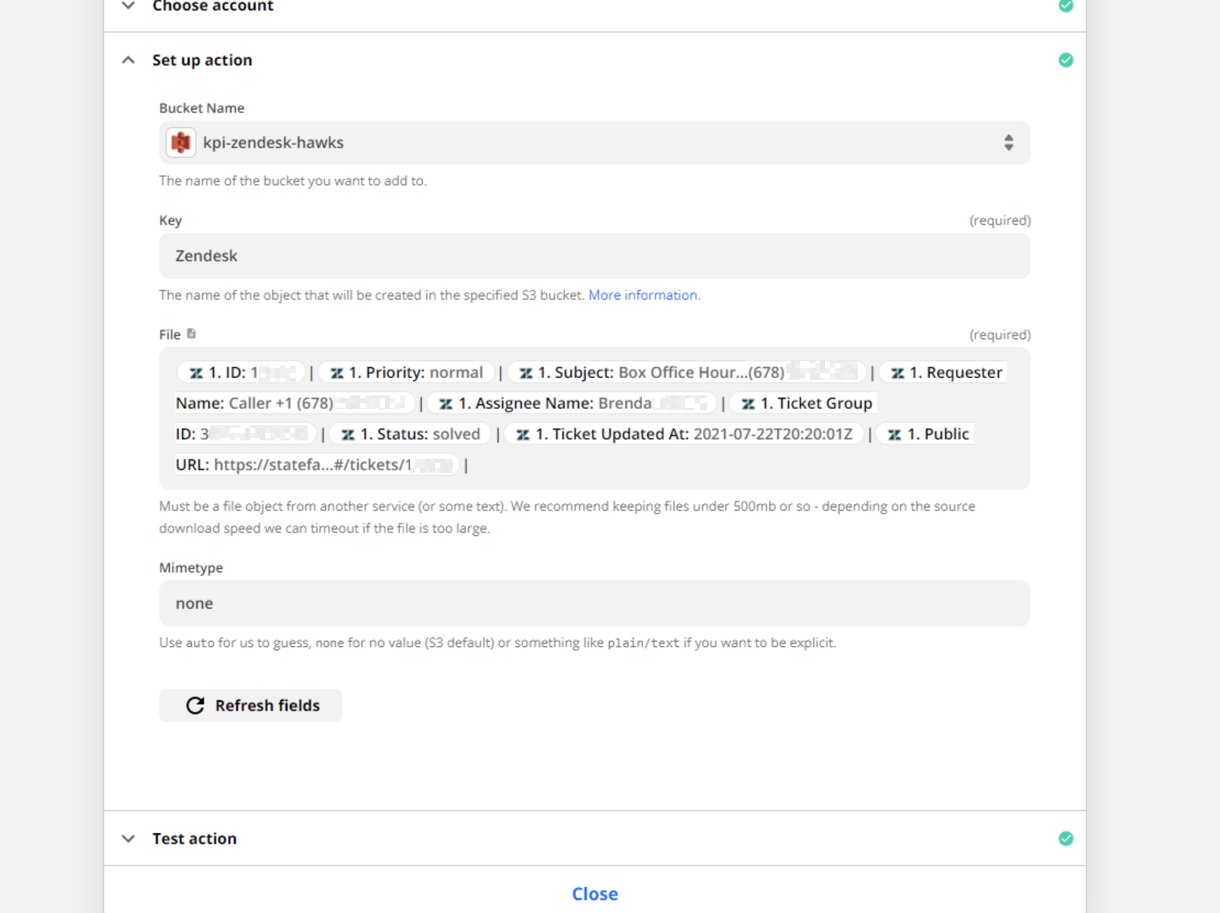
I have a Zap set up between Zendesk and s3, but when grabbing the file from s3 the file is being created as a full text file. Does anyone have advice on configuring the file to be transferred as a .csv?

I have a Zap set up between Zendesk and s3, but when grabbing the file from s3 the file is being created as a full text file. Does anyone have advice on configuring the file to be transferred as a .csv?
Best answer by SamB
Just wanted to follow up here as in the screenshot it looks like the Mimetype field hasn’t been specified. This may well be why Amazon S3 was having some trouble reading the file as a CSV.
Setting the Mimetype field to be text/csv should help to let Amazon S3 know that it’s a CSV file that’s being uploaded.
If that doesn’t work, then it may be worth uploading the file to another app first to generate the CSV file before sending it to Amazon S3. For example, you could use an app like EasyCSV to create the CSV. Then in the File field on the Amazon S3 step, you’d select the file generated from the EasyCSV step.

Join us September 23rd, 2026 for a free, one-day virtual event with 30+ sessions on AI automation. Get live build-alongs, playbooks, and strategies to lead AI transformation at your organization.
No account yet? Create an account
Enter your E-mail address. We'll send you an e-mail with instructions to reset your password.