Question

eSignatures - "The app returned "invalid-signers"

  • June 1, 2024
  • 4 replies
  • 34 views

I'm setting up a Zap to automatically populate contracts in eSignatures based on new Google Form responses (submitted by Sales Reps). I've mapped the fields, but during testing, I receive an "invalid-signers" error.

This post has been closed for comments. Please create a new post if you need help or have a question about this topic.


4 replies

Troy Tessalone
Zapier Orchestrator & Solution Partner
Forum|alt.badge.img+14
  • Zapier Orchestrator & Solution Partner
  • June 1, 2024

Hi @Stef Simon 

For us to have more context about the error, post screenshots with how your Zap steps are outlined and configured in EDIT mode.


  • Author
  • New
  • June 1, 2024

Hi Troy,


Thanks for answering. Are you looking for these?


https://prnt.sc/iiMuiKELkc4V

https://prnt.sc/cYXAjwwy8wE0

https://prnt.sc/cz6uff8AXZmd


Troy Tessalone
Zapier Orchestrator & Solution Partner
Forum|alt.badge.img+14
  • Zapier Orchestrator & Solution Partner
  • June 1, 2024

@Stef Simon 

Make sure to test the GForm by submitting it.

Then pull thru real examples in the Zap trigger step to use to test your Zap action steps.

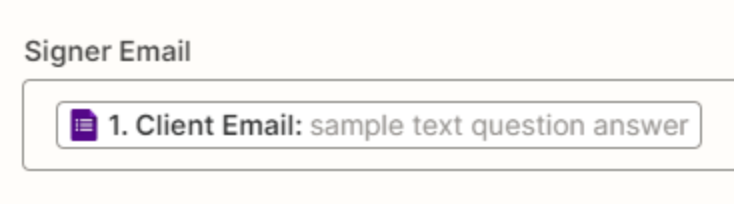
The mapped variable value for Signer Email does NOT have a valid email address.


ken.a
Forum|alt.badge.img+6
  • Zapier Staff
  • June 5, 2024

Hi @Stef Simon,

I just came across your post here and wanted to check in here to see how you’re getting on. Have you tried Troy’s suggestion here?

Please do let us know if you’re still in need of some help on this at all we’re happy to assist further! 🤗