

Question

Dynamics 365 app Find Account using wildcards?

  • September 5, 2025
  • 4 replies
  • 29 views

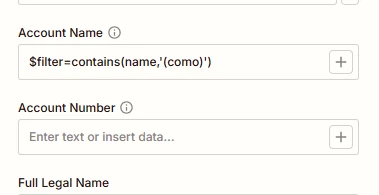
I have a Dynamics 365 App and valid connection.  I am connecting fine, and am using the action: Find Account.  How do I find an Account Name with wildcards?  or contains?  It works if I add an exact match in the Account Name field (‘Como’) but I dont have the full account name, just the start

 

This post has been closed for comments. Please create a new post if you need help or have a question about this topic.

4 replies

Sparsh from Automation Jinn
Forum|alt.badge.img+6

Hey ​@BCWA,

The approach you applying there is not directly supported. But you could add a Filter by Zapier step where you could filter for Text contains como in the Account name. This is a helpful article for Filter by Zapier-https://zapier.com/blog/filter-by-zapier-guide/. Hope it helps!


  • Author
  • Beginner
  • September 5, 2025

Thanks. I assume for the filter to work for what I need, I would have to find all accounts in the step before, then filter to get a matching name. I’ll see what I can do…


Sparsh from Automation Jinn
Forum|alt.badge.img+6

Yes. That’s true to need to Find all the accounts before or if the information is available in your trigger. Then you can apply the Filter action.


SamB
Community Manager
Forum|alt.badge.img+11
  • Community Manager
  • September 9, 2025

Hi there ​@BCWA 👋

How did you get on with Sparsh’s suggestion of using a Filter to find a partial match on the name? Did it do the trick?

If not, perhaps you could use a Custom Action, or API Request action, to do a wildcard search - assuming Microsoft Dynamics 365’s API supports the use of wildcards when searching. 

Keep us posted on your progress, want to make sure you’re all set 🙂



