Question

Dynamic time offset calculation for calendar events

  • June 25, 2026
  • 3 replies
  • 8 views

Feature Request: Dynamic Time Offset Calculation for Calendar Events

Summary: Enable Zapier to read the start time of an existing calendar event and automatically create a new event at a calculated time offset (e.g., X minutes or hours after the original event).

Use Case: I want to create a recurring "exercise" event every week at a specific time offset after a prayer time event. Prayer times shift daily and seasonally based on astronomical calculations. Rather than manually updating the time each week, I'd like Zapier to:

  1. Read the start time of a recurring calendar event (e.g., a prayer time) from my Google Calendar
  2. Calculate the offset (e.g., 45 minutes later)
  3. Automatically create or update a corresponding event at that calculated time

Why This Matters: This would enable dynamic, seasonally-aware automations for any recurring task tied to variable events—prayer times, sunrise/sunset, event-based scheduling, etc. Currently, Zapier only supports fixed recurring times, which defeats the purpose of automation for time-variable scenarios.

Suggested Implementation: A new action or filter in Google Calendar (or calendar integrations generally) that accepts: "Create event X minutes after [trigger event name]"


3 replies

Troy Tessalone
Zapier Orchestrator & Solution Partner
Forum|alt.badge.img+14
  • Zapier Orchestrator & Solution Partner
  • June 25, 2026

Hi ​@Talha MMA 

Use this Zap action: Formatter > Date & Time > Add/Subtract Time

Help links for using Formatter: https://zapier.com/apps/formatter/integrations#help


SamB
Community Manager
Forum|alt.badge.img+11
  • Community Manager
  • June 26, 2026

Hi ​@Talha MMA, welcome to the Community! 😁

Troy's right, a Formatter action would allow you to add or subtract the event time as needed.

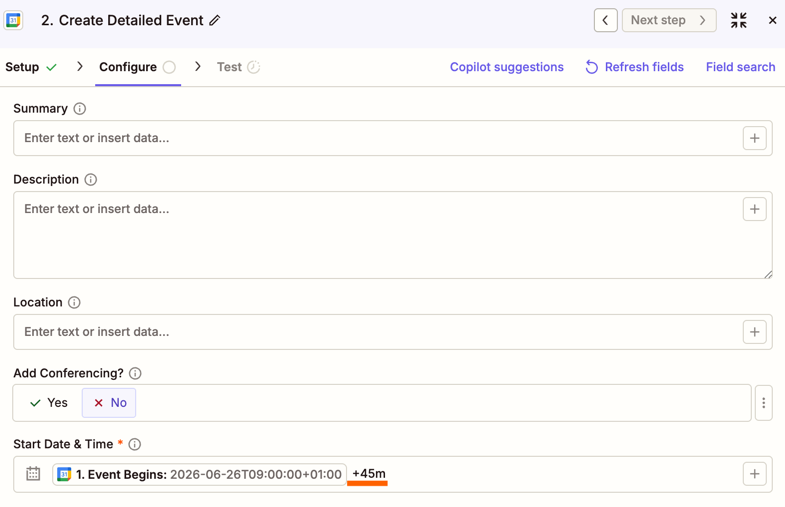
You could also use date modifiers for this. For example, in a Create Detailed Event action you'd select the existing time of the event that triggers the Zap and add a date modifier like ( +45m) after it (with a space before it), like this:

ae1827bbd681567db064f0c1f915d52d.png
And that would create a new event that starts 45 minutes later than the event that triggered the Zap. You can learn more about date modifiers in our Adjust date and time values in Zap workflows guide.

If you're wanting to update an existing "exercise" event though, then you'd need to add a Find Events action to find it and pass its event ID over to an Update Event action (so the Zap knows which event it needs to update). With recurring events though it would pick up the other recurring exercise events too and you'd then need the Zap to try and identify the right event for that day.

For either the Formatter or date modifier approach you could instead have the Zap use Google Calendar's Event Start trigger. It can be set to trigger a Zap X number of minutes, hours, days or weeks before an event starts. Then, have a Create Detailed Event action that uses a date modifier (or takes a date value from the Formatter action) to create an exercise event. The exercise event itself wouldn't be recurring, but since the trigger fires based on the actual prayer event time each time it runs, the exercise event will automatically adjust as prayer times shift.

Let us know how it goes!


  • New
  • June 26, 2026

The +45m modifier and Formatter both nail the offset piece. The part worth flagging for your prayer-time case is where the source times actually come from.

If those prayer events already live in your Google Calendar, you are set, just offset off the event start like the others said. If they do not, reading them back is the weak link since they drift daily and seasonally.

Cleaner is a Schedule trigger plus a Webhooks or Code by Zapier step that pulls the times for that day from a prayer-time API, then apply the same +45m offset. That keeps it seasonally accurate without you maintaining the source events by hand.