Hello!
We currently have a zap’s that set up and working pretty well, but I think there could be some room for improvement and possibly a better way to connect the information.
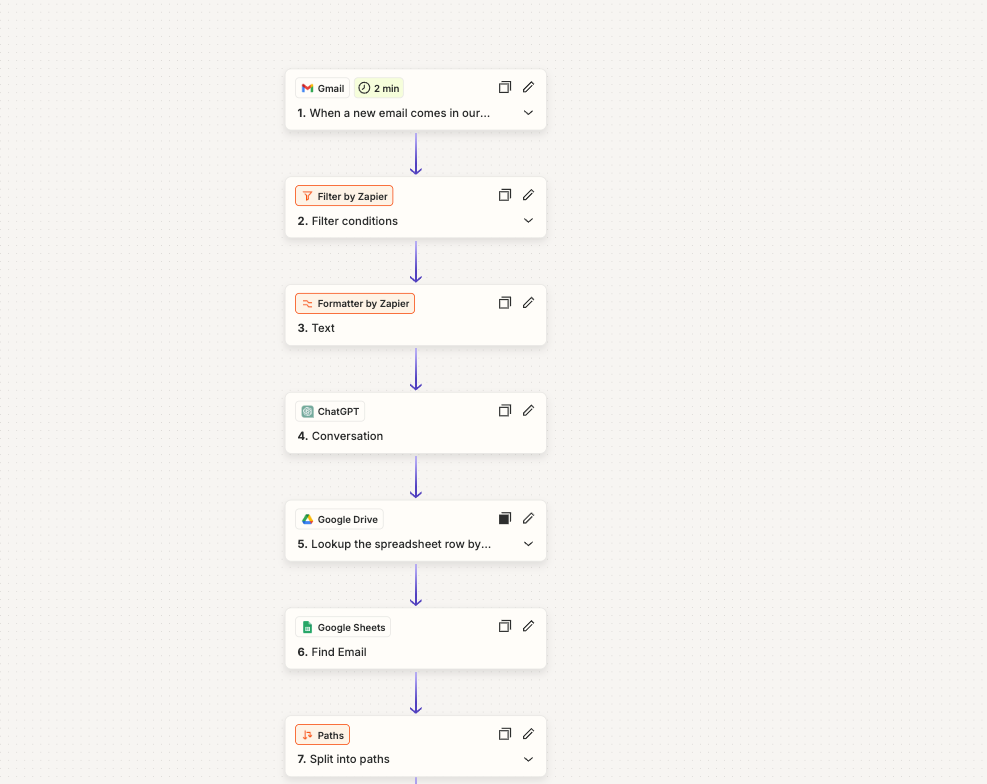
Basically, we have it set up that when an email comes into our orders inbox - we have a AIbot pulling the specific data that’s need, which will then search our GDrive for the specific google sheet that it corresponds to and then logs that data.
We use 123formbulder as our form - and the the only options with Zapier are with individual forms, so I figured that using Gmail since it’s a HUB for all the responses would be best.
What I’m running into is mainly a hydrating error with my Gmail - or there are emails that are not being sent into the Gmail and it’s being missed by the system all together.
I currently have the Gmail configured with: from: email@email.com (cannot provide the actual email).
Is there a better route to take? It’s not just one or two forms that are receiving data - it’s more like hundreds of different forms are pulling all the responses as they coordinate with different programs that we’re running simultaneously.