

Best answer

Create a task in Todoist, with next week's date in the Title of the task

  • April 4, 2023
  • 2 replies
  • 54 views

colino

Hi!

I could figure out how to create a task in a selected folder in Todoist, triggered by Zapier’s everyday schedule.

Is there a way to add next week’s date into the Todoist Task?

Eg, its Tue 4 April 2023 today. I’m hoping to use this Zap to create a task just called “Tue 11 April 2023”.

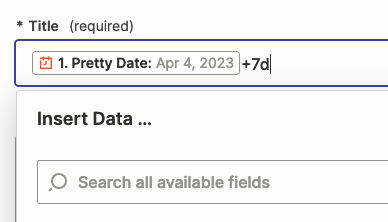
I tried using this with the +7d, but its not working.
 

Best answer by Troy Tessalone

Hi @colino 

Good question.

The Title field is a text string field, not a date field.

You can use the a Formatter > Date / Time > Add/Subtract Time step first.

This post has been closed for comments. Please create a new post if you need help or have a question about this topic.

2 replies

Troy Tessalone
Zapier Orchestrator & Solution Partner
Forum|alt.badge.img+14
  • Zapier Orchestrator & Solution Partner
  • Answer
  • April 4, 2023

Hi @colino 

Good question.

The Title field is a text string field, not a date field.

You can use the a Formatter > Date / Time > Add/Subtract Time step first.


colino
  • Author
  • New
  • April 4, 2023

Thank you Troy!


Regards

Colin




