Question

Connecting multiple Instantly campaigns to Pipedrive in one Zap

  • February 5, 2026
  • 4 replies
  • 26 views

I’m trying to connect Instantly to Pipedrive, and I want to connect it so that any reply from any campaign in Instantly leads to a Deal being created in Pipedrive. Right now only thing I can do is connect one campaign, I can’t pick multiple. Is there a way to do that in one zap or do I need to make a separate zap for each campaign.
The flow is super simple: reply received in Instantly > create Deal in Pipedrive. That’s all I need, I’d just prefer that all campaigns are in one Zap. 


Thanks!

4 replies

AndrewJDavison
Forum|alt.badge.img+11
  • Zapier Solution Partner
  • February 5, 2026

@LucaSid Multiple zaps is the way - you can use the ‘Duplicate’ feature to at least make it quick and easy!

Reach out if you need any help building.


Troy Tessalone
Zapier Orchestrator & Solution Partner
Forum|alt.badge.img+14
  • Zapier Orchestrator & Solution Partner
  • February 5, 2026

Hi ​@LucaSid 

TIP: Check field tooltips for info about the field values and expected formats.


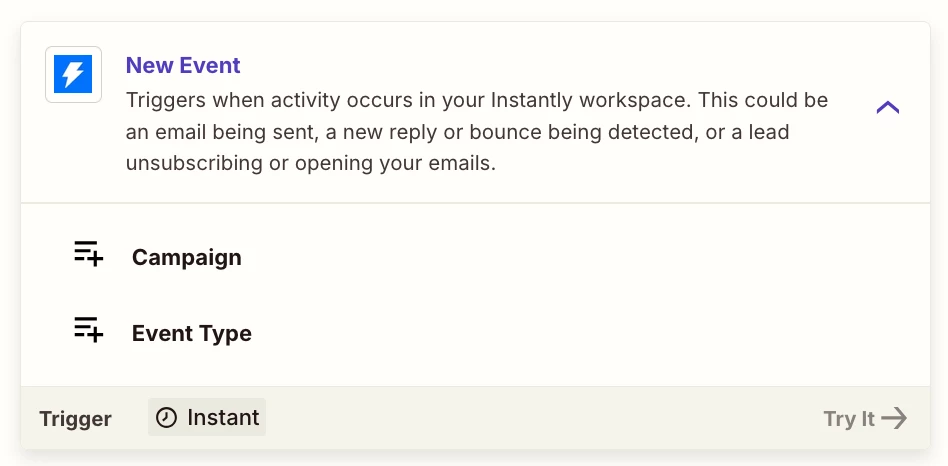
If the Campaign field is optional (not marked as required), then try leaving it blank, which should then trigger for ANY Campaign.

If the Event Type field is optional (not marked as required), then try leaving it blank, which should then trigger for ANY Event Type.


Sparsh from Automation Jinn
Forum|alt.badge.img+6

Hey ​@LucaSid,

I think you can use the New Event trigger in Instantly. After that you can use a Filter action to filter for reply received events.

Your sample workflow will look like this-

  • New Event Calendly Trigger
  • Filter action when EventType = Reply Received
  • Create New Deal in Pipedrive

This is a sample workflow and you need to add other actions like Filter, Formatter etc as workflows are usually personalized to user’s needs. Hope it helps!

PS: If you need more active help, I’m happy to connect through my Zapier Solution Partner page if you’d like to reach out here- https://zapier.com/partnerdirectory/automation-jinn


SamB
Community Manager
Forum|alt.badge.img+11
  • Community Manager
  • February 10, 2026

Hi there ​@LucaSid! How did you get on with the suggestions from Andrew, Troy and Sparsh here? 

Let us know whether you managed to get the Instantly leads added into Pipedrive, or still need some help with that at all 🙂