Can I zap / sync just one folder not all folders with box. I don't want to zip all box folders because I have over 250 gigs in box and only use drop box on occasion and with certain team members and clients. Can I zap just one designed folder rather than all?

Best answer
Box and Dropbox Zap Trigger
Best answer by nicksimard
Hi Alice,
Using the New File in Box trigger means that your Zap will run when a file is added, as opposed to running for all files that are already there.
When you create a Zap with that trigger, you can specify which folder:
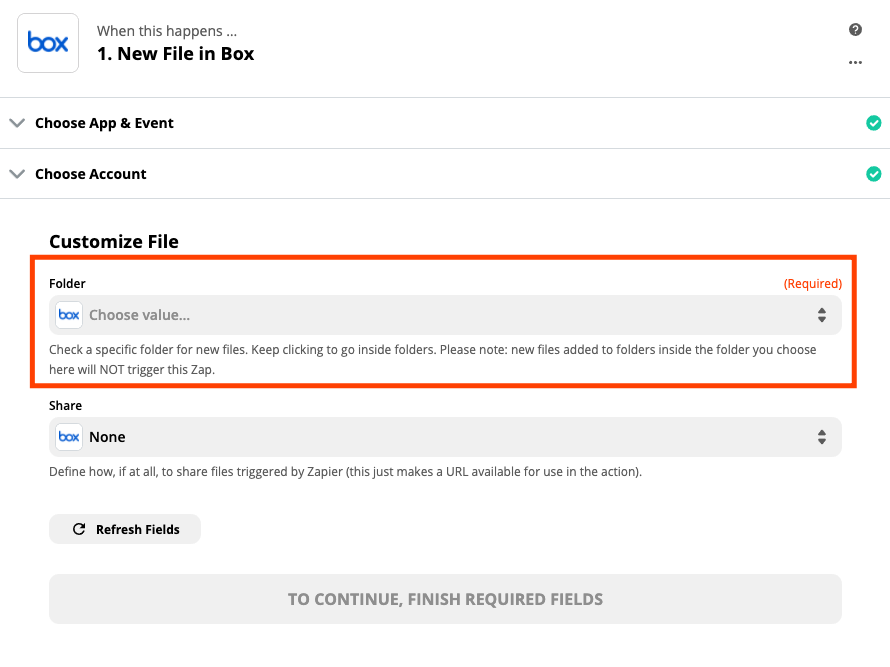
That means that files added to any other folders will not trigger the Zap :)
This post has been closed for comments. Please create a new post if you need help or have a question about this topic.



Early access

Next Gen Zaps
Build and deploy automations from AI tools you already use. With Agentic Management, if anything breaks, the agent diagnoses the issue and proposes a fix.
Request access now
Enter your E-mail address. We'll send you an e-mail with instructions to reset your password.