Question

Attach image with LinkedIn Post

  • August 25, 2025
  • 3 replies
  • 25 views

How do I attach an image with a LinkedIn post? I saw posts from over a year ago asking the same question and Zapier said it was a feature in development. When is this going to production? This is very frustrating.

This post has been closed for comments. Please create a new post if you need help or have a question about this topic.


3 replies

Troy Tessalone
Zapier Orchestrator & Solution Partner
Forum|alt.badge.img+14
  • Zapier Orchestrator & Solution Partner
  • August 25, 2025

Hi ​@NickyZap 

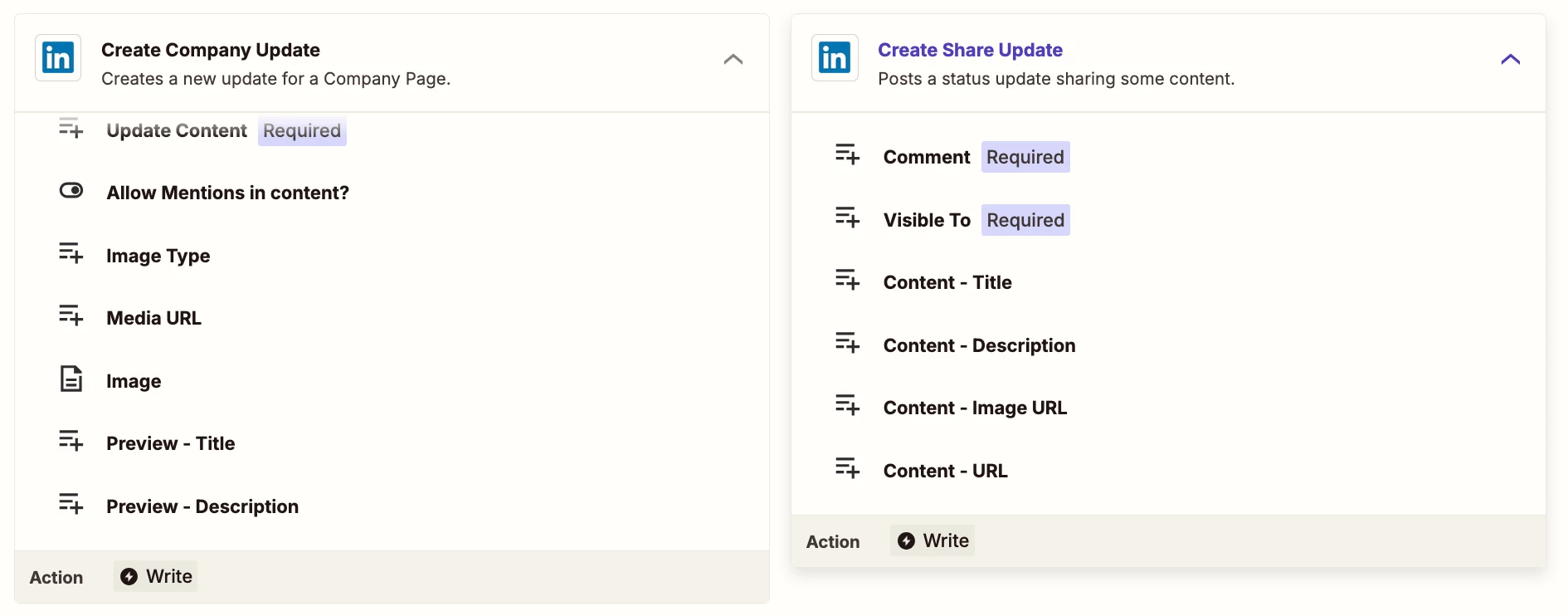
Help links for using files in Zaps: https://help.zapier.com/hc/en-us/articles/8496288813453-Send-files-in-Zaps


Zap action: LinkedIn - Create Company Update

Fields:

  • Media URL
  • Image


Zap action: LinkedIn - Create Share Update

Fields:

  • Content - Image URL


DennisWF
Forum|alt.badge.img+5
  • Zapier Solution Partner
  • August 26, 2025

@NickyZap attaching images directly is possible, but LinkedIn’s API (and therefore its Zapier integration) is notoriously finicky. I would consider adding a third-party tool like Buffer, which is much easier to work with (and for light usage, you can probably get by on Buffer’s free tier).


SamB
Community Manager
Forum|alt.badge.img+11
  • Community Manager
  • September 23, 2025

Hey ​@NickyZap, just checking in! 👋 Did the suggestions from Troy or DennisWF here help you to get the image attached? 

Let us know how it went, happy to lend a hand if you’re still stuck at all. 🙂