I have selected the oauth2 method, added the client key and client secret.
Added the authorise and token request route
Verified all the workflows in Postman, all the routes and workflows are working fine
but when in testing tab, I try Sign In to ‘App Name’
I get the error without any proper information
Best answer by Zach Johnson
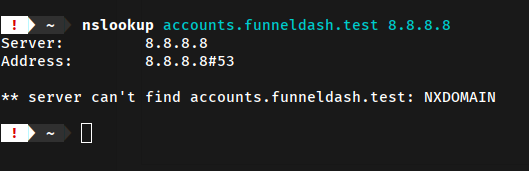
Hi @Zach Johnson - Are you sure that your domain name is publicly available? I tried to make a DNS lookup but it seems to be unavailable. I guess it’s only configured on your machine?
It was only configured on my system, for development purpose .. I deployed it live and everything started working,
for some reason, Zapier was unable to verify keys with my local environment ..
Hi @Zach Johnson - Are you sure that your domain name is publicly available? I tried to make a DNS lookup but it seems to be unavailable. I guess it’s only configured on your machine?
Hi @Zach Johnson - Are you sure that your domain name is publicly available? I tried to make a DNS lookup but it seems to be unavailable. I guess it’s only configured on your machine?
It was only configured on my system, for development purpose .. I deployed it live and everything started working,
for some reason, Zapier was unable to verify keys with my local environment ..
Early access
Next Gen Zaps
Build and deploy automations from AI tools you already use. With Agentic Management, if anything breaks, the agent diagnoses the issue and proposes a fix.