Question

Zap to check site status, return value to Google Spreadsheet, run loop until all sites checked

  • September 28, 2021
  • 15 replies
  • 216 views

hi, so i want to use zapier to create a zap that check if a website url taken from a google spreadsheet cell return an error when you try to visit them and then put a value like “To Verify” in the column to the right of it. But i’m not sure if there is an app that check if a website is still working or not. i also want that to repeat itself until the zap goes through a whole column.


does somebody knows how to do this ? i have friday as a deadline to do this and i just started using zapier today, so i’m not sure what to use to be able to do this.


This post has been closed for comments. Please create a new post if you need help or have a question about this topic.

15 replies

Troy Tessalone
Zapier Orchestrator & Solution Partner
Forum|alt.badge.img+14
  • Zapier Orchestrator & Solution Partner
  • September 28, 2021

Hi @slalonde00 

Check out this topic about creating a Loop with a GSheet:


  • Author
  • New
  • September 28, 2021

ok, but how do i check if a website is still working ? do we have any tools for that or should i just do a javascript script that check for a website response status ?


Troy Tessalone
Zapier Orchestrator & Solution Partner
Forum|alt.badge.img+14
  • Zapier Orchestrator & Solution Partner
  • September 28, 2021

Hi @slalonde00 

If you know JavaScript, then a Code step can be used in the Zap: https://zapier.com/apps/code/help

Otherwise, you can search the available Zaps here: https://zapier.com/apps


  • Author
  • New
  • September 28, 2021

aight i managed to create a loop, but now when i test the updating row action it gives me this Error : 

There was an error writing to your Google sheet. Unable to parse range: 'Entreprises_GA_20210913'!À Vérifier


how do i fix this ? My lookup row action return me the row i want, but it seems it can’t update the row.


i have editor permission on the google spreadsheet, no name of worksheet or spreadsheet was changed as far as i know and reselecting the spreadsheet did not helped. Also i tried to remove all of the protection from the whole worksheet, but it did not work either.


Troy Tessalone
Zapier Orchestrator & Solution Partner
Forum|alt.badge.img+14
  • Zapier Orchestrator & Solution Partner
  • September 28, 2021

Hi @slalonde00 

Please post screenshots of how your Zap steps are configured where the error is happening.


  • Author
  • New
  • September 28, 2021

Troy Tessalone
Zapier Orchestrator & Solution Partner
Forum|alt.badge.img+14
  • Zapier Orchestrator & Solution Partner
  • September 28, 2021

Hi @slalonde00 

Hi @slalonde00 

Please post screenshots of how your Zap steps are configured where the error is happening.


  • Author
  • New
  • September 28, 2021

also wanted to know how do i run it on the spreadsheet, because it is now turned on and i’ve yet to see any change to the spreadsheet.


  • Author
  • New
  • September 28, 2021

ok. so my zap seems to only work for the first time, which is fine. So all i need to know is how to run it on the spreadsheet @Troy Tessalone 


Troy Tessalone
Zapier Orchestrator & Solution Partner
Forum|alt.badge.img+14
  • Zapier Orchestrator & Solution Partner
  • September 28, 2021

@slalonde00 

Please post screenshots of how your Zap steps are configured.


  • Author
  • New
  • September 28, 2021


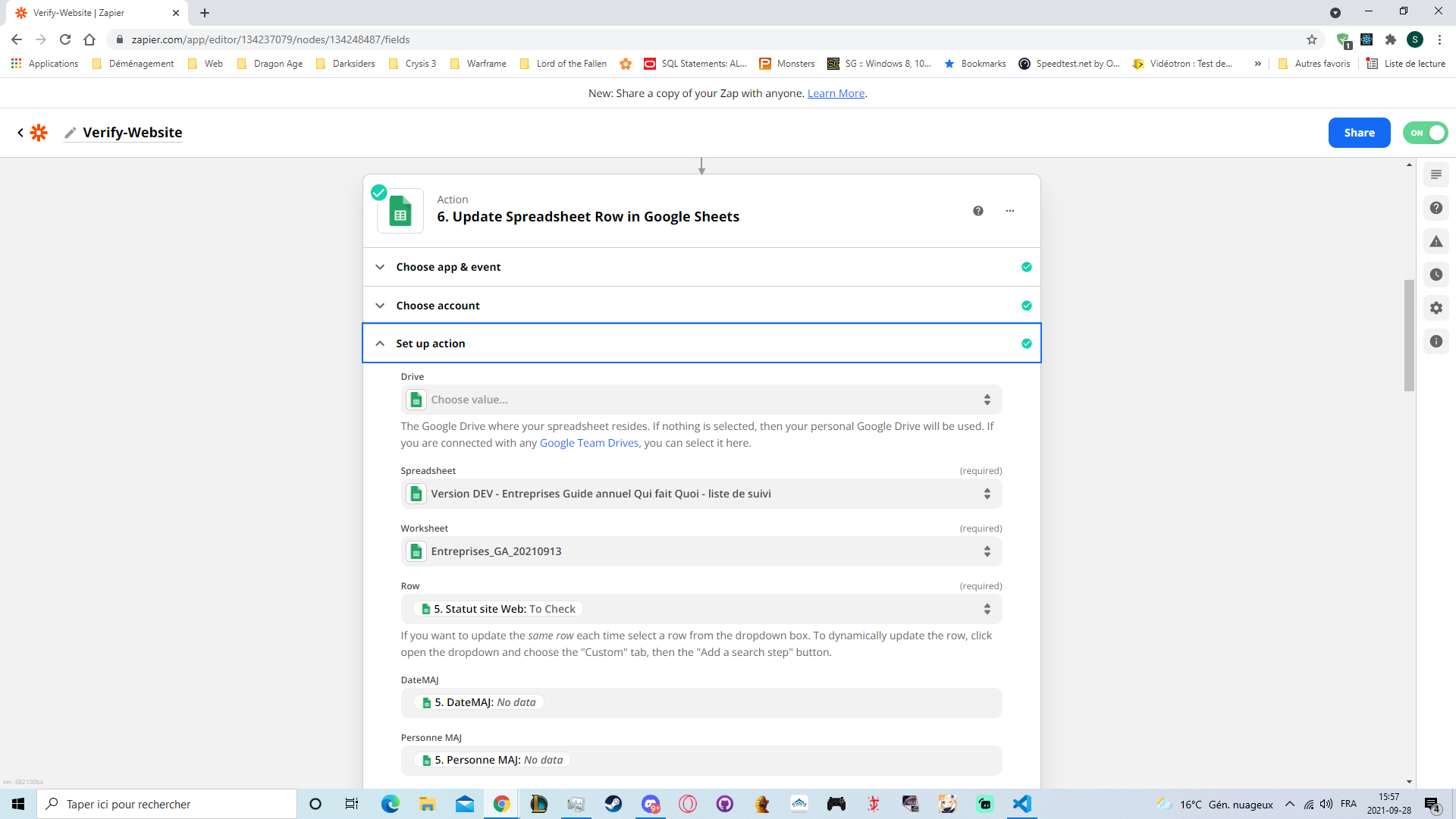
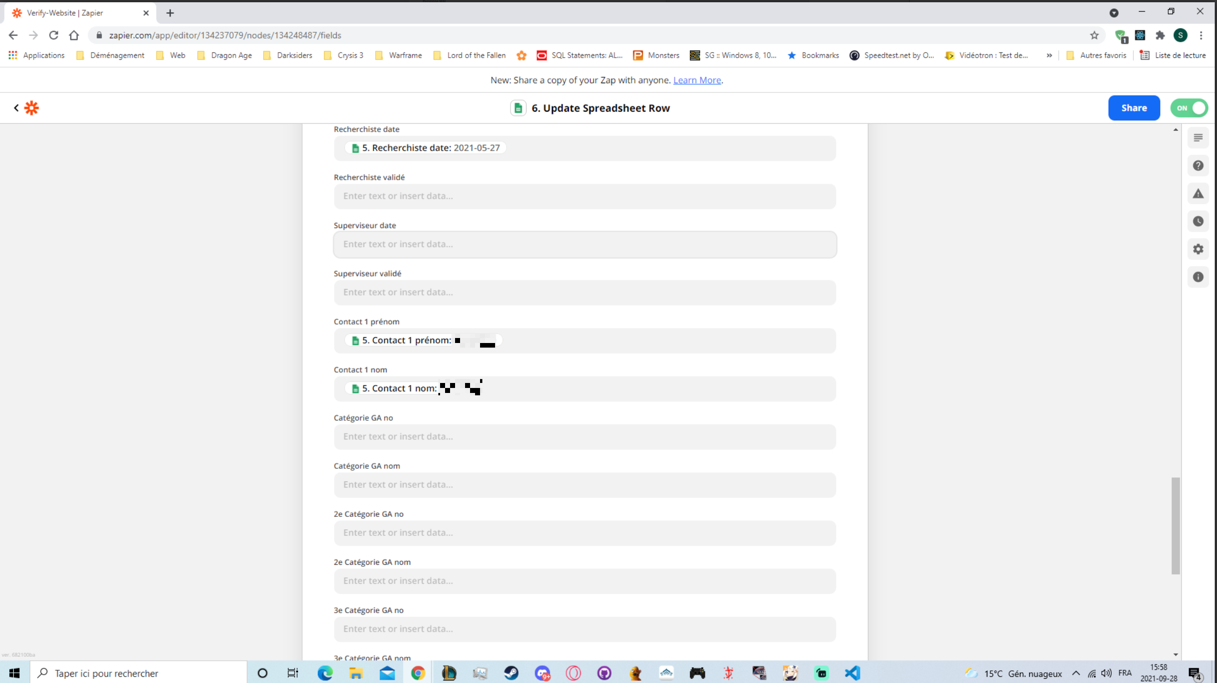
you mean those : 

basically i only change the cell named “Status Site Web” and keep the rest of the data as is. The empty data are normal as they don’t have anything in them atm.


This post has been edited by a moderator to remove personal information. Please remember that this is a public forum and to remove any sensitive information prior to posting.


Troy Tessalone
Zapier Orchestrator & Solution Partner
Forum|alt.badge.img+14
  • Zapier Orchestrator & Solution Partner
  • September 28, 2021

@slalonde00 

This needs to be a Row ID which is a numerical value.


  • Author
  • New
  • September 28, 2021

you mean on all the edited value or just on this one ? also i want to update 1 row in a loop until it goes through all the rows.


  • Author
  • New
  • September 28, 2021

@Troy Tessalone ok, so now i does overwrite the right cell, but now it just does not cycle through all the cell, it only does the 1st cell and doesn’t update the others. 


Troy Tessalone
Zapier Orchestrator & Solution Partner
Forum|alt.badge.img+14
  • Zapier Orchestrator & Solution Partner
  • September 28, 2021

@slalonde00 

Please post screenshots of all your Zap steps, thanks.


Might be worth revisiting this video...

Check out this topic about creating a Loop with a GSheet: