Question

Coda + Crove

  • December 13, 2025
  • 7 replies
  • 26 views

I’m trying to integrate Coda → Crove using Zapier and could use some help.

I have:

  • A document template in Crove with variables

  • A Coda table where those variables come from

What I’m aiming for:
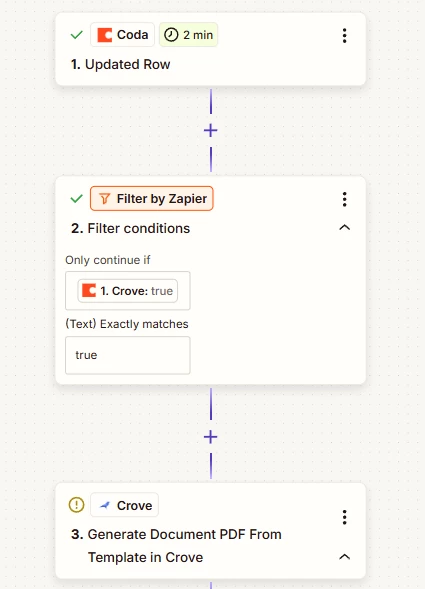
When I click or update a specific column in Coda (e.g., a checkbox called “Crove”), Zapier should trigger and create a draft document in Crove using an existing template, with the variables populated from the Coda row.

The issue:
I’m getting this error in Zapier:

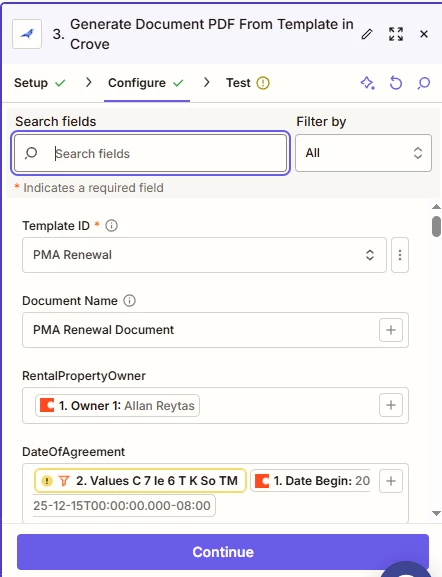
“The error indicates that some values expected from a previous step in your Zap are missing or not being passed correctly… placeholders like {{=gives[…]}}, suggest the data wasn’t available.”

It seems like some fields from Coda aren’t being passed properly to the Crove step.

Has anyone encountered this issue or successfully set up a similar Coda → Crove workflow? Any tips on triggers, field mapping, or common pitfalls would be really appreciated.

Thanks in advance!

7 replies

Troy Tessalone
Zapier Orchestrator & Solution Partner
Forum|alt.badge.img+14
  • Zapier Orchestrator & Solution Partner
  • December 13, 2025

Hi ​@Lex Shan 

For us to have more info about what you are referring to, post screenshots showing:

  • how your Zap steps are outlined
  • how your Zap steps are configured in the CONFIGURE tab with the field mappings visible
  • any encountered errors/issues on Zap steps

  • Author
  • New
  • December 13, 2025


  • Author
  • New
  • December 13, 2025


  • Author
  • New
  • December 13, 2025


Troy Tessalone
Zapier Orchestrator & Solution Partner
Forum|alt.badge.img+14
  • Zapier Orchestrator & Solution Partner
  • December 13, 2025

@Lex Shan 

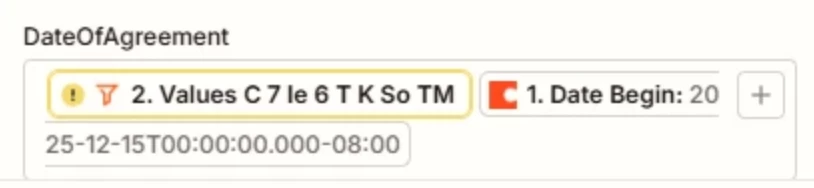
Remove the mapped variable from Zap step 2 shown in the screenshot below.


  • Author
  • New
  • December 15, 2025

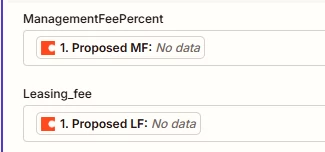
It’s still showing “No Data,” even though the Coda table has data.


Troy Tessalone
Zapier Orchestrator & Solution Partner
Forum|alt.badge.img+14
  • Zapier Orchestrator & Solution Partner
  • December 15, 2025

@Lex Shan 

Make sure you are selected a Zap trigger example record that has data for those fields.

You can check the row ID returned from Zap step 1.


You can add more Zap Filter step conditions to check that variables used in the Zap step 3 have existing values.


You can try turning the Zap ON and testing live.

Then check your Zap Run history details to see the DATA IN/OUT for each step to help you trace and troubleshoot: https://zapier.com/app/history/