Question

Zoom Registration Email Delivery Issue

  • Oct 5, 2023 6:47 PM UTC
  • 9 replies
  • 338 views

Greetings,


I have a zap set up to add registrants to a Zoom meeting (https://us02web.zoom.us/meeting/register/tZ0kd-CrpjsiGdarQWoAnNzkDLSm2hJmkFDR#/registration). I have confirmation email set to “true” in Zapier AND emails turned on in Zoom, but emails aren't going out to those registrants who come through the Zap.

When I register directly in Zoom the emails are going out.


What am I missing on the Zapier side?

This post has been closed for comments. Please create a new post if you need help or have a question about this topic.

9 replies

Troy Tessalone
Zapier Orchestrator & Solution Partner
Forum|alt.badge.img+14
  • Zapier Orchestrator & Solution Partner
  • Oct 5, 2023 7:06 PM UTC

Hi @cnptribe 

Good question.

Please post screenshots with how your Zap steps are configured to help us have more context.


  • Author
  • New
  • Oct 5, 2023 7:13 PM UTC

This post has been edited by a moderator to remove personal information. Please remember that this is a public forum and to remove any sensitive information prior to posting.

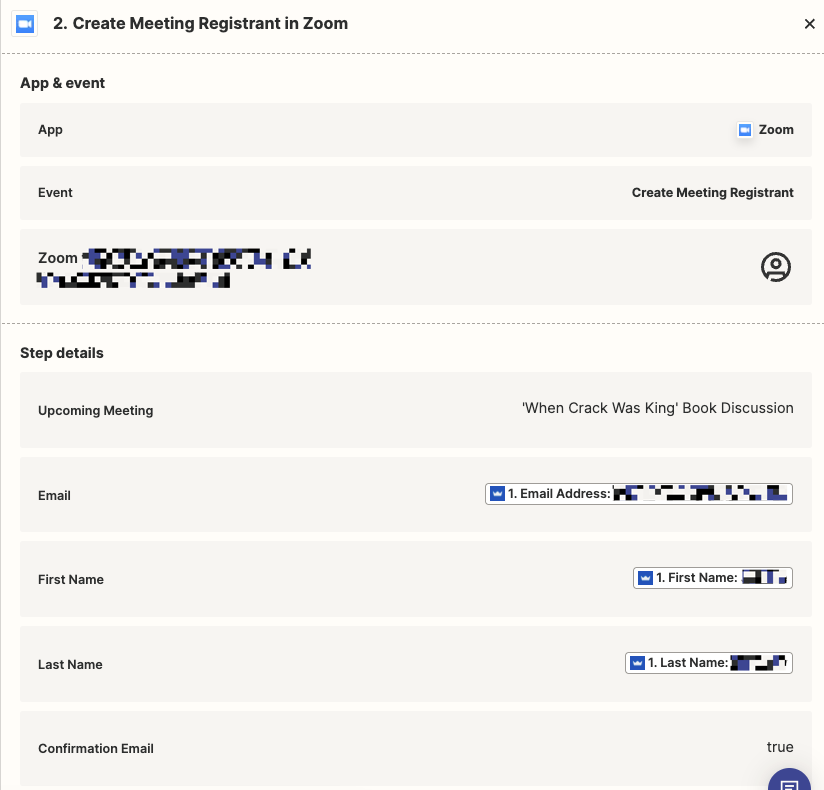
Thanks @Troy Tessalone  I have included the steps below:


ken.a
Forum|alt.badge.img+6
  • Zapier Staff
  • Oct 6, 2023 9:11 AM UTC

Hi there @cnptribe,

I’m jumping in to see if I can help!

Before we dig deeper, could you please double-check your email notifications settings in Zoom and ensure that it’s set to “Enabled”. More about these here:

Please keep us posted! 😊


  • Author
  • New
  • Oct 6, 2023 12:24 PM UTC

Hi @ken.a yes, I made sure to turn on send emails upon registration in Zoom. I should note, this is for a Zoom meeting not a webinar. See the screenshot. I also tested if they email gets delivered if I register in Zoom, and it does get sent and delivered. The emails that come in through Zapier, however do not.


ken.a
Forum|alt.badge.img+6
  • Zapier Staff
  • Oct 9, 2023 10:58 AM UTC

Thanks for the update @cnptribe!

Could you please try these for me?

  1. Turn off your Zap.
  2. Delete your current Zoom connection here: https://zapier.com/app/connections/zoom
  3. Add a new Zoom connection.
  4. Head to your Zap, and use the newly added connection.
  5. Republish the Zap.
  6. Trigger the Zap while it’s published.
  7. Check if it’ll send a confirmation email.

Please let me know if that worked for you. Please keep us updated.


I am having the exact same issue, Zap works, passes all details across to Zoom, registers in zoom but does not send the confirmation email.

Also the same is can register directly in zoom and the confirmation email is sent - So the Zoom side is set up correctly.

Was there a resolution for this? I have tried all of the options in this thread to no avail.


ken.a
Forum|alt.badge.img+6
  • Zapier Staff
  • Jan 11, 2024 10:00 AM UTC

Hi @Blair in Aus,

Unfortunately, I have exhausted my resources regarding this issue. I’d recommend reaching out to our Support Team so that they can take a closer look at the Zap and its logs to determine the cause of this issue.

You can reach our Support Team here: https://zapier.com/app/get-help

I appreciate your patience and understanding.


  • New
  • Dec 4, 2024 3:36 AM UTC

Any luck on this? Just submitted a request but have had no luck for hours trying to resolve this issue...


SamB
Community Manager
Forum|alt.badge.img+11
  • Community Manager
  • Jan 10, 2025 4:13 PM UTC

Hey folks! 👋

​@jdlsoft - I had a look on this end and it seems you were using the Create Meeting (Zoom) action and were able to resolve this using the suggestion from the Support team of adding a Send Email type of action to send out the email confirmations via the Zap. Yay! 🎉

​@cnptribe and ​@Blair in Aus - were you able to get the emails confirmations sent in the end?