
Best answer

Zapier Not Displaying All Fields From PandaDoc Template

  • September 29, 2023
  • 5 replies
  • 367 views

I am trying to set up a zap to take information from Moday.com and populate it into a PandaDoc contract. However, it is not showing all of the fields in my template. (It is giving me a pricing table, which is not something my template has.) The fields in question are both text fields and Zapier is interacting fine with other text fields in the same template. Is there some setting Panda that I don’t know about that I need to change? As far as I can tell, the fields are the same as all the others in Panda other than their Field IDs, which I edited for my own ease of understanding. 

Any ideas?
Best answer by Troy Tessalone

Hi @timmmmar 

Help article about using fields in PandaDoc templates: https://support.pandadoc.com/hc/en-us/articles/360040595714-Fields


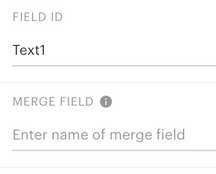
Make sure each of your PandaDoc template fields have these values set:

  • Field ID
  • Merge Field


This post has been closed for comments. Please create a new post if you need help or have a question about this topic.

5 replies

Troy Tessalone
Zapier Orchestrator & Solution Partner
Forum|alt.badge.img+14
  • Zapier Orchestrator & Solution Partner
  • 34082 replies
  • September 29, 2023

Hi @jimmythepenguin 

Good question.

Help article from PandaDoc:

https://support.pandadoc.com/hc/en-us/articles/360008722914-Zapier


Check out the FAQs at the bottom of the link.


###

  • If you have several workspaces in your PandaDoc account, you will see sample templates from the workspace you connected to Zapier at the 3rd step "Connect PandaDoc + Zapier"
  • If you have multiple pricing tables in a document, products from the pricing tables will show up in different arrays (like in different fields). In order to pass all products into an Action application, you need to add all product arrays in a respective field, e.g., find and add all product name (PricingTable1 Product Name, PricingTable2 Product Name fields) fields arrays in the Name field.
  • If role name in PandaDoc contains an underscore (_), errors might occur in the “Create document” action causing recipient information to map incorrectly. The Zap will fail during a test.
  • If PandaDoc serves as a “Trigger” application and you do not select a PandaDoc template, you’ll be able to use general PandaDoc document data only in an “Action” application. However, if you select a template, you will get all the data available in the template: tokens, fields, pricing tables, metadata.
  • Zap set for a template won’t work for a document duplicate created out of this template.

  • Beginner
  • 2 replies
  • March 4, 2024

hi @jimmythepenguin I’m having the same issue. Did you ever figure out a solution?


Troy Tessalone
Zapier Orchestrator & Solution Partner
Forum|alt.badge.img+14
  • Zapier Orchestrator & Solution Partner
  • 34082 replies
  • Answer
  • March 4, 2024

Hi @timmmmar 

Help article about using fields in PandaDoc templates: https://support.pandadoc.com/hc/en-us/articles/360040595714-Fields


Make sure each of your PandaDoc template fields have these values set:

  • Field ID
  • Merge Field


  • Beginner
  • 2 replies
  • March 5, 2024

amazing, thank you @Troy Tessalone!


ken.a
Forum|alt.badge.img+6
  • Zapier Staff
  • 6780 replies
  • March 6, 2024

That’s awesome @timmmmar! A huge thanks to Troy for lending a hand here!

If you have any other questions, please don’t hesitate to reach out to the Community. We’re always happy to help! 🤗






