Best answer

Zap not triggering automatically for new Contractor+ leads despite test working

  • February 19, 2026
  • 9 replies
  • 35 views

I’m using Contractor+ in Zapier as the trigger for a Zap (New Lead / New Record). When I run a test inside Zapier, the test records from Contractor+ populate correctly. However, when an actual new lead or record is created in Contractor+, the Zap does not trigger automatically.

All configurations are set correctly, the trigger is published, and both accounts are active and connected properly.

Can you help identify why the live trigger is not firing even though test records are coming through successfully?

Best answer by SamB

Hi there ​@Handy Handz Home Tech 👋

Looks like you reached out to our Support team and they opened up a bug report for the issue you’re running into. We can’t give any sort of ETA on when the developers of the Contractor+ app will be able to get it fixed by but you’ll get an email notification from us once they do. 

In the meantime, are you able to get an email notification from Contractor+ whenever a new lead is added? If so, you could try getting the agent to trigger on those emails instead.

If not, perhaps you could use the Webhooks app for the trigger instead. I couldn’t see any documentation for Contractor+ on setting up a webhook notifications so you’d likely need to use a Retrieve Poll trigger rather than Catch Hook trigger. And set it up to ‘poll’ their List Lead endpoint to check for new leads. If that’s something you’d like to explore I’d recommend reading our Trigger Zaps from polling webhooks as well as their guide on how to use their List Lead API endpoint here: https://developer.contractorplus.app/#39773b34-e26d-4f07-96a4-11637583185c.

Hope that helps. If you get stuck at all with either of those approaches just let us know!

9 replies

Troy Tessalone
Zapier Orchestrator & Solution Partner
Forum|alt.badge.img+14
  • Zapier Orchestrator & Solution Partner
  • February 19, 2026

Hi ​@Handy Handz Home Tech 

Post screenshots to give more context about how your Zap trigger step is configured.


Check your Zap Run history for activity and errors: https://zapier.com/app/history/


Hi ​@Handy Handz Home Tech 

Post screenshots to give more context about how your Zap trigger step is configured.


Check your Zap Run history for activity and errors: https://zapier.com/app/history/

The Zapier integration used to work correctly for new lead triggers. However, since the recent CRM update, the automation has completely stopped working.

Nothing appears in Zapier task history when a new lead is created. The Zap is turned on, accounts are connected properly, and test pulls still retrieve data — but real-time triggers no longer fire at all.

It appears that something may have changed in the API structure or event handling during the recent update.

Can you please confirm:

  • Did the recent CRM update modify how lead creation events are handled?

  • Was the Zapier trigger endpoint changed or deprecated?

  • Is there a new recommended method for triggering automations on new lead creation?

This workflow is critical for automated SMS intake and lead response, so I need clarity on whether the native Zapier trigger is still supported or if we must transition to API/webhook-based automation.


The trigger data is populating correctly inside Zapier when I test it, so the connection appears active. However, when a real lead is created, the Zap does not run and nothing appears in Zapier task history.

So the data is accessible during testing, but the live trigger is not firing.

This issue started after the recent CRM update.

Can you please confirm whether the recent update changed how lead creation events are pushed to Zapier, or if the current trigger is now polling-only instead of event-based?

I need to determine whether the native Zapier trigger is still supported for real-time automation.


Troy Tessalone
Zapier Orchestrator & Solution Partner
Forum|alt.badge.img+14
  • Zapier Orchestrator & Solution Partner
  • February 20, 2026

@Handy Handz Home Tech 

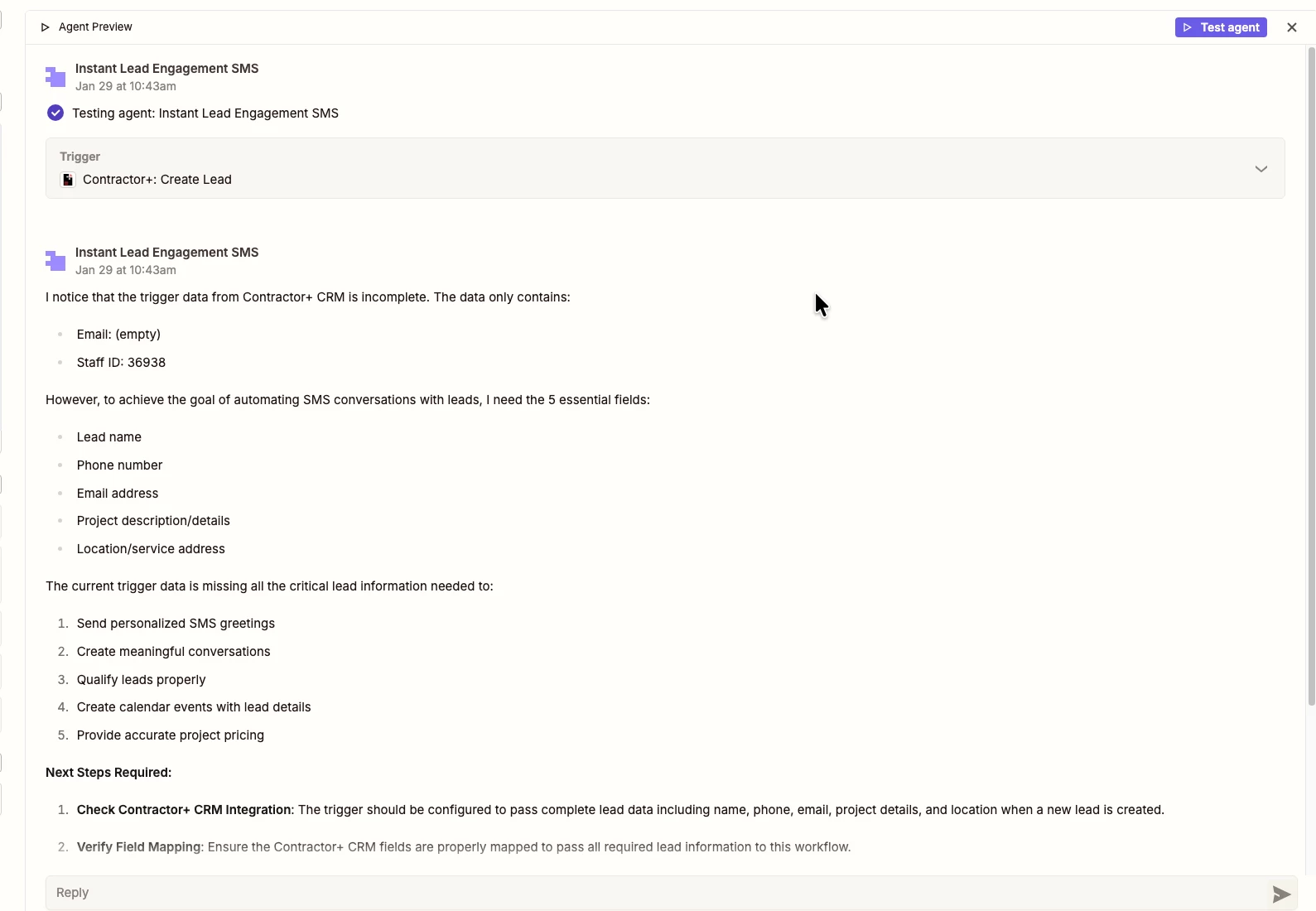
Screenshot shows you are using a Zapier Agent, not a Zap.


Most Zap app integrations are created and managed by the app developer (not Zapier).

I recommend reaching out to Contractor+ for help troubleshooting their Zap app integration since that is what the Zapier Agents rely on.


Also, you can try opening a ticket with Zapier Support: https://zapier.com/app/get-help


The screenshot is from the agent interface while I was testing to see what information is coming in from a live, real-time webhook.


It is not from Zap history or an actual triggered Zap run. It was simply showing the data received during manual testing of the webhook.


However, despite the data appearing in the test, the Zap itself is not automatically firing when a real lead is created.


Troy Tessalone
Zapier Orchestrator & Solution Partner
Forum|alt.badge.img+14
  • Zapier Orchestrator & Solution Partner
  • February 20, 2026

@Handy Handz Home Tech 

Can you post screenshots with how the Zap is outlined and configured that you are referring to? (not the Zapier Agent)


AutomateMyBiz
Forum|alt.badge.img
  • Zapier Solution Partner
  • February 21, 2026

@Handy Handz Home Tech 


Have you tried using webhooks or creating Zapier Zaps and not use agents for this?
 

If you need assistance on this, book a free 20min troubleshooting call from my calendar here: —LINK REMOVED—


Fahad S

Founder @ AutomateMyBiz.ai. | Zapier Platinum Partner

This post has been edited by a moderator to remove self-promotional calendar booking link as per our Community Code of Conduct.


SamB
Community Manager
Forum|alt.badge.img+11
  • Community Manager
  • Answer
  • March 19, 2026

Hi there ​@Handy Handz Home Tech 👋

Looks like you reached out to our Support team and they opened up a bug report for the issue you’re running into. We can’t give any sort of ETA on when the developers of the Contractor+ app will be able to get it fixed by but you’ll get an email notification from us once they do. 

In the meantime, are you able to get an email notification from Contractor+ whenever a new lead is added? If so, you could try getting the agent to trigger on those emails instead.

If not, perhaps you could use the Webhooks app for the trigger instead. I couldn’t see any documentation for Contractor+ on setting up a webhook notifications so you’d likely need to use a Retrieve Poll trigger rather than Catch Hook trigger. And set it up to ‘poll’ their List Lead endpoint to check for new leads. If that’s something you’d like to explore I’d recommend reading our Trigger Zaps from polling webhooks as well as their guide on how to use their List Lead API endpoint here: https://developer.contractorplus.app/#39773b34-e26d-4f07-96a4-11637583185c.

Hope that helps. If you get stuck at all with either of those approaches just let us know!