Question

Zap is not working as expected when the trigger involves attached documents

  • January 20, 2026
  • 6 replies
  • 21 views

Hello there! I'm trying to configure a Zap whose trigger is an email with attached documents. In the following steps, those documents need to be uploaded and sent to Claude to analyze them by using a promt that I created and make a report. The Zap finishes with the report sent to my email. The structure is as follows: 1. New email (trigger), 2. Filter conditions, 3. Upload File (Anthropic Claude), 4. Send message (Anthropic Claude) and 5. Send email. I tested the Zap (just in the editor) and published it but when I receive an email with the information that needs to be analyzed with Claude, after a couple of minutes, I received an email with no information, no report. When I tested the Zap on the editor, I can't use real documents and I believe that could be the problem but I am not sure. Does anyone knows how to fix this?

6 replies

Sparsh from Automation Jinn
Forum|alt.badge.img+6

Hey ​@AndreaSoasti,

There are lot of things that can be going wrong in your Zap. Please post screenshots of Data In, Data Out as well as how each Zap step is configured for us to have more context. 

Some of the debugging you can try-

  • Make sure that the dynamic mapping is correct
  • See that the file is passing properly to Claude.

For live zap run, you can also check the Zap history page(https://zapier.com/app/history) to spot any issues there. Hope it helps!

PS: If you need more active help, I’m happy to connect through my Zapier Solution Partner page if you’d like to reach out here- https://zapier.com/partnerdirectory/automation-jinn


Troy Tessalone
Zapier Orchestrator & Solution Partner
Forum|alt.badge.img+14
  • Zapier Orchestrator & Solution Partner
  • January 20, 2026

Hi ​@AndreaSoasti 

How to use real Zap Runs as a Zap trigger example record: 

https://help.zapier.com/hc/en-us/articles/35632951078029-Use-previous-Zap-runs-as-trigger-test-records


Check your Zap Run history to see the DATA IN/OUT for each step to help you trace the data flow and troubleshoot: https://zapier.com/app/history/


If you need to hire help, there is a directory of Zapier Partners: https://zapier.com/partnerdirectory


drtanvisachar
Forum|alt.badge.img+3
  • Zapier Solution Partner
  • January 21, 2026

Hello ​@AndreaSoasti have you been able to get it sorted out with what ​@Troy Tessalone and ​@Sparsh from Automation Jinn provided ?


  • Author
  • New
  • January 21, 2026

Hey ​@AndreaSoasti,

There are lot of things that can be going wrong in your Zap. Please post screenshots of Data In, Data Out as well as how each Zap step is configured for us to have more context. 

Some of the debugging you can try-

  • Make sure that the dynamic mapping is correct
  • See that the file is passing properly to Claude.

For live zap run, you can also check the Zap history page(https://zapier.com/app/history) to spot any issues there. Hope it helps!

PS: If you need more active help, I’m happy to connect through my Zapier Solution Partner page if you’d like to reach out here- https://zapier.com/partnerdirectory/automation-jinn


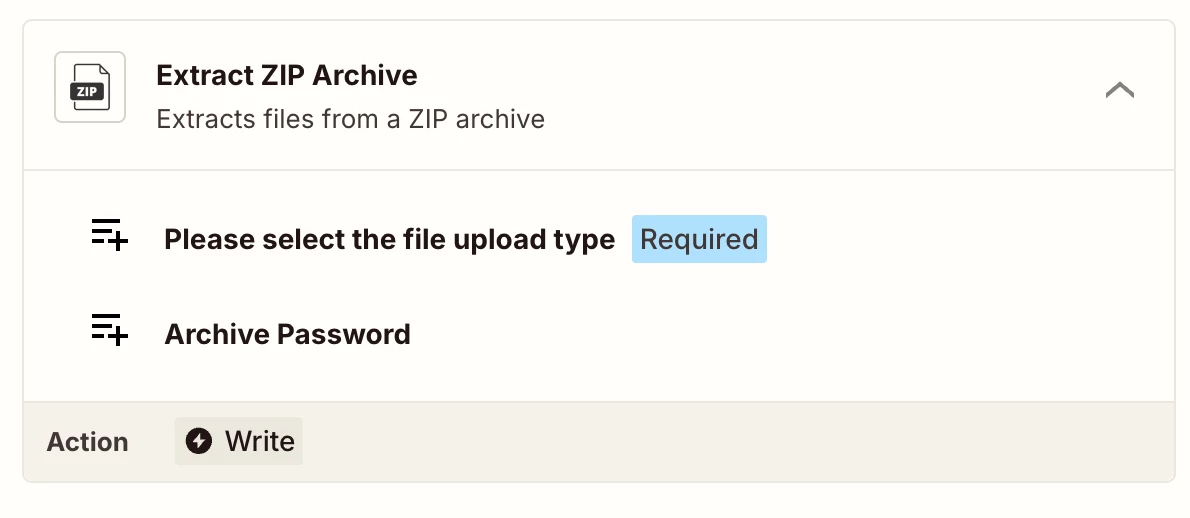
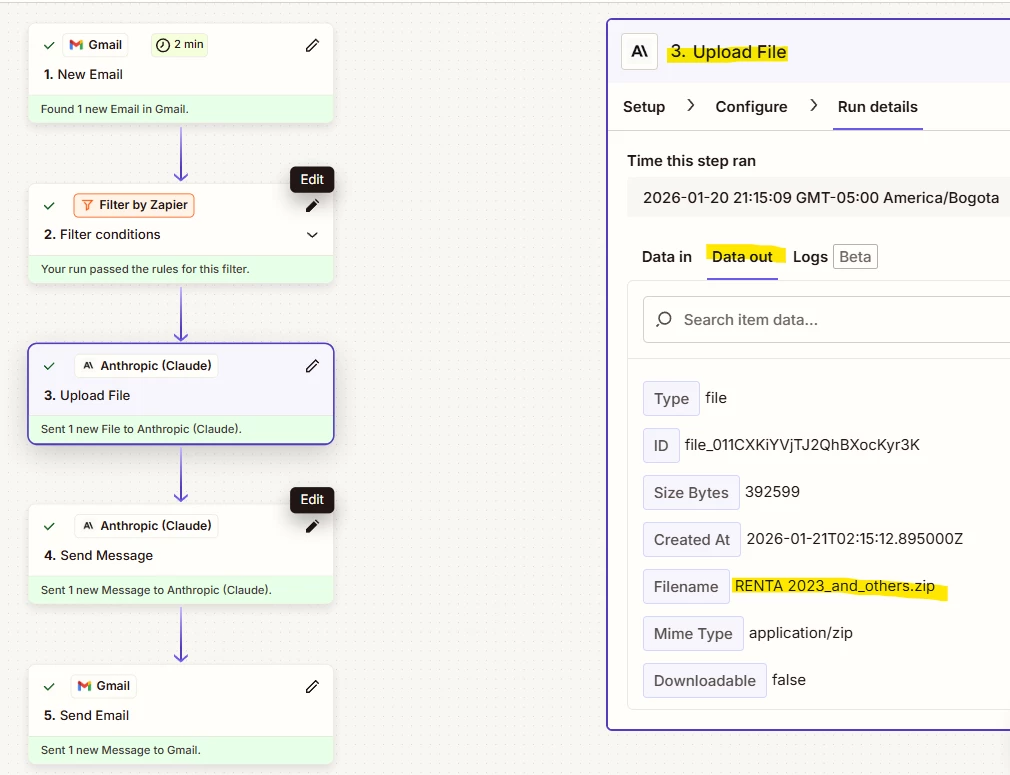
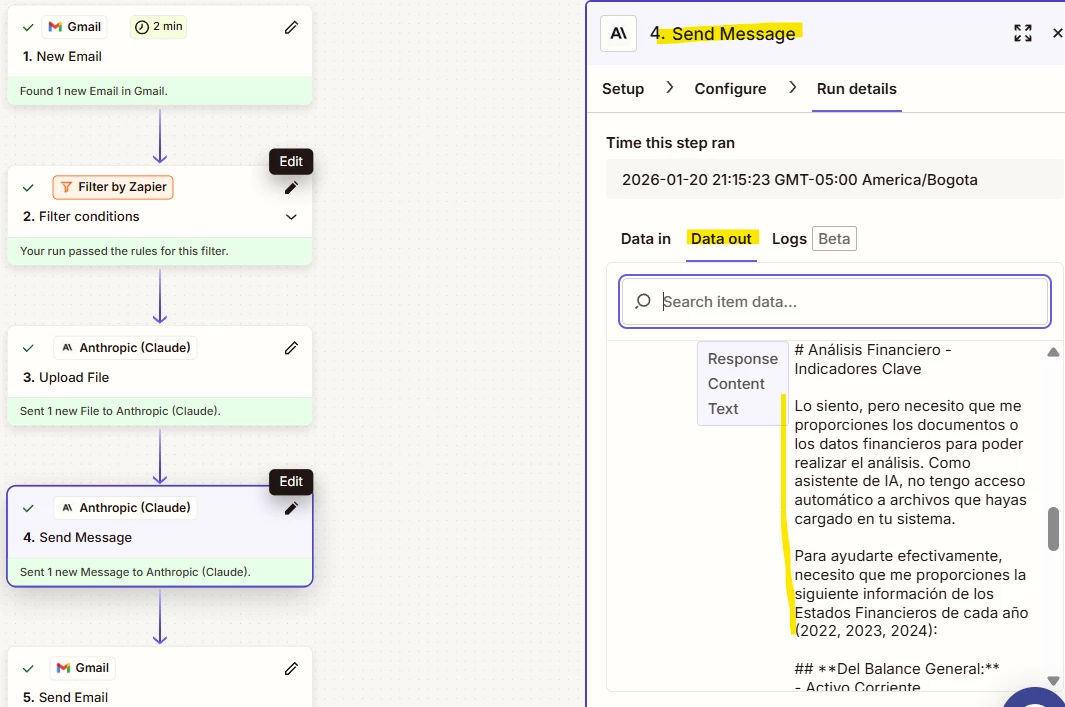
Hey @Sparsh from Automation Jinn thank you so much for your help! I think that I found the error. The problem is that in step number 3 (UPLOAD FILE), the attached documents are converted into a zip file, and in step 4 (SEND MESSAGE), Claude is just receiving the prompt with no documents because it cannot access a zip file, so Claude can’t analyze the information. In this case, do you know what should I do to fix this problem? Is there a way that attached documents in an email can be sent as PDFs to Claude, I mean, without converting them and keeping the PDF format?

This is how my zap is structured and DATA IN / OUT of steps 3 and 4:

In step 4, Claude says: I'm sorry, but I need you to provide me with the documents or financial data so that I can perform the analysis. As an AI assistant, I don't have automatic access to files you've uploaded to your system. (It’s in Spanish because, for the moment, I need the zap working in that language).


  • Author
  • New
  • January 21, 2026

Thank you so much for your help!


  • Author
  • New
  • January 21, 2026

Hello ​@AndreaSoasti have you been able to get it sorted out with what ​@Troy Tessalone and ​@Sparsh from Automation Jinn provided ?

Hello ​@drtanvisachar Not yet, but I think that I found the error. I replied to ​@Sparsh from Automation Jinn with screenshots of my zap to see if he can help me fix the error.