Question

Wix forms records not populating

  • March 25, 2024
  • 14 replies
  • 692 views

I am trying to create a new Wix Zap for transfer of Wix Form data. In App & event if I select Wix and Forms as the event, the Test returns as “No forms found.” If I change the Event to “Wix Custom Triggers” then my forms all populate in the Trigger Automation Rule dropdown. I select my Automation and continue to Test trigger. The Test returns just one Record that contains generic info (First Name John, Last Name Doe). It does not show any of my new records (Form Submissions). (I have 25 other Zaps that are working that were created a while ago. If I go back into those Zaps and try to pull records they have the same problem, but since the fields are all already mapped they are still working. If I would add a field to a form I would not be able to add it to the Zap becore Zapier won’t pull a new record). I know taht Wix has a webhook option that can circumvent Zapier but I am trying to connect to Salesforce which does not have a webhook option.

This post has been closed for comments. Please create a new post if you need help or have a question about this topic.


14 replies

Troy Tessalone
Zapier Orchestrator & Solution Partner
Forum|alt.badge.img+14
  • Zapier Orchestrator & Solution Partner
  • March 25, 2024

Hi @Michaelc101 

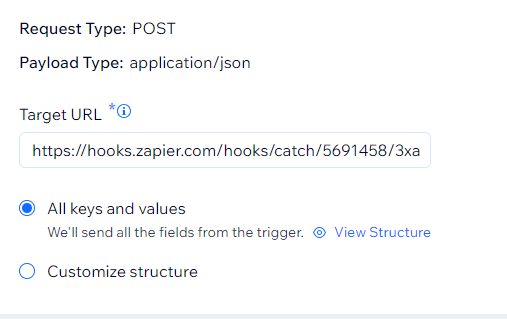
Here is a possible workaround using Wix Automation Webhooks: https://support.wix.com/en/article/wix-automations-sending-data-via-webhook


Zap trigger: Webhook - Catch Hook


  • Author
  • Beginner
  • March 25, 2024

Thank you Troy, I mentioned at the end that webook would not work here as Salesforce does not work with webhooks. (As far as I was able to find)


Troy Tessalone
Zapier Orchestrator & Solution Partner
Forum|alt.badge.img+14
  • Zapier Orchestrator & Solution Partner
  • March 25, 2024

@Michaelc101 

If you are trying to send data to Zapier, then you can use the webhook workaround to send data from Wix Automations to the Zap to fire the Zap.

Then in the Zap, you can use the available Salesforce Zap app actions: https://zapier.com/apps/salesforce/integrations#triggers-and-actions


  • Author
  • Beginner
  • March 25, 2024

Thank you, I will try it. What would I use as the target URL?


Troy Tessalone
Zapier Orchestrator & Solution Partner
Forum|alt.badge.img+14
  • Zapier Orchestrator & Solution Partner
  • March 25, 2024

@Michaelc101 

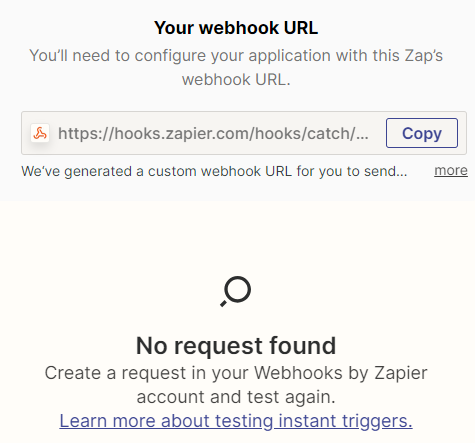
The url generated by the Zap trigger.


  • Author
  • Beginner
  • March 25, 2024

Hi, 

Doesnt seem to be working.


  • Author
  • Beginner
  • March 25, 2024


Troy Tessalone
Zapier Orchestrator & Solution Partner
Forum|alt.badge.img+14
  • Zapier Orchestrator & Solution Partner
  • March 25, 2024

@Michaelc101 

Did you test the event in Wix that would trigger the Wix Automation to then send data to the Zap webhook?


  • Author
  • Beginner
  • March 25, 2024

Hi, thank you. I did now and it did appear. I had an issue with webhooks in the past where Wix did not generate Keys for all of my forms (I have about 90 forms). I havent checked it yet this time around but so far this seems like a good work around. Thank you.


Troy Tessalone
Zapier Orchestrator & Solution Partner
Forum|alt.badge.img+14
  • Zapier Orchestrator & Solution Partner
  • March 25, 2024

@Michaelc101 

Some apps will only send a data payload to a webhook for fields that have values to keep the data payload size as small as possible.

When testing make sure to populate all the fields you need to use in the Zap.


  • New
  • August 10, 2024

@Troy Tessalone - I am not very tech savvy, however I am trying to do something similar. I use Wix Forms, and am trying to send the data to Odoo CRM as a new lead. I’ve tried connecting from Wix to Odoo without Webhook and it doesn’t pull from the proper form. Any help would be greatly appreciated


Troy Tessalone
Zapier Orchestrator & Solution Partner
Forum|alt.badge.img+14
  • Zapier Orchestrator & Solution Partner
  • August 10, 2024

@KoiDragon 

Try using the Wix Webhook Workaround:


  • New
  • August 10, 2024

@Troy Tessalone unlike previous person I am not very tech-savvy, and I need to know do I click on Zapier webhooks first or Wix module first then webhooks by zapier then Odoo. I need order of operations. I’ve been struggling with this for 2 days


Troy Tessalone
Zapier Orchestrator & Solution Partner
Forum|alt.badge.img+14
  • Zapier Orchestrator & Solution Partner
  • August 10, 2024

@KoiDragon 

Learn more about Zapier via Zapier Learn: https://learn.zapier.com/


Configure your Zap trigger step.

Use the webhook URL from the Zap trigger step to configure in Wix.

Test Wix to send data to the Zap trigger step.

Finish configuring your Zap action steps.

Test the Zap action step.


If you need help, consider hiring help.

Directory of Certified Zapier Experts: https://zapier.com/experts