
Question

Why is my friend missing Stripe fields in the Zapier integration?

  • Nov 9, 2026 8:10 PM UTC
  • 6 replies
  • 13 views

I’m using the zap template “Add transactions in Wave for new Stripe sales” for my business. I’m trying to help a friend use it just like I do, but his Stripe isn’t sharing all the same mapping fields that I have. Help?!


We compared our set up screen for screen and his Stripe doesn’t appear to provide the same data as mine. We disconnected and reconnected Stripe and Wave. We’re looking at Test data from Stripe, but that’s true for my working zap and his incomplete zap. 

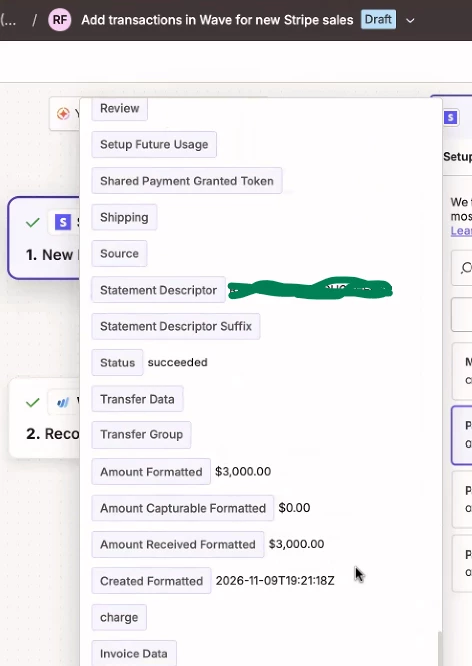
This is his screen where you’ll note at the bottom there are no fields available between “charge” and “invoice data”.
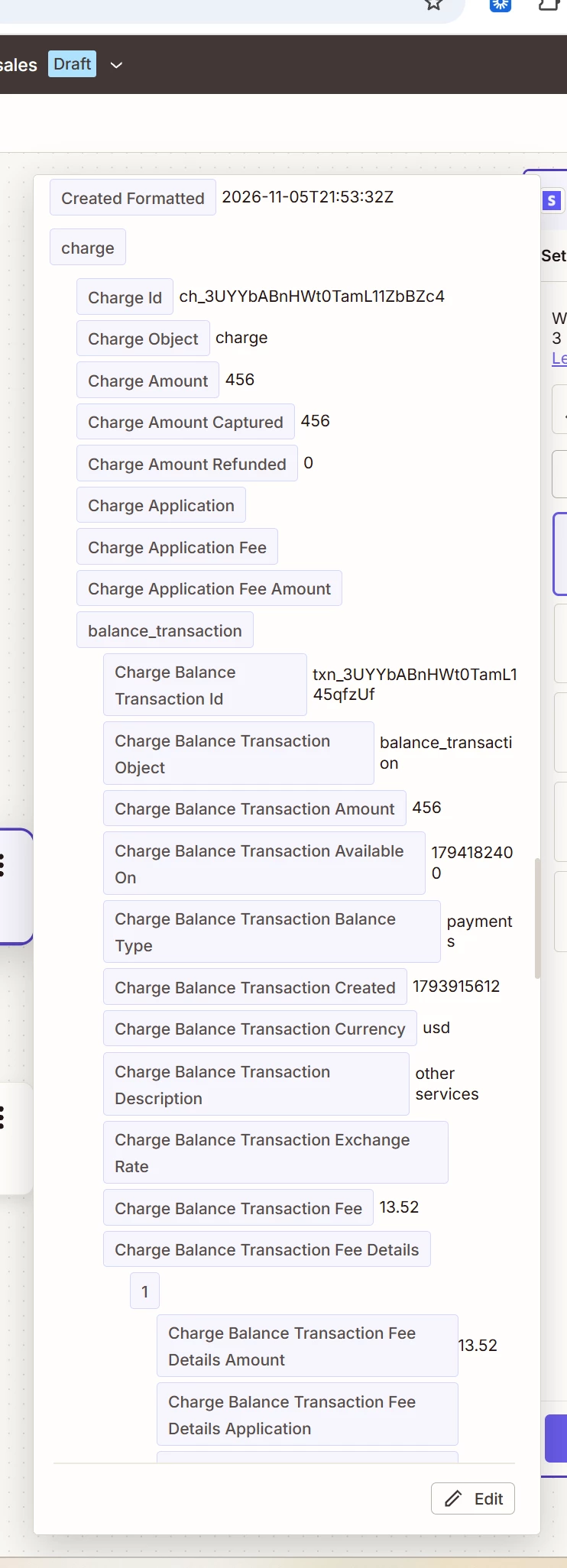
On my screen you’ll see after “charge” comes an exceedingly long list, including the vitally important for our purposes “Charge Balance Transaction Fee” field. 
 

I can’t find any documentation for why this difference might be occurring. Please help! 

6 replies

WebhookEngineer
Forum|alt.badge.img+1

Your friend's sample is missing a whole block of Charge fields, not just the fee. One possibility is that it contains only a Charge reference, while yours includes the nested Charge details.

Before adding any steps, compare the exact Stripe trigger event names and the selected test records. Checking that both use test data isn't enough.

In your friend's sample, does “Charge” contain only an ID beginning with `ch_`, while yours also shows the additional Charge fields? You don't need to post the actual IDs. That comparison would help narrow down whether the returned sample structures differ.


Troy Tessalone
Zapier Orchestrator & Solution Partner
Forum|alt.badge.img+14
  • Zapier Orchestrator & Solution Partner
  • Nov 9, 2026 8:40 PM UTC

Hi ​@Maggie Karshner 

Help links for using Stripe in Zaps: https://zapier.com/apps/stripe/integrations#help

Which Zap trigger event are you using? (can’t tell from screenshot)

Check which mode is being used: TEST or LIVE


Your friend's sample is missing a whole block of Charge fields, not just the fee. One possibility is that it contains only a Charge reference, while yours includes the nested Charge details.

Agreed. This is the problem as I see it.


Before adding any steps, compare the exact Stripe trigger event names and the selected test records. Checking that both use test data isn't enough.

We’re both using the Stripe trigger in the template I linked: New Payment. I don’t know what you mean by the same “selected test records” as we each have our own Stripe accounts and the test records would not match. 


In your friend's sample, does “Charge” contain only an ID beginning with `ch_`, while yours also shows the additional Charge fields? You don't need to post the actual IDs. That comparison would help narrow down whether the returned sample structures differ.

I don’t know what you mean by “only an ID beginning with ch_”. I don’t know how to “post the actual IDs”. Perhaps you’re operating at a skill level that’s beyond mine? I was able to set this up without knowing any of that and thought it’d be just as simple for my friend. <sad trombone> 


Help links for using Stripe in Zaps: https://zapier.com/apps/stripe/integrations#help

Yep, I’ve read the help files pretty extensively. 


Which Zap trigger event are you using? (can’t tell from screenshot)

It’s the trigger that’s default in the template I linked: New Payment. 


Check which mode is being used: TEST or LIVE

I put in my original post: these are the TEST mode for both Zaps. (I have a working LIVE mode zap, but he does not.) 


Troy Tessalone
Zapier Orchestrator & Solution Partner
Forum|alt.badge.img+14
  • Zapier Orchestrator & Solution Partner
  • Nov 9, 2026 9:20 PM UTC

​@Maggie Karshner 

Try creating the Zap using the Stripe LIVE connection, since that is ultimately what is needed to go live with the Zap.


WebhookEngineer
Forum|alt.badge.img+1

Sorry, my explanation was too technical. You’re right that the payments are from different accounts and don’t need to match. I meant comparing the information shown in each sample, not looking for the same payment in both.

In your friend’s Stripe step, open the Test section and look at the selected payment’s data. Does “Charge” have a value beside it (a string of letters and numbers), or is it blank? You don’t need to copy or post that value. Just “has a value” or “blank” is enough.

Your TEST sample already includes the fee fields, so I wouldn’t assume switching to LIVE is the fix yet.




